

Every studio knows this week. Six packshots are ready, but the person who needs to approve them is in meetings until Thursday. No one else is allowed to say yes. The team keeps working, but the next jobs start piling up. By Friday, a campaign deadline is at risk because one approval sat with one person for too long.
That is rarely a people problem. Most approvers are not trying to slow anything down. The problem is usually the way the approval flow has grown over time: one named approver, unclear handover rules, feedback in too many places, and no easy way to see what is stuck.
This article shows how to make approvals easier to run, easier to understand, and harder to block.
TL;DR
- Most delays come from one person being the only approver, missing information, or feedback spread across email, Slack, and review tools.
- Let approval steps happen at the same time when they do not depend on each other.
- Give every approval step one owner, one backup approver, and a clear reply time.
- Track how long approvals take, where work waits, and which approvals are overdue.
- Put overdue approvals on a visible list so a producer can move them forward.
Why approvals get stuck
Most blocked approvals come from four simple patterns.
Only one person can approve. One person has the authority to release a certain type of work. When they are busy, travelling, sick, or on a shoot, everything behind them stops. This is the most common cause of delay, and it is often invisible until it causes a missed deadline.
The approver is missing context. They open the image but cannot see the brief, reference image, previous comments, or reason for the change. Instead of approving, they ask a question. The job goes back into discussion, even if the actual work was ready.
Feedback is split across too many places. One comment is in the review tool, one is in Slack, and one is buried in an email thread. The editor has to piece the request together. The second round of changes often happens because the first round was never collected in one place.
Problems are found too late. A final reviewer rejects an image at the end for something that could have been caught earlier by the studio. That reviewer is an external client for a commercial studio, or the brand and its webshop for an in-house team. When it happens, the whole job may need another round. A simple internal quality check before final sign-off prevents many of these late rejections.
Decide what can happen at the same time
The fastest approval flow is not always the one with fewer steps. It is the one where the right steps happen in the right order.
Some approvals can happen at the same time. For example, an internal quality check and a rights check can both start as soon as an image is ready. They look at different things, so neither team needs to wait for the other.
Other approvals need a fixed order. Final brand approval should usually wait until the studio has checked the work internally. Otherwise, the client may spend time reviewing an image the studio would not have sent in the first place.
The common mistake is putting every approval step in a long line. When studios review their process, they often find at least one step that can run at the same time as another. That one change can remove a full day of waiting.
Give each approval step an owner, a backup, and a reply time
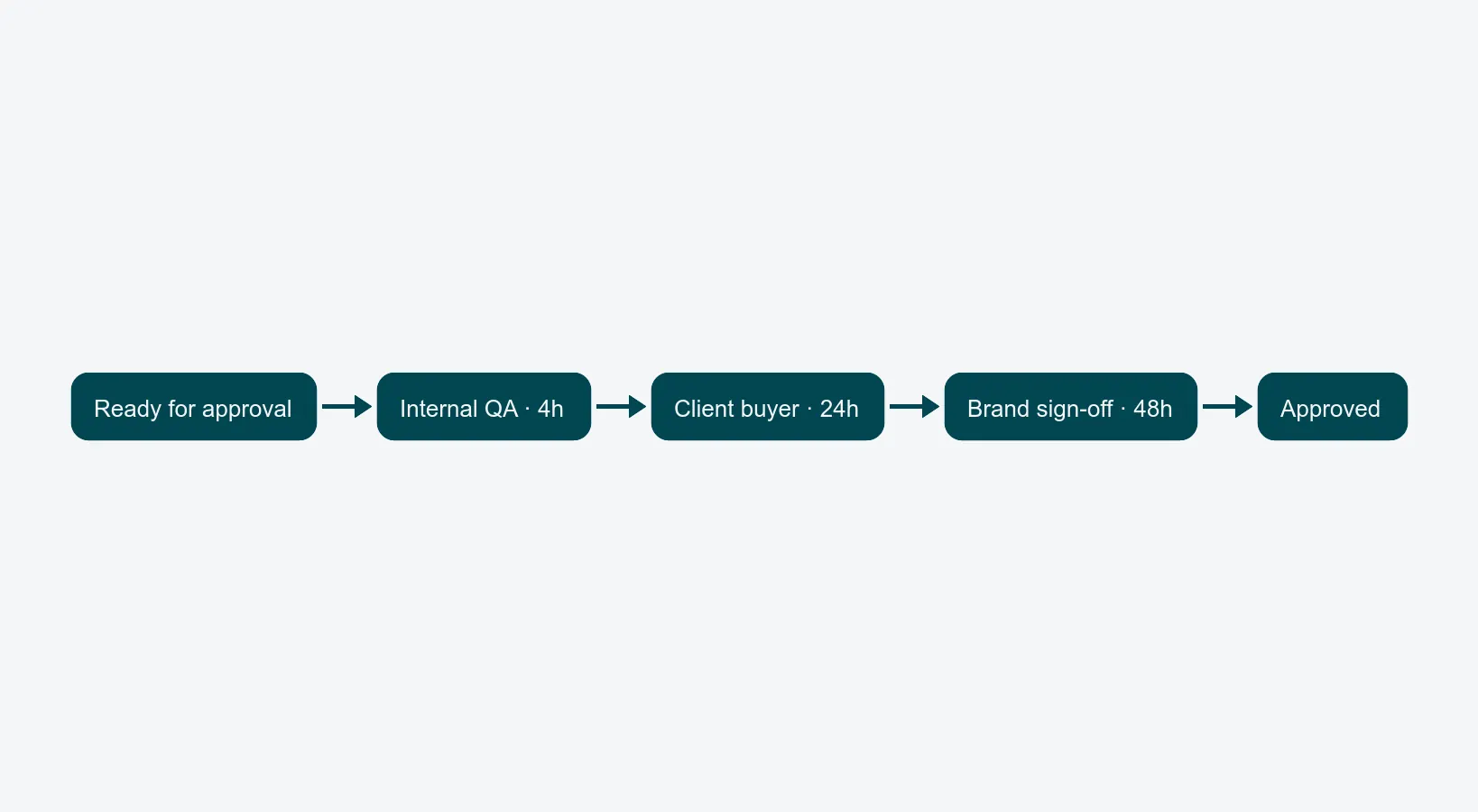
Once the order is clear, each approval step needs three things.
An owner by role, not by name. Instead of sending work only to Maria, send it to a role such as Studio QA, Senior Retoucher, or Brand Manager. Maria can still be the main approver, but the role should also have a backup. If Maria is unavailable, the work can move to the backup without starting a new email chain.
A clear reply time. Agree how long each step should take. Internal quality check might be 4 business hours. Client approval might be 24 hours. Senior brand approval might be 48 hours. The goal is not to pressure people. It is to make waiting visible before it becomes a problem.
A plan for overdue work. Decide what happens when the reply time passes. Should the producer get a notification? Should the backup approver be added? Should low-risk images move forward after a longer wait? The right answer depends on the work, but the rule should be agreed before the campaign is already late.
The structured review loop explains the quality check that should happen before approval. This article focuses on what happens after the work is ready to be approved.
Track the numbers that show where work waits
You do not need a complicated dashboard to start improving approvals. Start with three simple numbers.
Total approval time. How many hours pass between "ready for approval" and "approved"? Measure this per image or asset. If a packshot usually takes 48–72 hours to approve, the process almost certainly has one step that needs attention.
Waiting time per step. How long does the work wait at each approval step? This shows where the delay actually sits. You may find that one role is responsible for most of the waiting, not because they are doing anything wrong, but because too much work depends on them.
Overdue approvals. How many open approvals have passed their agreed reply time? If that number stays high, the reply times may be unrealistic, the backup approvers may not be working, or the team may simply need a clearer process.
It is also useful to track how often work is approved in the first round. A high number usually means the brief and internal quality check are working. A low number often means the team needs to catch issues earlier.
Put stuck approvals somewhere visible
When an approval is overdue, it should not sit quietly in the normal work list. It should appear somewhere a producer can see it.
A practical rule is: if an approval has waited twice as long as agreed, move it to a "stuck approvals" view. Show the producer which job is waiting, who owns the approval, who the backup is, when reminders were sent, and what comments already exist. The producer can then chase, reassign, or escalate the approval.
The important point is visibility. Many studios discover that several approvals each week were not really moving, even though everyone assumed they were.
Use live review only when it helps
Most approvals do not need a meeting. The approver can open the asset when it fits their day, leave comments, or approve it. This works well for packshots, individual images, and most retouching rounds.
Live review is useful when the cost of misunderstanding is high. That might be the first shoot with a new creative direction, a sensitive campaign launch, or the first asset for a new client or product line. In those cases, a short shared review can set the standard for everything that follows.
The mistake is making live review the default. Then the calendar fills with meetings that could have been three clear comments in the review tool.
What to record
For a reliable approval flow, record the basics:
- When each asset enters and leaves each approval step
- Who approved it, including any backup approver
- The agreed reply time and the actual time used
- Comments and whether they have been resolved
- Which approvals are overdue and who can move them forward
- Approval times by client, brand, or asset type, so you can spot repeat problems
Averages can hide the problem. It is better to know which approvals take unusually long, because those are the ones most likely to threaten deadlines.
Where to go next
If approvals are slowing production down, the packshot workflow guide shows where approvals fit into the broader process from intake to delivery. The quality assurance article explains how to catch issues before work reaches the approver. For in-house brand teams, faster sign-off feeds straight into time-to-market on the webshop; for commercial studios, it means predictable client delivery.
PixelAdmin keeps approval steps, backup approvers, reminders, comments, and production status in the same platform used for capture, retouching, and delivery. Book a 30-minute walkthrough, and we will show how a clearer approval flow can work with your real production process.