
Every studio has a moment where it realises email cannot carry another season. A buyer marks up a JPG in Preview, drops it in a thread with eight people on it, and the retoucher spends twenty minutes reconstructing what was actually requested. Two days later, a different version of the same image gets approved by mistake. Nobody can find the audit trail. This is what content production QA looks like when it is glued together with email - and at scale, it is the single most expensive thing a studio does.
This article is about what to put in its place: a structured QA loop tied to the asset, with role-based gates, status fields, and SLA timers, plus a migration plan that does not break shoots already in flight.
Why email review fails at content production scale
Email works for a handful of assets. It collapses somewhere between fifty and a hundred per week, for reasons that are not about discipline.
- Lost threads. A buyer replies to the wrong message. A retoucher misses a CC. Feedback from one stakeholder never reaches the editor implementing changes.
- Version chaos. "v3-final-FINAL.jpg" is in three inboxes. Nobody is sure which file the comment refers to. The retoucher fixes the wrong version.
- No audit trail. When a buyer asks "who approved this on the 14th?" there is no answer that does not require a thirty-minute search.
- Slow approval cycles. A single round of changes takes two business days, not because the work takes two days but because the email lands in someone's inbox at 16:30 on Friday.
- Imprecise feedback. "Move the logo a bit to the left" is not actionable. The retoucher guesses, the buyer disagrees, and a second round begins.
None of these are individual failures. They are the predictable behaviour of a communication channel that was never designed for high-volume visual approval.
What a structured QA loop actually looks like
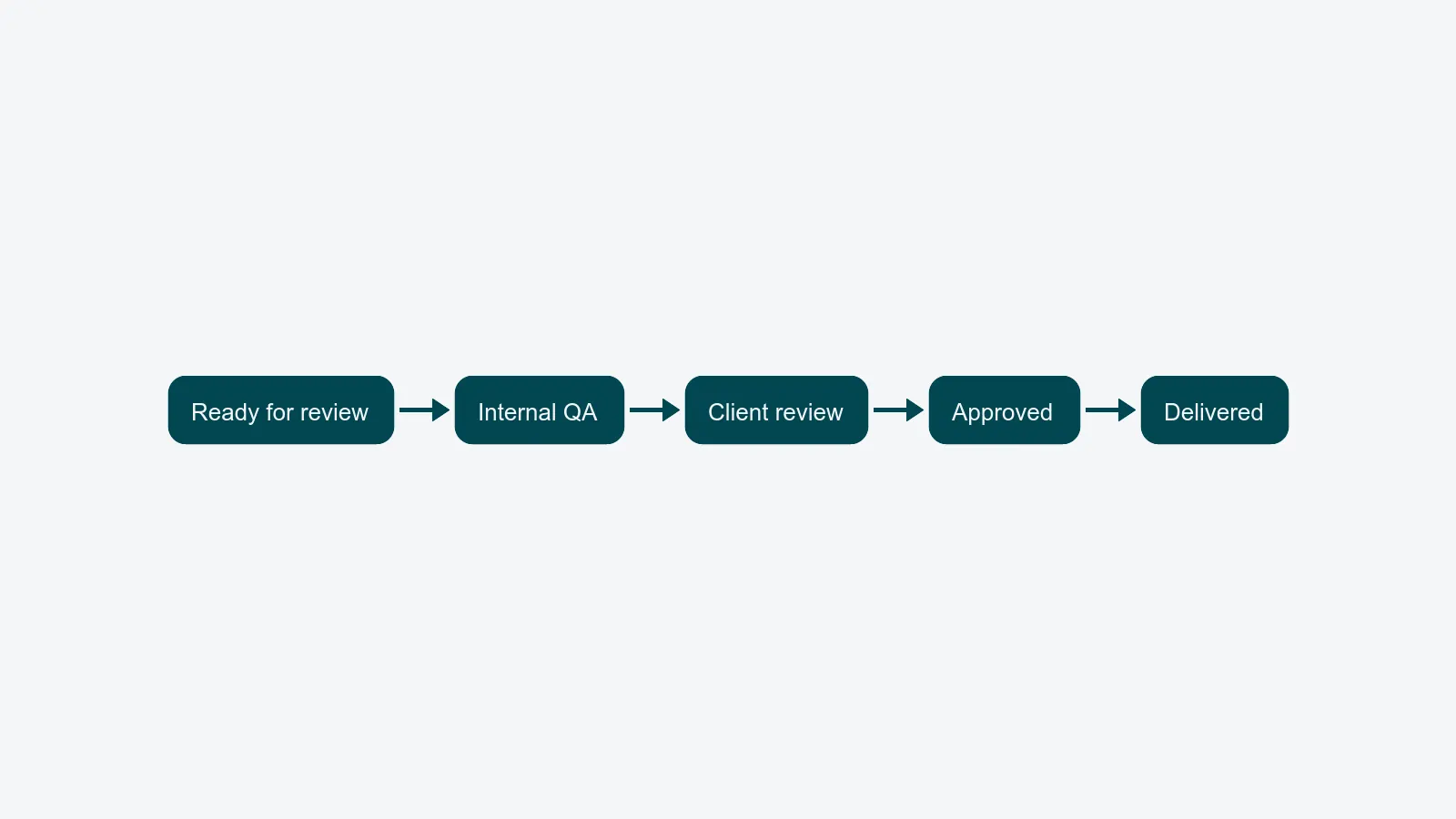
A real visual review system replaces the email thread with four things working together.
Annotation on the asset itself. Reviewers click a point, drag a box, leave a comment. The comment is anchored to the pixel, not to a paragraph in an email. The retoucher sees the dot, opens the comment, and knows exactly what to change.
Role-based approval gates. A packshot does not move from "in review" to "approved" until the right roles sign off - typically internal QA first, then the client buyer, then optionally a brand manager. Each gate is named, owned, and tracked.
Status fields on every asset. Open, in progress, resolved, approved, rejected. A retoucher's queue shows only what is actionable. A producer's dashboard shows where things are stuck. Status updates as work happens, not when somebody remembers to update a spreadsheet.
SLA timers. Every gate has a clock. If the buyer has not reviewed within 24 hours, the producer sees it before the buyer does. If a comment has been open for two days without a reply, it surfaces in the daily standup automatically. The point is not to punish anyone - it is to make wait time visible.
Together, these four elements turn QA from "a thing that happens in inboxes" into a system you can measure and improve.
The KPIs that tell you QA is working
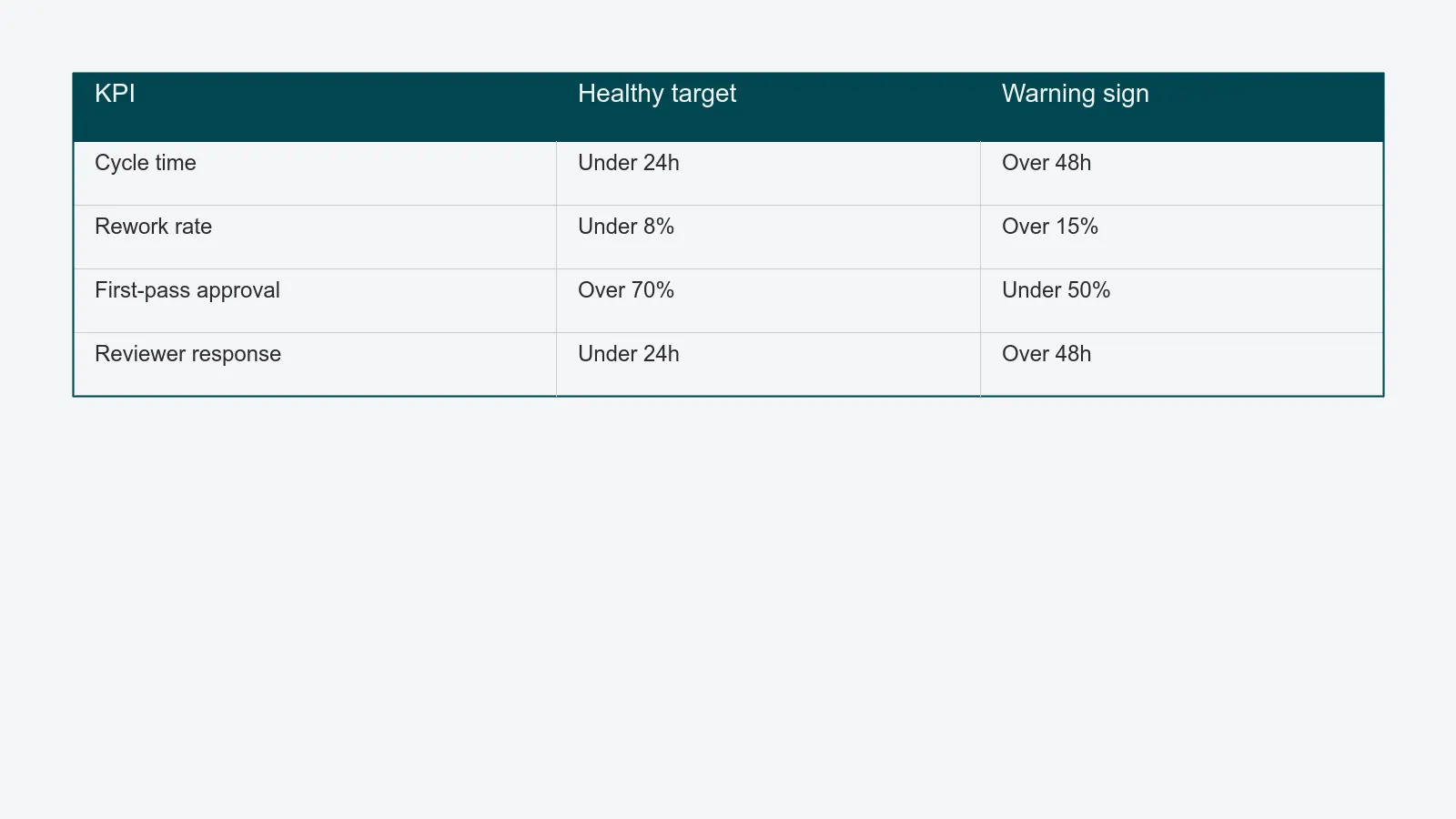
Most studios cannot answer basic questions about their review process because they have no instrumentation. Once QA lives on the asset rather than in email, three numbers become trivial to track.
Cycle time. How many hours pass between "ready for review" and "approved"? For standard packshots, a healthy studio targets under 24 hours. Studios on email-based review typically sit at 36–72 hours.
Rework rate. What percentage of approved assets come back later for additional changes? This catches QA gates that look like they are working but are letting issues through. Anything above 8% suggests gates are missing or being skipped.
First-pass approval rate. What percentage of assets are approved on the first review round, with no revisions? This is the cleanest single measure of how well briefs, captures, and retouching are aligned upstream. Studios that pass 70%+ on first review are usually the ones with locked shot lists and pre-flighted briefs - the Studio Manager role is where that discipline lives.
A fourth metric - reviewer response time - is useful when you suspect the bottleneck is the buyer, not the studio. SLA timers expose this without anyone having to write an awkward email.
How to migrate from email review without breaking active shoots
The most common reason studios stay on email is fear of the migration. Active jobs are in flight, buyers are used to their inbox, and a hard cutover sounds like chaos. It is, if you do it that way. The pattern that works is staged.
Week 1 - pick one client, one project type. Run a single buyer's standard packshots through the new review system. Keep everything else on email. The point is to get the team comfortable with annotations and status, not to convert the whole pipeline.
Week 2 - capture the audit trail. Once one stream is on the new system, stop running parallel email threads for that work. The audit trail only works if it is the only source of truth. If buyers email feedback anyway, copy it into the system as a comment and reply there.
Week 3 - add SLA timers. Now that the team is used to the loop, turn on the timers. Set them generously at first (48 hours per gate) and tighten as the data shows what is actually achievable.
Week 4 - expand to a second client. By now the studio has muscle memory. Onboarding a second client is mostly about explaining the annotation interface to that buyer, which usually takes one 15-minute call.
Week 5–6 - migrate remaining work. Active jobs that started on email finish on email. New jobs from week five start in the new system. By week six, email review is gone, and nobody had to recreate a job mid-flight.
What about external clients who refuse to log in?
Most modern review tools, PixelAdmin's included, let external reviewers comment via a guest link without an account. The buyer clicks the link in their email, lands on the asset, drops their annotations, and leaves. The audit trail captures their identity from the link token. No login screen, no friction, but every comment is structured and tied to the asset.
This single feature removes 90% of the resistance to migration. The remaining 10% is usually a buyer who insists on emailing PDFs of marked-up screenshots - and the practical answer there is to copy their feedback into the system as comments yourself, so the audit trail still holds. After two cycles, most buyers prefer the link.
What the structured loop unlocks
Once content production QA is structured, several second-order benefits appear that nobody asked for but everybody notices.
Onboarding new retouchers gets faster, because their queue tells them what to do. New buyers get up to speed in one session, because the interface is the brief. Producers stop running daily status meetings, because the dashboard is the status. And the studio starts answering questions like "what is our first-pass approval rate by client?" - which leads to genuinely useful conversations with buyers about brief quality and campaign planning.
These are not the reasons to migrate. The reason to migrate is that email review breaks at scale. But once you migrate, the rest of the studio quietly gets better too.
Where to go next
If your team is sitting on a packshot pipeline that has outgrown email, the packshot workflow guide covers the full intake-to-delivery picture, and the turnaround time article shows how QA fits into the larger time budget. When you are ready to see the review loop in action on your own assets, book a 30-minute walkthrough and we will run a sample job through it.