

If you retouch product images for a living, you have probably seen this pattern: a vendor demos AI image tagging on a stock dataset, the tags look perfect, you turn it on against your own archive, and the model decides every black wool coat is a "dress." Suddenly the search index your buyers rely on is poisoned with confident nonsense, and you are the person who has to clean it up.
Auto-tagging is one of the highest-leverage parts of a modern content operation, and one of the easiest to get wrong. This article walks through how it actually works under the hood, where it fails for fashion and retail, and the governance you need in place before you let machine-generated metadata anywhere near your DAM.
TL;DR
- Auto-tagging uses vision models to predict labels, then maps those predictions onto your taxonomy. Both halves can fail independently.
- Off-the-shelf models trained on consumer datasets miss the distinctions retail cares about: exact colour, material, garment subtype, season.
- Governance is not optional. You need confidence thresholds, human-in-the-loop review, and an audit trail per tag.
- Done right, auto-tagging changes retrieval, not retouching: search becomes faceted, precise, and answerable in seconds rather than minutes.
- The right vendor evaluation question is not "how accurate is your model" but "how do you handle the 8% it gets wrong."
How auto-tagging actually works
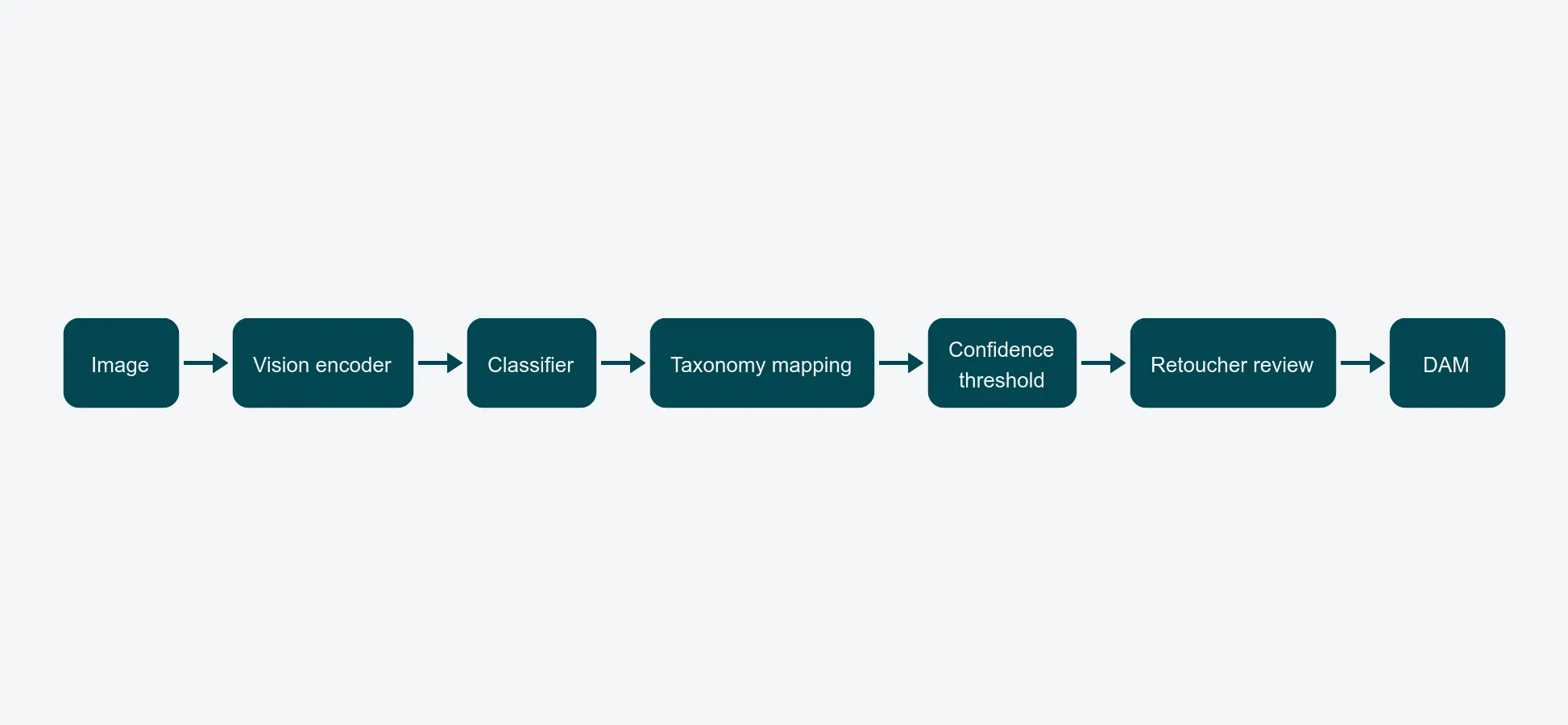
A modern auto-tagging pipeline has three stages, and it helps to keep them separate when you are reviewing vendors or debugging output.
Stage one: a vision encoder turns the pixels into a vector. This is a pretrained model - usually a CLIP-style or transformer-based encoder - that has learned a general visual vocabulary from hundreds of millions of images. It does not know what a "wool peacoat" is. It knows that this image is statistically close to other images it was trained on.
Stage two: a classifier head predicts labels. This is the part vendors swap in and out. A generic head will output broad consumer-facing categories ("clothing", "person", "outerwear"). A retail-tuned head outputs structured attributes - garment type, neckline, sleeve length, dominant colour, material guess, pattern, season window.
Stage three: taxonomy mapping. The model's output vocabulary almost never matches your DAM's vocabulary one-to-one. "Outerwear / coat / wool / black" needs to become whatever your taxonomy actually calls that combination - including any brand-specific or buyer-specific labels your team uses internally. This step is where most accuracy is won or lost, and it is rarely visible in vendor demos.
If a vendor only talks about model accuracy, they are skipping stages two and three. Press for the full pipeline.
Why off-the-shelf tags fail in fashion and retail
Generic vision models are trained on the open internet, which is heavily skewed toward consumer photography, lifestyle imagery, and stock content. That training distribution is wrong for product photography in three specific ways.
Colour accuracy. A model trained on lifestyle imagery learns "red" as a fuzzy concept that absorbs everything from rust to coral. Retail buyers care about the difference between "warm red", "cherry", and "tomato" because those map to different SKUs and different planograms. A model that flattens them is actively harmful.
Material distinction. Wool, cashmere, merino, alpaca, acrylic, and polyester blends can look identical in a packshot - but they sit in different price tiers and different product lines. Generic models guess at material from texture and frequently confuse them. A retail-tuned model usually treats material as a suggestion the editor confirms, not a fact.
Brand-specific taxonomies. Your taxonomy is not the world's taxonomy. You may classify a "longline cardigan" as outerwear in spring/summer and knitwear in autumn/winter. You may treat "co-ord set" as a single SKU or as two. These are business decisions baked into your merchandising, and a generic model has no way to know them. The taxonomy mapping step has to encode them - which means someone on your side has to maintain the mapping as the taxonomy evolves.
The honest version: a tuned model gets you to roughly 80% of fields without intervention, and your team's job becomes confirming the rest. That is still a transformative improvement over manual tagging - but only if the workflow is built around the residual error, not around the assumption that the model is correct.
Governance: what to build around the model
The number one rule of auto-tagging is that the model is part of the system, not the system itself. The system is the model plus the rules around what happens when the model is wrong.
Confidence thresholds. Every prediction has a probability. Treat anything above a high threshold (say 0.95) as auto-applied, anything between a medium threshold (0.75) and the high threshold as auto-applied with a flag for review, and anything below the medium threshold as suggestion only - surfaced to the retoucher but not committed. The exact thresholds depend on your taxonomy and your tolerance for noise, but the structure is non-negotiable.
Human-in-the-loop review. The flagged tier above is where your team adds value. The right place for this work is inside the retoucher's existing tool, not as a separate "tagging UI" they have to context-switch into. This is one reason auto-tagging belongs to the same platform as your DAM and not to a standalone service - the workflow needs to be one motion, not three.
Audit trail per tag. For every tag on every asset, you need to know: was this applied by a human, by the model, or by the model and confirmed by a human? Which model version? At what confidence? This sounds like compliance theatre until the first time a buyer challenges a search result and you need to explain why the system thinks this jacket is "navy" rather than "black."
A retraining loop. The corrections your team makes are training data. A serious vendor will feed those corrections back into a tuned model for your account on a regular cadence. If a vendor cannot describe their retraining loop, the model will be the same in twelve months as it is today - and your taxonomy will not be.
What auto-tagging actually changes for retrieval
The visible benefit of auto-tagging is not "we save time on tagging." It is what becomes possible in retrieval once the metadata is dense, consistent, and structured.
Search stops being full-text on filenames and becomes faceted: filter by colour family, then by garment type, then by season, then by photographer, in any order. A buyer can answer "show me every black wool outerwear piece from any FW collection in the last three years" in one query. That same question on a shared drive is a half-day project.
The same effect helps the retouching queue. Editors can pull a batch of "all FW26 black knitwear awaiting retouch" and apply a consistent treatment in one session, rather than context-switching between thirty unrelated SKUs. This compounds with an editor-retoucher workflow where jobs arrive pre-sorted instead of being fished out of a folder.
Failure modes to watch for
Three failure patterns show up in almost every auto-tagging deployment. Knowing them in advance makes them easier to catch.
Hallucinated attributes. A model can confidently tag attributes that are not visible in the image - the wrong material because the visual signature is similar, a "model" tag on a flat-lay because the dataset associated certain compositions with people. Confidence thresholds catch some of this; sample audits catch the rest.
Biased training data. If the training dataset over-represents one demographic, body type, or product category, the model will be more accurate on that subset and quietly less accurate everywhere else. Ask vendors what their dataset composition looks like, and audit accuracy on the parts of your catalogue that look least like the training data.
Drift after taxonomy changes. The day you add a new attribute to your taxonomy, every existing asset is retroactively missing that field. A serious system handles this by re-tagging the back catalogue against the new attribute on a schedule, not by leaving it as a perpetual gap.
Evaluation criteria for vendors
When you evaluate an auto-tagging vendor, score them on four things - in this order.
- Taxonomy fit. Can the system map predictions to your taxonomy, including brand-specific labels, with rules you can edit? If the answer is "we have a fixed taxonomy," the answer is no.
- Confidence and review UX. Where do flagged tags surface? How long does a retoucher spend per asset? If the demo skips this, it is because it is bad.
- Audit and explainability. Can you, today, answer "why is this asset tagged navy?" If not, you cannot defend your search index when it matters.
- Retraining cadence. How often does the model improve on your data? If the answer is "the base model is updated quarterly", that is not the same question.
Accuracy benchmarks matter least, because every vendor benchmarks on their own dataset. The four questions above are how you tell who has actually done this work for retail.
Closing
AI image tagging is not magic and it is not optional. It is the layer that turns an archive into a searchable system, and it lives or dies on the governance around it. If you want to see what disciplined auto-tagging looks like against your own catalogue - including how confidence thresholds and retoucher review fit into a real shoot week - book a short walkthrough and bring a representative sample of your imagery.