
Retouch smarter.
Directly in Photoshop.
Software for editors and retouchers that acts as a task queue directly inside Adobe Photoshop - not a replacement. Retrieve tasks, view specifications, and upload with a single click, whether you retouch for in-house brands or external clients.
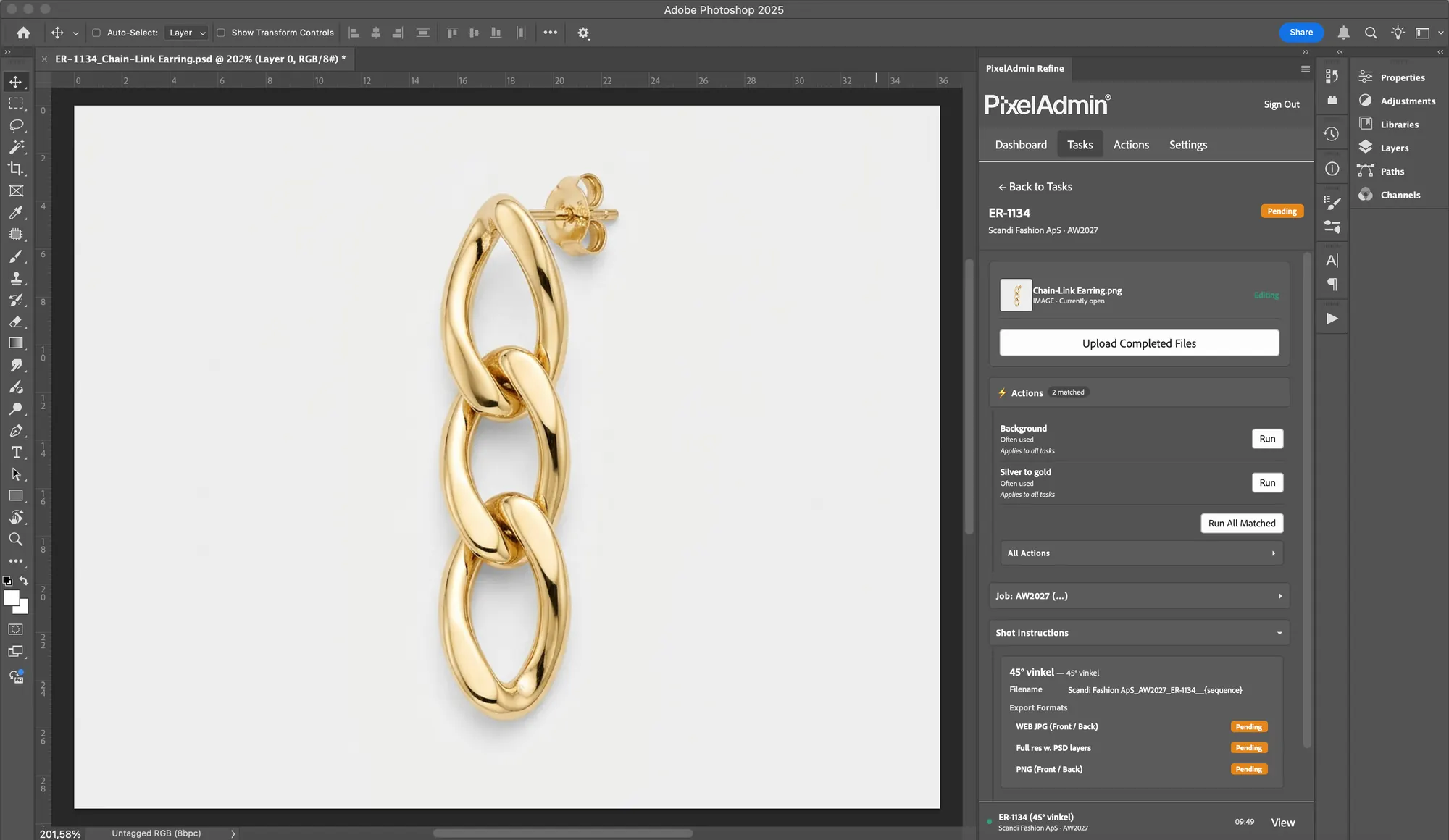
View Assigned Tasks
See your queue and grab the next task straight from the panel.
Download/Upload
Fetch and upload files with a single click. Auto-naming included.
Product-Specific Actions
Run Photoshop actions automatically tailored to the specific product.
Style Guide
Style guide specs displayed front-and-center in the panel.
Auto time tracking
Time tracking runs automatically while you work.
A daily grind of context switching and clutter
Most editors and retouchers struggle with fragmented workflows and no unified task queue. The result? Hours wasted on file management, incorrect deliveries to in-house brands or external clients, and zero overview.
Context switching
Bouncing between Photoshop, email, browsers, and folders. Every switch drains focus and kills time.
Unclear specs
Which clipping path? What drop shadow? Specs buried in a PDF you can't find.
Manual file handling
Download raw files, hunt down the right folder, upload finals. Manually. Every. Single. Time.
No task queue
What’s up next? When's the deadline? Guessing priorities from scattered emails and messages.
Wrong versions
The wrong version got sent. No history, no rollback. Frustrating for everyone.
Export chaos
Different formats for different brands and channels. Manual conversion and renaming. Sources of error everywhere.
Sound familiar?
PixelAdmin integrates seamlessly into your workflow.
Everything you need - right in Photoshop.
Task queue, inline style guides, version control, and batch export combined in a single Photoshop plugin - ensuring consistent delivery, whether you retouch for in-house brands or external clients.
Photoshop Plugin
Fetch tasks, view style guides, and upload right from Photoshop. Zero context switching.
Task Queue
Prioritized list with specs, deadline, and brand.
Inline Style Guides
Clipping paths, shadows, color profiles, and output formats. Everything at your fingertips.
Automatic Export
Files are automatically exported in the defined formats.
Version Control
Full history tracking. Compare and roll back with a single click.
Always know what is next.
A prioritized task queue with everything you need - specs, deadline, brand, and source files. All in one place.
Prioritized queue
Tasks sorted by deadline and priority. You always know what is urgent.
Brand context
Brand, campaign, and specific requirements directly on the task.
Source files
Download source files with a single click straight from the task. No folder hunting.
Deadline tracking
View deadlines and estimated times. Plan your day efficiently.
Right formats. Automatically.
Stop converting and renaming files manually. Batch export automatically delivers the formats and outputs required by each channel - for internal brands or external clients.
Multi-format export
JPEG, PNG, TIFF, PSD - in the sizes and profiles specified.
Output templates
Define output templates per brand or channel. Automatic conversion on upload.
Batch export
Export multiple shots at once. Automated file naming and folder structures.



Every edit. Fully tracked.
Every change is saved. Compare versions side-by-side, and roll back with one click if the brief changes.
Full history
See all versions of an image with timestamp and who made the change.
Side-by-side
Compare two versions directly. See exactly what changed.
One-click rollback
Revert to a previous version with a single click. No data lost.
Review notes
See feedback directly on the version that was commented on.
From context switching to flow
Based on platform design and workflow analyses. Your actual results depend on current processes and implementation.
- Alt-tabbing between programs
- Manual file downloads and uploads
- Specs hidden in separate docs
- No version control
- Manual export and conversion
- Everything centralized in the Photoshop panel
- One-click download and upload
- Specs attached right to the task
- Full version control with rollback
- Automated export in all formats

Convinced?
Share it with your manager.
Send a link to your studio manager or head of production - we've created a page outlining the benefits for the entire team and the business.
The link leads to our studio managers page
See how editing fits into in-house brand and e-commerce studios or commercial photo studios with client deliveries.