

If you are buying — or replacing — a content operations platform in 2026, the hard part is not the demo. It is knowing which questions actually matter once the contract is signed and your team is depending on the system every day. Most procurement checklists ask whether the vendor has "DAM," "AI," and "integrations." Every modern platform answers yes. The interesting answers are about how each one is built, where the data lives, and what happens at month four when volume doubles.
This guide is the buyer's checklist a Head of Content Production should run through before committing to a content operations platform. It is vendor-neutral on purpose. The goal is to help you build a defensible evaluation that survives the scrutiny of finance, IT, and legal — not to score points for any single product.
TL;DR
- A content operations platform is judged on ten axes, not one feature list — workflow, samples, DAM, AI, review, integrations, distribution, reporting, security, and vendor fit.
- Most teams over-weight AI features and under-weight the boring axes (sample tracking, RBAC, audit logs) that determine whether the platform survives an enterprise rollout.
- GDPR is non-negotiable for EU studios — confirm EU data residency, a Data Processing Agreement, and concrete encryption details, not marketing claims.
- Total cost of ownership includes integration work, training, change management, and the cost of running fragmented tools in parallel for the first six months.
- The checklist below works for any vendor; bring it to demos and force the same answers from each.
What a content operations platform actually has to do
Before scoring vendors, agree internally on what a content operations platform is supposed to replace. For a typical commercial studio or in-house brand team, it is the layer that joins five jobs that today live in five tools:
- Tracking physical product samples from arrival to return.
- Planning shoots — capacity, talent, equipment, calendar.
- Capturing and routing files from camera through retouching and QA.
- Managing the resulting digital assets so they can be found and reused.
- Delivering finished assets to the channels and partners that need them.
If the platform you are evaluating only covers two or three of these, you are buying a point solution, not a content operations platform. That can be the right call — but be honest about it, because the integration cost of stitching three point solutions together usually exceeds a single platform license.
Axis 1 — Workflow automation
The first question is not "does it have workflows?" — every modern tool does. The real questions are:
- Granularity. Can a workflow trigger on a single field change (status moves to "shot"), or only on full job transitions? The first lets you automate the small handoffs that cost the most time.
- Conditional routing. When a shoot finishes, can the platform route raw files to different retouchers based on product category, client, or deadline?
- SLA timers. Can a step have a deadline that escalates if missed, with the escalation visible to the studio manager?
- Bulk operations. Can you push 200 SKUs through the same workflow in one action, or does each have to be triggered individually?
Ask the vendor to demo a workflow that already exists in your studio — not a generic e-commerce template. A platform that can model your real-world stages is one that will survive the rollout. PixelAdmin's workflow automation overview shows the granularity expected at this tier; use it as a baseline when comparing demos.
Axis 2 — Sample tracking
Sample management is the axis most generic project tools fail. A sample is a physical object with a return date — your client's inventory — and treating it as just another task field will eventually cost you.
What to check:
- Sample records that are linked to the job, the shoot, and the asset, so you can trace any delivered image back to the physical object it was made from.
- Status that updates as a side effect of work (scan a barcode, status flips), not as an extra task someone has to remember.
- Configurable lifecycle states (received, in capture, awaiting return, returned) and timestamps on every transition.
- Search across shoots and seasons — "did we ever shoot this SKU in red?" should be a one-second query.
If you are still running samples on a spreadsheet, the sample management for photo studios guide walks through what good actually looks like before you score vendors.
Axis 3 — DAM and asset structure
Every content operations platform claims a DAM. The differences are in structure and search.
- Metadata model. Can you define your own metadata fields (collection, season, channel, retouching status), or are you locked into the vendor's schema?
- Versioning. Does the system keep retouch history, or does each new version overwrite the last?
- Rights and usage windows. Can an asset carry an expiry date, after which it is hidden from delivery flows automatically?
- Search. Full-text on filename is table stakes. Look for search that covers metadata, embedded EXIF, and visual similarity.
- Permissions. Can you grant a freelance retoucher access to one collection only, with a time-bound expiry?
The PixelAdmin DAM page describes the metadata and search model expected at this tier.
Axis 4 — AI assist (without the hype)
AI features are the easiest thing to demo and the hardest to evaluate honestly. Skip the marketing reels and ask:
- Where does the model run? On the vendor's infrastructure, in the EU? Or are images sent to a US-hosted third-party API? This matters for GDPR.
- Quality at your real assets. Bring 50 of your own packshots — ideally the awkward ones, like reflective metal or sheer fabric — and run them through background removal or auto-tagging during the demo. Generic stock photos prove nothing.
- Reversibility. Can you reject an AI suggestion and recover the original in one click, or is the AI step destructive?
- Throughput. What happens when you submit 1,000 images at once — do they queue, parallelize, or fail?
AI that saves a retoucher 20 seconds per asset is worth more than AI that demos beautifully on cherry-picked samples. The right test is your own catalog, on your own deadlines.
Axis 5 — Review and quality assurance
Email-based review is where most production weeks quietly bleed time. The platform should make a single round of feedback faster than the email thread it replaces.
- Side-by-side comparison of versions with pixel-accurate annotations.
- Comments that resolve as a unit when the retouch lands, so you do not lose the audit trail.
- Client-facing review links that do not require a client-side login or a new vendor account.
- Approval as a workflow event — when the client approves, delivery fires, without anyone clicking export.
If your current review cycle is longer than two business days, this axis alone usually justifies a platform change.
Axis 6 — Integrations and distribution
A content operations platform is only as useful as its ability to connect to the systems already running your business. Score vendors on:
- Direct connectors to PIM, ERP, e-commerce, and marketplace platforms — not just "we have a Zapier integration."
- Webhooks and a documented REST API for the integrations no vendor will build for you.
- Distribution presets that auto-resize, recolor, and rename assets per channel, so a single approved image becomes the correct file for Shopify, Amazon, and the print catalog without manual work.
- Audit on every outbound transfer — when a finished asset goes to a channel, the system records when, by whom, and which version.
The PixelAdmin integrations page lists the connectors most studios need first.
Axis 7 — Reporting and KPIs
If you cannot measure throughput, turnaround, and cost per asset on the platform, you will end up exporting CSVs into a spreadsheet to do the analysis yourself — which is exactly what you were trying to escape.
Look for:
- Real-time dashboards for jobs in flight, capacity utilization, and bottleneck steps.
- Per-client and per-channel KPIs (turnaround, rework rate, sample return delay).
- Cost-per-asset calculations that include coordination overhead, not just retouching minutes.
- Export to BI tools (Power BI, Looker) for finance reporting.
Reporting is the axis CFOs care about. A platform that cannot prove its own ROI in six months will not survive renewal.
Axis 8 — Security, GDPR, and EU residency
For any studio handling brand assets — and especially anything with model releases — security is procurement-blocking, not nice-to-have. Confirm in writing:
- Encryption. TLS 1.3 in transit, AES-256 at rest. These are the current expected baselines.
- Hosting and residency. Where do data, backups, and AI processing happen? For EU teams, "EU region" should mean a named region on a named cloud, not "we host in Europe."
- GDPR. Article 28 of the EU General Data Protection Regulation requires a Data Processing Agreement between you and any vendor that processes personal data on your behalf. A vendor that cannot provide a DPA fails this axis.
- Information security management. Vendors aligned to ISO/IEC 27001 operate a documented information security management system — the global benchmark for handling customer data.
- Access control. Role-based access, SSO/SAML for enterprise, full audit logs.
- Backup and recovery. Daily backups, point-in-time recovery, and a published RTO/RPO.
PixelAdmin's security page lists the concrete controls — TLS 1.3, AES-256, EU hosting on Microsoft Azure, GDPR-compliant by design — and is a useful reference for what good answers look like.
Axis 9 — Vendor fit and support
Software is a five-year decision. The vendor matters more than the feature list because the platform you sign for in 2026 will be different in 2028 — and you will be working with the same people.
- Local-language support. For Danish and Nordic teams, support in Danish during business hours is not a luxury; it is the difference between a one-hour fix and a three-day ticket.
- Implementation model. Self-service onboarding, guided implementation, or dedicated success manager? Match this to your team's capacity, not the vendor's preference.
- Roadmap transparency. Can the vendor share what shipped in the last six months and what is committed for the next two quarters? Vague answers here are a red flag.
- Customer references in your tier. A platform serving 200-person agencies may not be the right fit for a 12-person studio, and vice versa.
- Exit path. What happens if you leave? Confirm bulk export of assets, metadata, and workflow history in open formats.
Axis 10 — Total cost of ownership
License cost is roughly half the real total. Build a TCO model that covers:
- License fees at projected user count and storage tier, three years out.
- Implementation and integration — connecting PIM, ERP, e-commerce, and existing DAMs is rarely free.
- Training and change management — assume 2–4 hours per user, plus a champion's time, in the first quarter.
- Parallel running — most teams keep the old tools alive for three to six months during migration. Budget for both.
- Avoided cost — the licenses, storage, and FTE coordination time the new platform replaces. This is the line that justifies the investment.
PixelAdmin's pricing page lists the published tiers and what each one includes — and the fact that the numbers are public, rather than hidden behind a sales call, is the kind of transparency you should expect from any serious vendor in this category. It also makes year-three renewals predictable, because the price you sign on is the price the next buyer sees.
The checklist itself
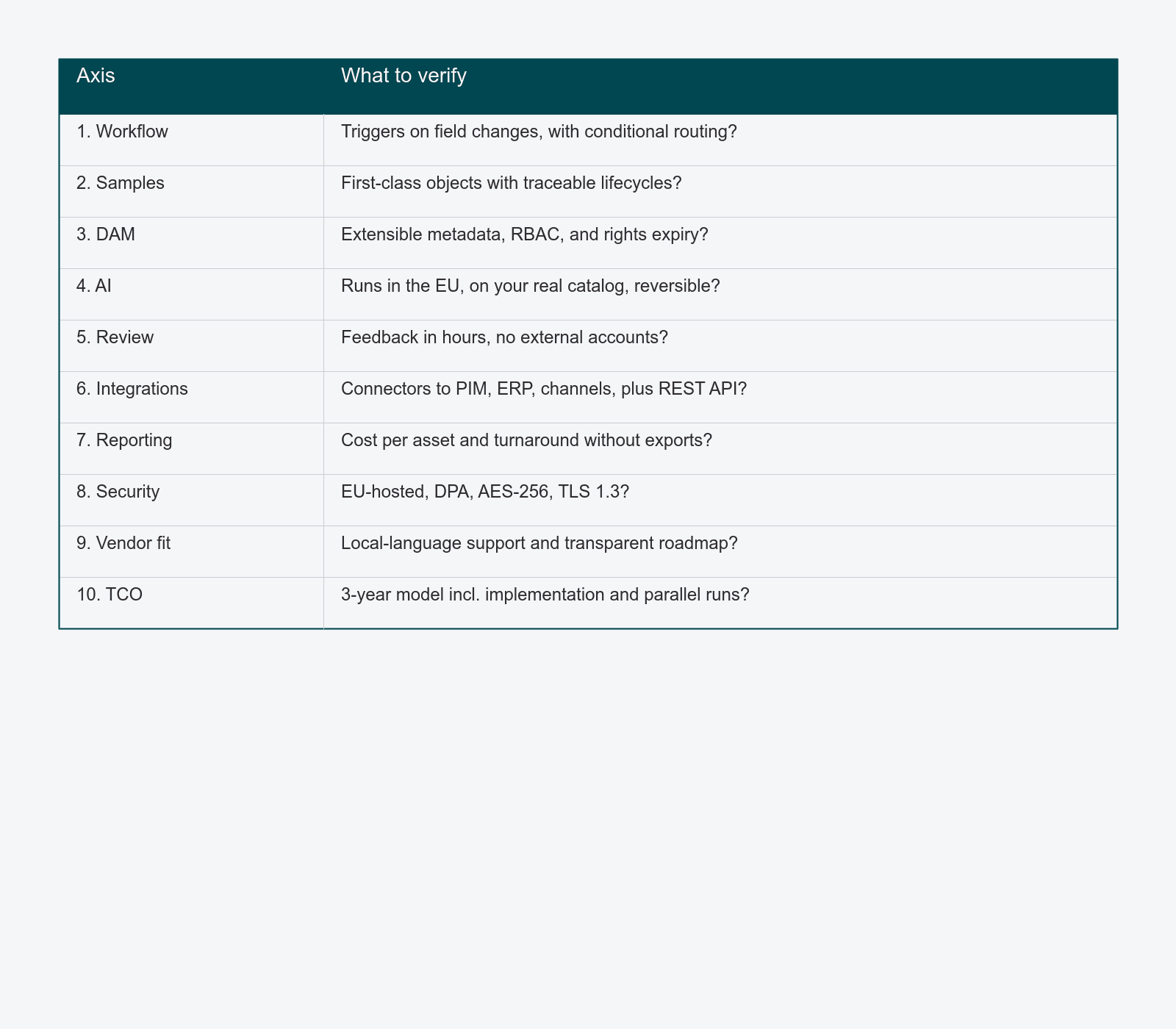
Print this. Take it to every vendor demo. Force every vendor to answer the same questions in the same order.
- Can a workflow trigger on a single field change, with conditional routing and SLA timers?
- Are samples first-class objects with traceable lifecycles, linked to jobs and assets?
- Is the metadata model extensible, with permissions, versioning, and rights expiry?
- Does AI processing happen in the EU, on your real catalog, with reversible steps?
- Does review collapse a feedback round into hours, not days, without external accounts?
- Are there direct connectors to PIM, ERP, and your major channels — plus a REST API?
- Can you measure cost per asset, turnaround, and rework rate without exporting to a spreadsheet?
- Is the platform GDPR-compliant, EU-hosted, with a DPA, AES-256 at rest, TLS 1.3 in transit?
- Does the vendor provide local-language support and a transparent roadmap?
- Have you modeled three-year TCO including implementation, training, and parallel running?
If you can answer "yes, with evidence" on eight or more, you have a defensible recommendation. If you cannot answer four, you are not yet ready to sign.
FAQ
How long does a content operations platform evaluation usually take?
For a mid-sized studio, plan for six to ten weeks: two weeks to write requirements, three to four weeks of vendor demos and reference calls, two weeks for security and legal review, and a final week for commercial negotiation. Compressing this rarely saves time — it just shifts work into the rollout.
Should we run a paid pilot before committing?
Yes, if the vendor offers one and the scope is bounded. A four- to six-week pilot on one product category, with clear success criteria written before it starts, is the most reliable way to verify performance on your real workload. Avoid open-ended pilots — they drag and the data is not comparable.
How do we compare a content operations platform against keeping our current stack of generic tools?
Build the TCO model both ways. Most teams discover the generic-tool stack costs more than they think once they include the FTE time spent on coordination, the cost of lost samples, and the opportunity cost of slow review cycles. Make those costs explicit; do not let them stay invisible.
Where to go next
If you are early in the evaluation, the packshot workflow guide shows how a unified content operations platform plays out in a real production line — useful context before scoring vendors.
If you are further along and want to see PixelAdmin specifically against the criteria above, book a platform walkthrough and we will run through your studio's stack against this checklist with you.