
If you run a packshot studio - commercial or in-house - you already know what kills your week. It is rarely the camera, the lights, or the retouching. It is the box of suede boots that arrived on Tuesday and is now nowhere on the shot list. It is the courier label nobody printed. It is the stakeholder asking why SKU-1042 still has not shipped back - the external client at a commercial studio, or the merchandising team at a brand. The day a sample lands is the day the sample-to-live clock starts, and sample management is the operational layer that makes everything else possible. Most teams are still running it on a spreadsheet that was last cleaned up in 2022.
This guide walks through what good sample management looks like, why spreadsheets break at scale, and what to put in place before you outgrow the chaos.
TL;DR
- A sample is a physical object with a lifecycle: incoming → received → shot → reviewed → returned. Every stage has a handoff and a clock.
- Spreadsheets fail not because they cannot store the data, but because they cannot enforce the workflow.
- A real sample tracking system replaces "where is it?" with a status that updates itself.
- Five signals tell you it is time to upgrade: search-by-memory, return delays, missed shots, duplicate receipts, and "we shot the wrong colour."
- Done right, sample management gives you back roughly a day per shoot week - without anyone working faster.
What sample management actually means
In a commercial photo studio, a sample is anything physical that needs to be in front of the camera: garments, shoes, packaging, electronics, jewellery, props, accessories. Each sample arrives, gets logged, gets shot, may be retouched, gets reviewed, and then needs to leave. That last step matters more than people admit - most retail brands lend samples on tight return windows because the sample is also their inventory.
So sample management is not an inventory problem and it is not a project management problem. It is both, simultaneously. You are tracking the physical location of an object and the production status of the asset that object will become. That is why generic tools struggle. A project tool like Asana handles the latter and ignores the former. A shared drive cannot stand in for proper asset management, and a spreadsheet handles neither side well.
Why the spreadsheet stops working
Every studio I have spoken with started with a spreadsheet. They work fine for the first six months. Then volume goes up, the team grows, and three things break at once.
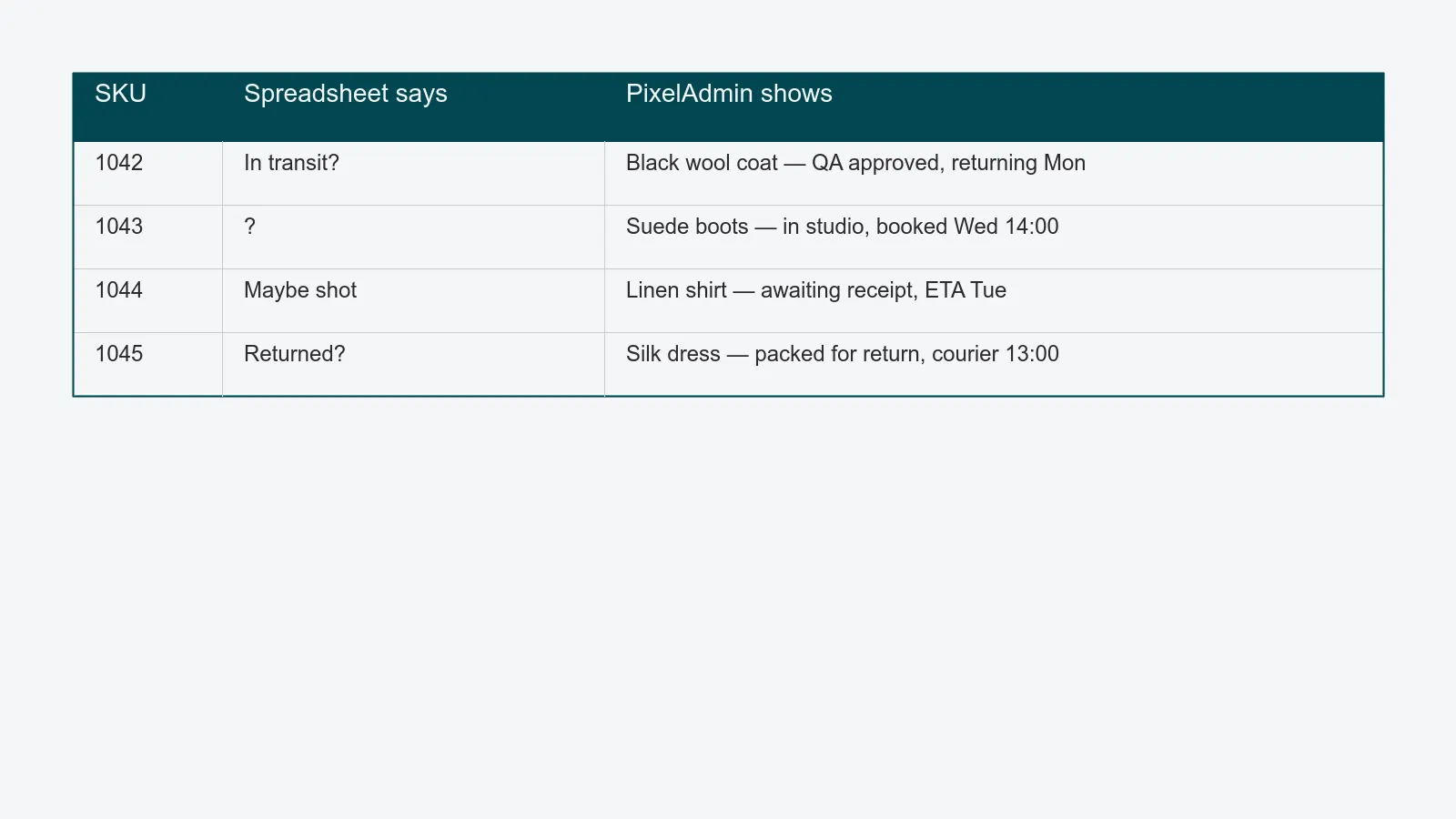
The data goes stale faster than anyone can update it. Sample arrives at reception, but reception does not have the spreadsheet open. The photographer pulls a sample off the rack to test a setup, never updates the row, and the buyer assumes it has shipped. Multiply by 200 SKUs a week.
Two people overwrite each other. Live spreadsheets in Google Sheets help, but they are still a flat structure. A studio manager updates "shot - needs retouch" while an editor updates "QA approved" and you do not know which one is current.
Nothing is searchable across shoots. When a buyer asks "did we ever shoot this in red last season?" the answer is in fourteen different sheets, named inconsistently, and the photographer who shot it has left.
The hidden cost is not the spreadsheet. It is the half hour every morning where someone walks the studio with a printed list, reconciling reality.
What good looks like
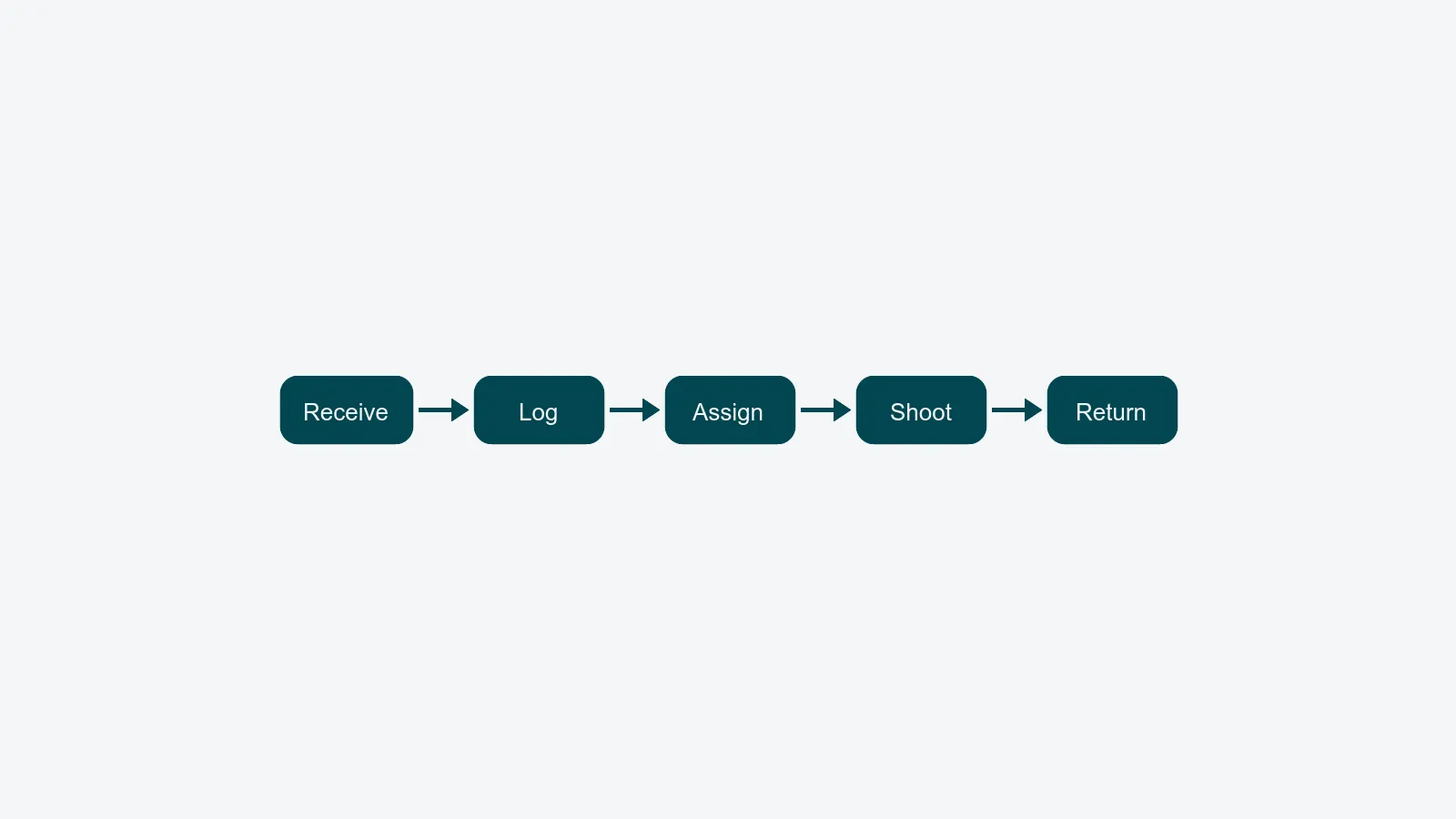
A real sample tracking system has five things a spreadsheet does not.
1. A receipt step that produces a record. When a courier drops off a box, someone scans or photographs the contents and the system creates a sample record per SKU, with a barcode or QR. That barcode lives on a label attached to the sample for the rest of its time in the studio.
2. A status that updates automatically. When the photographer scans the barcode at the start of a shot, the status flips to "in capture." When the editor opens the file in retouching, it flips again. Status is a side effect of work, not an extra task.
3. A booking layer. The shot is scheduled in studio capacity planning before the sample is needed, not after it arrives. If the sample is late, the booking moves automatically and the producer is notified.
4. Return logistics. Every sample has a return-by date, a recipient, and a courier label. The system flags overdue returns before the buyer has to.
5. A search index across every shoot. Find every photograph of a black wool coat from any season, any photographer, any campaign - in seconds.
Five signals it is time to upgrade
If three or more of these sound familiar, you have already outgrown the spreadsheet. The sooner you replace it, the cheaper the migration.
- You find samples by remembering where they are. Someone - usually one specific person - is the human index. When they are on holiday, you cannot find anything.
- Returns slip past the deadline. Buyers are calling about samples that should have been back two weeks ago. Some are technically lost.
- You shoot the wrong colour or size. Twice a quarter, the sample on set is not the one on the brief. Reshooting costs a day.
- Receipt is duplicated. The same sample is logged twice, once at reception and once when the photographer rediscovers it. The system has no opinion about which record is real.
- Reporting takes a week. When the head of content asks "how many SKUs did we shoot last quarter," the answer requires a freelancer.
What to put in place
You do not need to solve everything at once. Start with the parts that hurt most.
Phase 1 - receipt and labelling. Even before any software changes, get every incoming sample labelled the same day it arrives. A barcode on a sticker is enough. This alone removes the "is it here yet?" question from your standups.
Phase 2 - status lives in one place. Pick a system that handles the full lifecycle and migrate the spreadsheet into it. Resist the temptation to keep the spreadsheet "as a backup" - two sources of truth means zero sources of truth.
Phase 3 - connect to the shot list. Once samples and shots are linked, you can answer "which samples do I need on set tomorrow?" without asking. This is the moment the studio manager gets their morning back.
Phase 4 - close the loop on returns. Return labels print automatically when QA approves the final asset. The sample never sits in a corner waiting for someone to remember it.
What about brands with in-house studios?
In-house studios often think sample management does not apply to them, because the sample is internal stock from the same company. It still applies - and the consequences of losing a sample are higher. An internal sample is rarely insured the same way a borrowed one is, and the inventory team is often relying on the studio team to return it before stocktake.
Brand studios also tend to have a tighter feedback loop with merchandising. Knowing exactly which SKUs have been photographed - and which have not - feeds directly into go-to-market readiness. For an in-house studio feeding its own webshop, the sample record is the first link in the sample-to-live chain: every day a product sits unlogged is a day it is not earning on the site. A sample management system gives you that report at any point in the season.
FAQ
Is sample management the same as DAM? No. A digital asset management (DAM) platform stores the files you produce. Sample management tracks the physical objects you photograph. The two should be linked, but they are different systems with different concerns.
Do we need barcodes if our team is small? A four-person studio shooting 50 SKUs a week can probably get away with named labels and shared status. Above that, barcodes pay for themselves in a month - they remove every "which one is this" question.
How does this work with returnable samples on tight deadlines? The system tracks the return-by date as a first-class field, prints labels on demand, and warns you 48 hours before the deadline. Returns become a queue, not a fire drill.
Can you migrate from an existing spreadsheet? Yes. We import existing sheets directly during onboarding - the only thing we cannot import is undocumented institutional knowledge.
Closing
Sample management is the least glamorous part of running a packshot studio and the most expensive thing to ignore. Whether you are billing an external client or racing a product to your own webshop, the studios that win - on cost-per-asset or on time-to-market - are not the ones with the fastest cameras or the most photographers. They are the ones whose samples are exactly where they should be at 9am every morning.
If you want to see how PixelAdmin handles every stage of this lifecycle in one place, book a short walkthrough. Bring your messiest receipt-day spreadsheet - we will show you what it looks like with a status that updates itself.