
Every photo studio starts with a shared drive. Google Drive, Dropbox, an on-prem NAS, sometimes all three. It works. The team finds files by remembering where they are. The naming convention is "mostly consistent." The folder tree mirrors how shoots happened to be scheduled in 2021.
Then the studio doubles in size. The naming convention drifts. Three different versions of the same hero image live in three different folders. A buyer asks for the red coat from last spring, and the answer takes 40 minutes. At some point, "shared drive" stops being good enough - and the question is when, not if.
This article is a practical guide to that decision. When does a photo studio actually need a digital asset management (DAM) platform, and what changes the day you make the switch?
The short version
- A shared drive stores files. A DAM stores files plus the structured metadata that makes them findable.
- Most studios cross the threshold between 5,000 and 20,000 finished assets, or when they grow past 4–6 people.
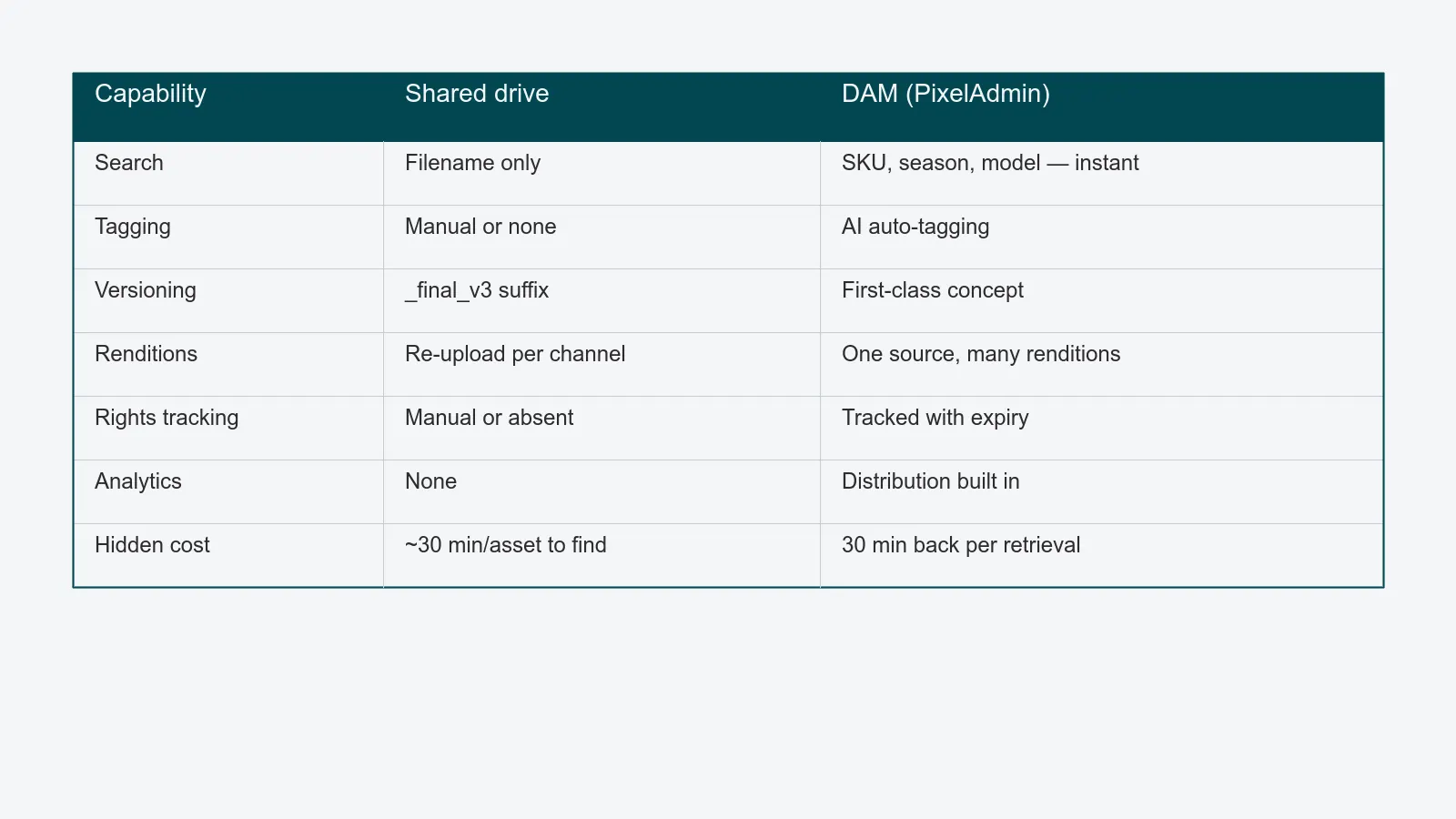
- The cost of staying on a shared drive is invisible: 30+ minutes per asset retrieval, repeated reshoots because nobody could find the original, and rights expiry that nobody is tracking.
- The cost of switching is real but bounded - usually a quarter of operational disruption.
What a shared drive actually is
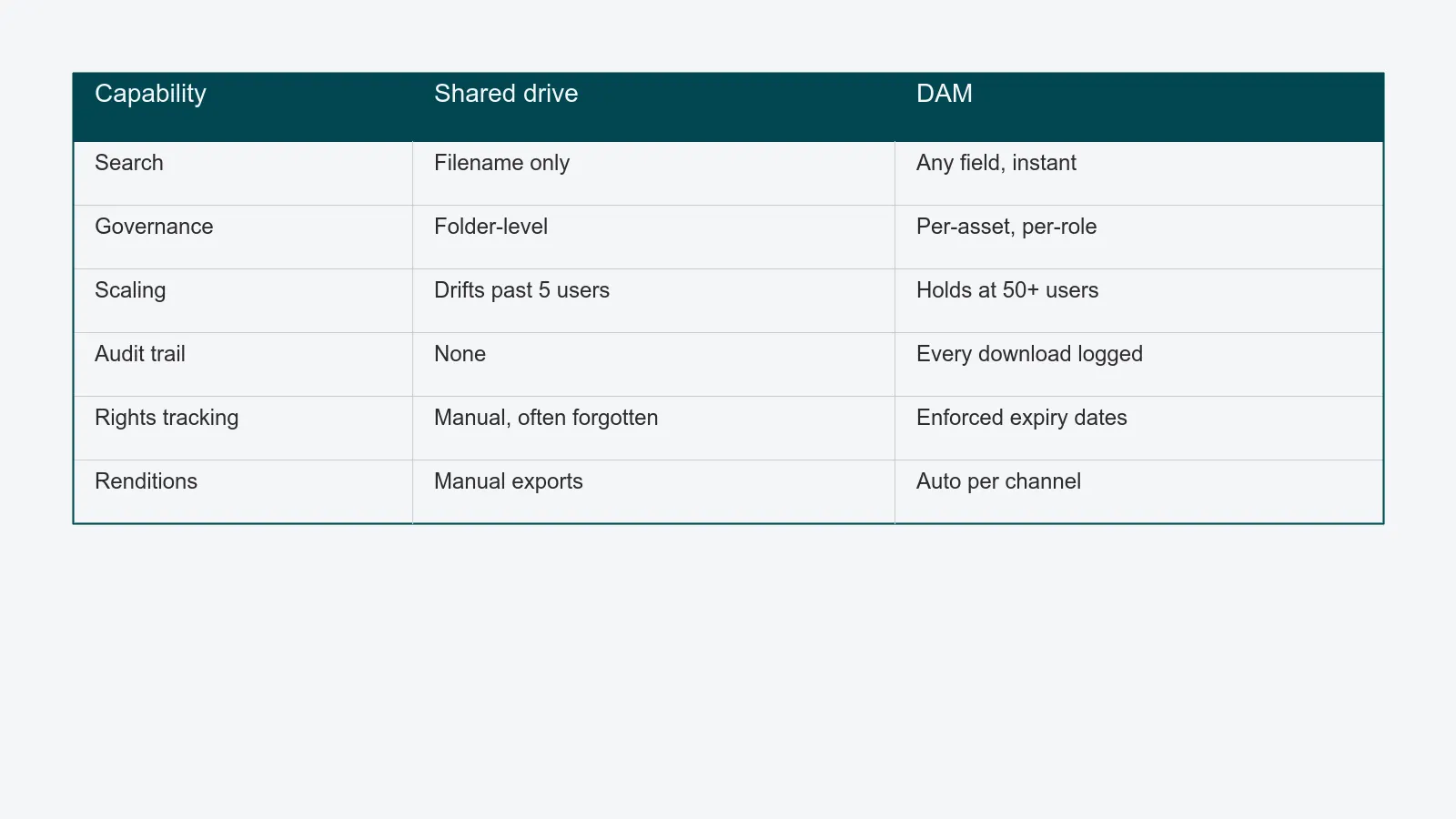
A shared drive is a hierarchical filesystem. You make folders, you put files in them, and you find files by remembering the path. Permissions are coarse: usually folder-level, sometimes file-level, almost never per-asset.
For a small team shooting fewer than 100 assets a week with one consistent naming convention, this is fine. Folders work. Search works just well enough. The tax of "where did I put it?" is small.
The shared drive starts to fail when finding assets becomes the work, not the side effect of the work.
What a DAM is, in one paragraph
A DAM is a database with files attached - every asset is a record with structured fields (SKU, season, channel rights, expiry date, model release status) that you can query, version, and govern. For the full definition - including how a DAM differs from PIM, MAM, and a generic cloud bucket - see what a DAM actually is. The rest of this guide is about the comparison: at what point a shared drive stops being enough for a working studio.
The five thresholds
You do not need a DAM on day one. You need one when you cross specific thresholds. Here are the five most reliable.
1. You have crossed 5,000 finished assets. At this point, manual folder hierarchies stop being navigable. Search becomes the only way to find anything, and search on a shared drive is essentially full-text on filenames.
2. More than three people are uploading. Each person has slightly different folder instincts. By the time five people are putting work in, the structure is no longer a structure.
3. You have to track rights. If your assets feature models, properties, or licensed products, expiry dates need to be enforced. A shared drive cannot do this. A DAM with usage rights tracking can refuse to serve an expired asset.
4. You distribute to multiple channels. PIM, e-commerce platform, social, retail partners - each one wants a different rendition. Generating those manually from the shared drive is a job. Generating them automatically from the DAM is a setting.
5. Someone has asked for usage analytics. "Which campaign assets did we actually use?" "What is the most-downloaded image from this season?" These questions are unanswerable on a shared drive.
If three of these are true, the migration pays back in under a year. If four are true, the shared drive is actively losing you money.
What changes the day you switch
People assume the big change is search. It is, but it is not the most valuable change.
The most valuable change is what stops happening. Reshoots because nobody could find the original original. Late-night searches before a launch. The "do we have a vertical version of this?" question. The "what was the licence on that model?" question. The full afternoon a senior person spends auditing folder structure once a quarter.
Search is a single feature. The collapse of all those silent costs is the actual return on investment.
What to look for in a DAM (for a photo studio)
Not all DAMs are built the same, and a generic enterprise DAM can be more expensive and less useful than a purpose-built one. For a photo studio, prioritise:
- Native sample/SKU concept. Generic DAMs treat every asset as standalone. Studio DAMs link assets to the SKU they shot, which means searching by SKU finds every angle, season, and rendition.
- Tight integration with studio workflow. Capture → retouch → QA → publish should be one platform, not four.
- AI tagging trained on commercial imagery. Generic vision models tag a black wool coat as "clothing." A studio-tuned model tags it as "outerwear / wool / black / female / waist-length / season FW26."
- EU hosting and GDPR compliance. Especially if you shoot models, your DAM holds personal data. EU-hosted, GDPR-by-design is not a checkbox - it is a procurement requirement at most enterprise brands.
- Rendition pipeline. One source, many channel-specific outputs, generated automatically.
What a migration actually looks like
The fear of migration is bigger than the migration itself. A typical photo studio migration runs in three phases:
Phase 1 - current quarter goes into the DAM directly. Stop adding to the shared drive on day one of the migration. Everything new goes into the new system. This alone removes "two sources of truth" within a month.
Phase 2 - selective backfill. Bring in the last 6–12 months of finished assets. These are the ones the team actually retrieves regularly. Older assets stay where they are until someone needs them.
Phase 3 - archive backfill. The historic archive comes in over the next quarter, often in chunks tied to specific projects (an upcoming reshoot, a retrospective campaign).
Done in this order, the team is productive on the new system in week two and the historical drag does not block anyone.
What about brands with in-house studios?
In-house studios usually need a DAM earlier than commercial studios. The reason is volume and longevity: brand assets stay in circulation for years across web, retail, print, and partner channels. Without structured metadata and rights tracking, the brand team ends up using last season's expired imagery in this season's campaign - and finding out from a legal email.
For in-house brand studios, the DAM is also where marketing meets production. It is the layer that lets a campaign manager pull a coordinated set of assets without going through a creative producer for every request.
FAQ
Is Dropbox or Google Drive ever enough? For under 1,000 active assets and a team of 1–3, yes. Above that, the cost of finding things eats the cost of not having a DAM.
What about SharePoint with metadata columns? SharePoint can technically do some of this. In practice, the metadata UX is so painful that nobody fills it in, and you end up with the same shared-drive problem with extra steps.
Can a DAM replace our retouching tools? No. A DAM is the system of record for finished assets and their metadata. Retouchers still use Photoshop, Capture One, etc. The DAM connects to those tools.
Is the AI tagging accurate enough? For 80% of fields, yes - and the team corrects the rest during review. The economics still work out: tagging 20% of fields manually is much cheaper than tagging 100%.
Closing
A shared drive is not wrong. It is just a tool that has a ceiling. The studios that hit that ceiling and ignore it pay an invisible tax for years. The ones that recognise it and switch usually wonder, six months later, how they ever ran the operation without structured search.
If you want to see what your specific archive would look like in PixelAdmin's DAM - including how AI tagging would handle your existing imagery - we will run a sample import in a 45-minute session and show you side by side.