

If you sit in a retouching seat, you have already tried three or four AI background removal tools. The demos always look perfect. Then you feed in a real shoot - sheer chiffon, a glass perfume bottle, a model with flyaway hair against a grey seamless - and you spend the rest of the afternoon repairing edges by hand. AI background removal at scale is not a quality problem and not a speed problem. It is a governance problem. You need to know which images the AI can be trusted with, which ones need a human, and how the work moves between the two without anyone retyping a filename.
This article is for editors and retouching leads who are evaluating AI background removal as part of a real production line - not a one-off plugin. We will cover what AI does well, where it still fails, the throughput math at studio volume, and the questions to ask any vendor before you commit.
TL;DR
- Modern AI background removal is reliable on hard-edged products, mid-tone backgrounds, and clean studio lighting. It is still unreliable on hair, fur, semi-transparent fabric, glass, and dark-on-dark.
- "Accuracy" is not a single number. Ask vendors for category-level benchmarks (apparel, hardlines, glassware, jewellery) on your kind of images, not theirs.
- A working pipeline routes the easy 70 to 85 percent through automatic processing and pushes the rest into a manual review tier - without breaking the queue.
- Throughput improvements come from the integration, not the model. A model that is 12 percent faster but lives outside your asset system saves you nothing.
- For European studios, EU-hosted processing matters for GDPR and for predictable cost per image.
Where AI background removal actually works
Today's models are very good at the cases that already had decent contrast and clean edges. If your shoot follows a consistent lighting recipe and your subjects have a defined silhouette, you can expect production-grade cutouts on:
- Apparel on a mannequin or flat lay - solid garments, structured shapes, mid-tone seamless backgrounds.
- Hardline products - packaged goods, electronics, footwear with defined contours.
- Cosmetics and packaging - opaque containers with printed labels.
- Furniture and homewares with hard edges.
For these categories, modern models routinely produce a clean alpha channel that needs zero or near-zero manual cleanup. That is the part of your queue that should be automated end to end.
Where it still fails
The cases that break AI background removal are the same ones that have always been hard for traditional masking, just sped up. You should expect manual intervention on:
- Hair, fur, and feathers - strands and flyaways against busy or near-tone backgrounds.
- Semi-transparent fabric - chiffon, lace, sheer hosiery, mesh.
- Glass and clear acrylic - perfume bottles, drinkware, eyewear lenses.
- Reflective metallics and jewellery - chrome, polished silver, diamond facets.
- Dark-on-dark and white-on-white - a black wool coat on charcoal grey will defeat most consumer-grade models.
- Complex props or shadows the brand wants preserved or stylized.
The instinct is to fight the model on these cases. Don't. Treat them as a separate lane in the queue, retouched by a human, and only ever judge the AI on the images you sent it that match its strength profile.
The throughput math
Headline numbers from vendors usually quote an isolated cutout: "200 ms per image." Multiply that out across a real day and the picture changes.
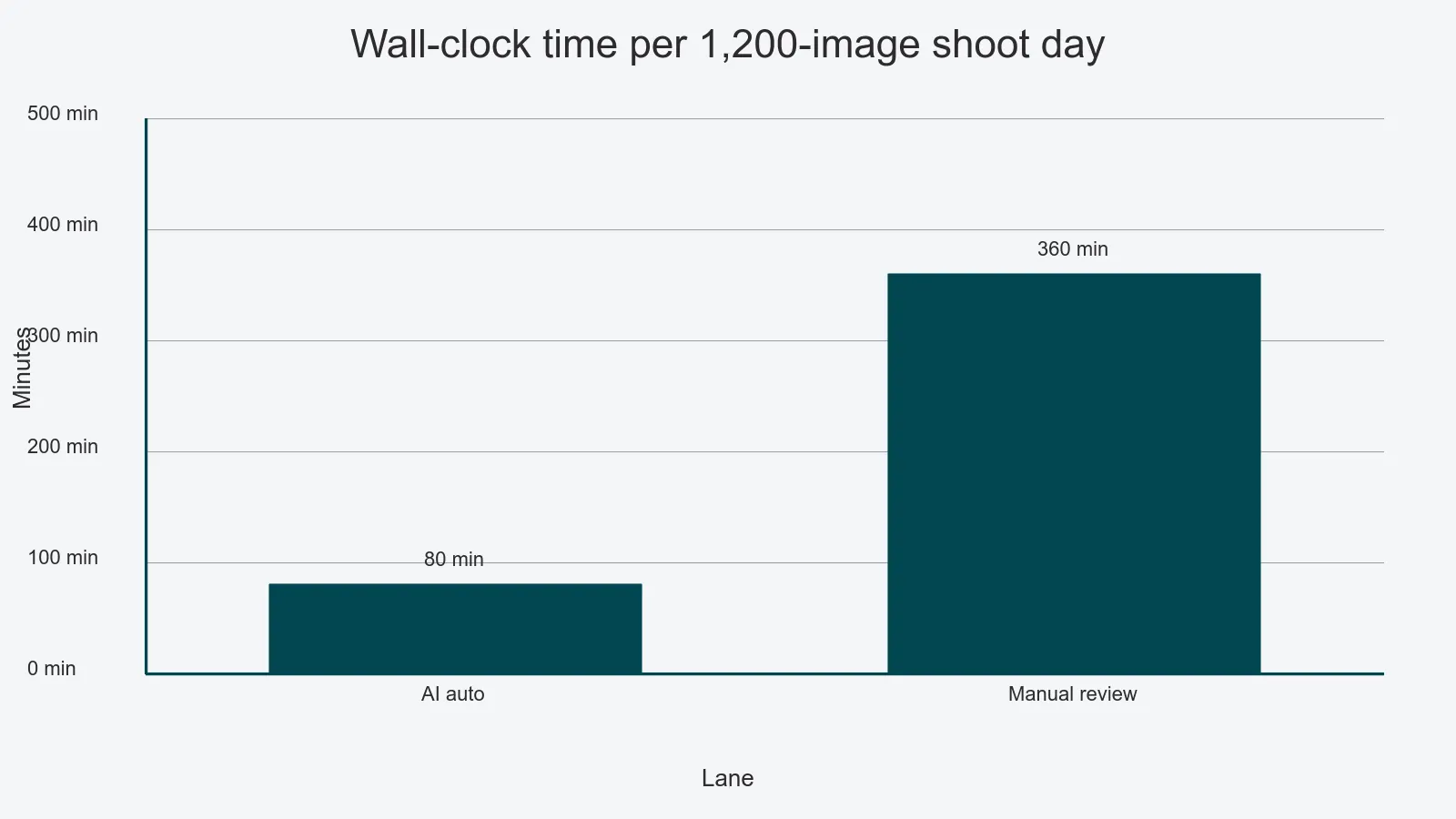
Take a studio shooting 1,200 images per shoot day. If 80 percent of those (960 images) flow through automated removal at five seconds end-to-end including queue, transfer, and write-back, the AI portion finishes in well under two hours of wall-clock time. The remaining 240 images go into a manual queue at, say, 90 seconds per image - that is six hours of retoucher time, which is where your cost actually lives.
Two implications:
- The bottleneck is the manual tier, not the AI. Speed wins come from giving your retouchers a clean, prioritized queue with the original brief, the reference image, and the partial AI mask as a starting point.
- The model's batch behavior matters more than its single-image latency. Ask the vendor what happens when you submit 5,000 images at 9:00 a.m. on a Monday. Queue depth, parallelism, and how cleanly it backpressures into your asset system determine the real number.
Edge-case governance: the manual review tier
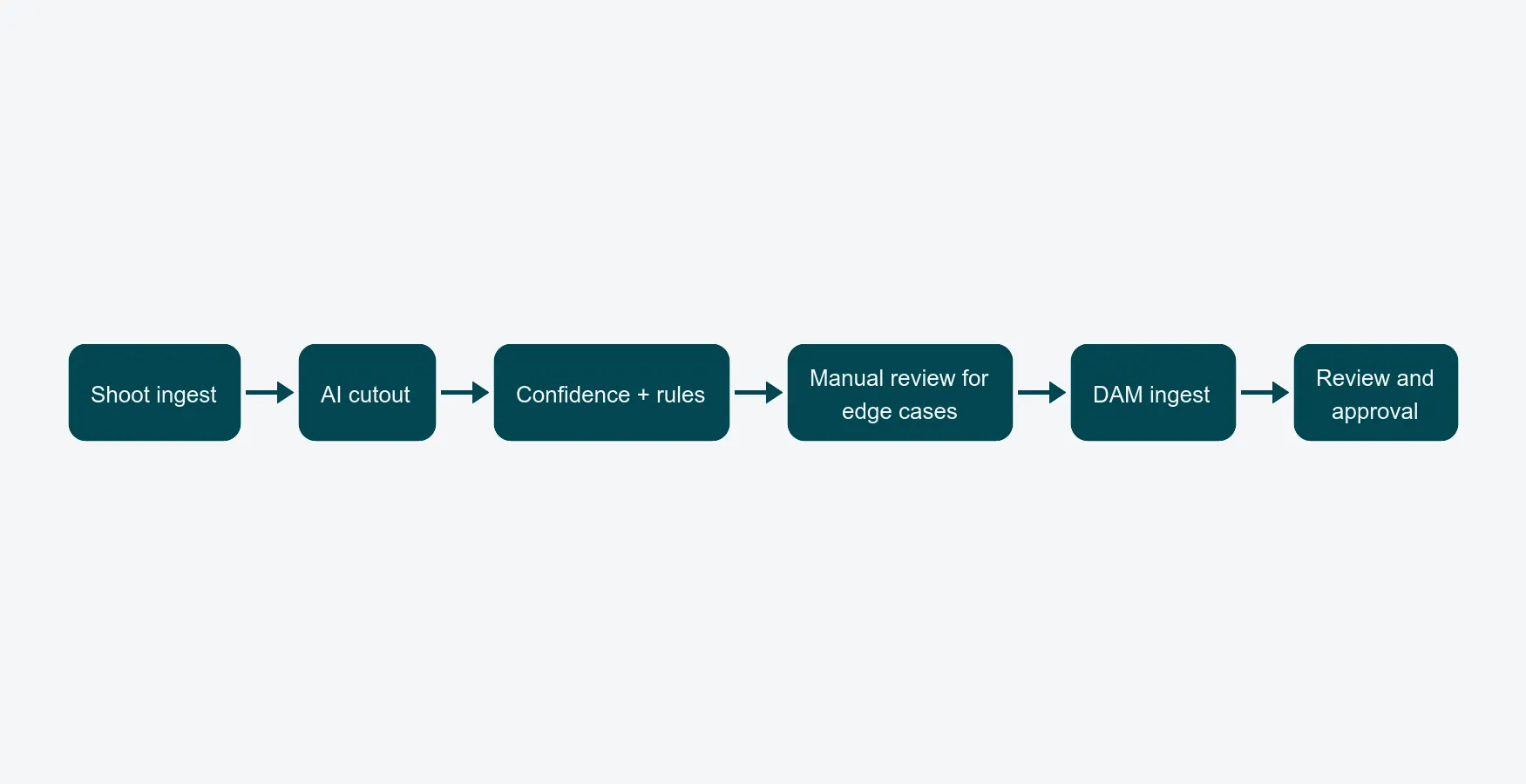
This is the part most vendors avoid talking about. A serious production setup needs explicit rules for which images bypass AI entirely and which ones get the AI mask as a starting layer for a human. Examples worth codifying:
- All glassware, hair-detail beauty shots, and jewellery skip auto-publish and route to a senior retoucher.
- Any image where the AI's confidence score falls below a threshold - most models expose one - gets flagged.
- Anything from a high-value campaign goes to manual review by default, regardless of confidence.
Without these rules, you will ship a perfume bottle with a chunk of background still inside the glass, and the buyer will find it before you do. Build the routing into your content production workflow so the rules execute automatically, not as a retoucher's mental checklist.
The hand-off into DAM and approvals
A cutout that lives on a retoucher's desktop is not done. Three things have to happen the moment the AI (or the human) finishes:
- The asset lands in your centralized digital asset management with the right job ID, SKU, and channel metadata, in every export format the client expects.
- The version with transparency is preserved - PNG with alpha or PSD with the layer structure intact - alongside flat JPGs for delivery.
- The image enters the review and approval flow automatically, so the producer or client can sign off without anyone emailing a WeTransfer link.
If your AI tool finishes the cutout but you still drag files between folders and rename SKUs by hand, you have not bought throughput. You have just moved the bottleneck.
How to evaluate vendors
Use these six questions when you are shortlisting AI background removal:
- Category benchmarks. Can you get accuracy numbers broken out by apparel, hardlines, glassware, and hair-detail beauty - measured on your sample images, not theirs?
- Batch behavior. What is the throughput at 1,000, 5,000, and 20,000 images submitted at once? What is the queue depth and how does it backpressure?
- Confidence scoring. Does the model expose a per-image confidence score so you can route low-confidence work to manual review automatically?
- Cost-per-image transparency. Is pricing per processed image, per minute of compute, or a flat seat license - and how does it scale at peak volumes?
- Pipeline integration. Does it connect natively to your DAM and workflow, or is it a separate desktop app that produces orphan files?
- EU hosting and GDPR. For European studios, where is the model run and where do source images sit during processing? Hosting in the EU on infrastructure like Microsoft Azure simplifies the GDPR story, and avoids cross-border transfer reviews every time you onboard a new client.
A model that wins on questions 1 to 3 but fails on 5 will save you nothing in production. The boring questions matter more than the demo-friendly ones.
What this means for your retouching team
For an editor or retoucher, the right outcome is not "the AI does my job." It is that the queue you open in the morning has been pre-sorted: easy work already done and waiting for a sanity check, edge cases prioritized by deadline, briefs and references one click away. That is what the editor and retoucher role page describes, and it is the only setup where AI background removal at scale actually compounds.
If you want to see a real pipeline that handles AI cutouts, manual review, DAM ingest, and client approvals as a single flow, book a walkthrough and we will show you the queue with your kind of images in it.