
A packshot is a clean, accurate photograph of a product - typically shot against a plain background - used to show the item exactly as a customer will receive it. In e-commerce and retail, it is the primary image on a product detail page (PDP) and the asset that does most of the selling.
If you have ever asked "what is a packshot?" while briefing a studio, comparing vendor quotes, or specifying assets for a product launch, this guide gives you the working definition, the main types, where they appear, and how a modern studio actually produces them.
Packshot definition
In commercial photography, a packshot is a product image - usually on white, transparent, or neutral background - optimized for catalog and e-commerce use. The term is often used interchangeably with "product shot" or "product photography," though packshot specifically implies a clean, isolated, catalog-ready frame.
Three things distinguish a packshot from other product imagery:
- Isolation. The product is the only subject. Backgrounds are removed or neutral.
- Accuracy. Color, shape, and proportions match the physical product so customers know what they are buying.
- Standardization. Within a brand or marketplace, packshots follow consistent framing, lighting, and crop rules so a catalog of thousands of items looks coherent.
This is what separates a packshot from a lifestyle or editorial image, where mood, story, and styling take priority over neutral product accuracy.
Types of packshots
Most e-commerce catalogs use a small number of packshot types, often combined for the same product.
1. Flat lay
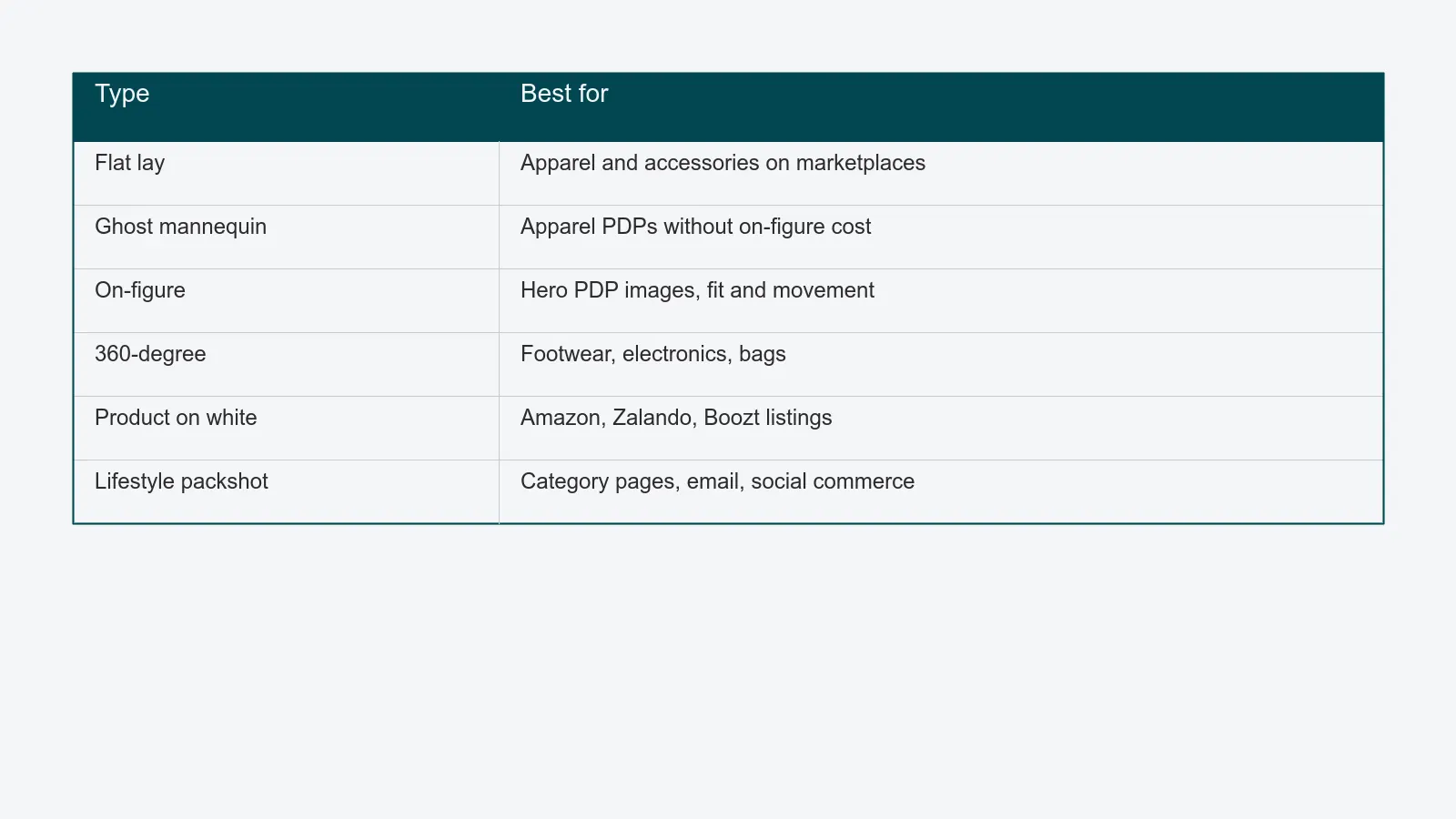
The product - usually apparel, accessories, or small goods - is arranged on a flat surface and shot from directly above. Flat lay is fast to produce, cheap per shot, and works well for color and pattern visibility. It is the workhorse of marketplace listings.
2. Ghost mannequin (invisible mannequin)
Garments are photographed on a mannequin, then the mannequin is digitally removed in post-production. The result is a hollow, 3D-looking garment that shows fit and shape without a visible model. Standard for apparel PDPs where on-figure imagery is too expensive or too slow.
3. On-figure / on-model
The product is worn or held by a live model. This shows fit, scale, and movement, and helps the customer imagine the product in use. More expensive and slower than flat lay or ghost mannequin, but typical for hero PDP images and editorial-leaning brands.
4. 360-degree packshot
A sequence of frames taken every 10–15 degrees on a turntable, stitched into an interactive image the customer can rotate. Common for footwear, electronics, and bags, where details from every angle drive the buying decision.
5. Product-only on white
The classic isolated shot - a bottle, box, or hard-good photographed cleanly on pure white or a knockout (transparent) background. The default format for marketplaces like Amazon, Zalando, and Boozt.
6. Lifestyle packshot
A hybrid - the product is still the subject, but it sits in a styled context (a kitchen counter, a bedroom, a desk) instead of an empty backdrop. Useful for category pages, marketing emails, and social commerce.
For a longer overview of product photography categories, see Wikipedia's product photography article.
Where packshots appear
A single product launch typically generates packshots used in several channels:
- Product detail pages. The hero packshot, plus 4–8 alternates, gallery shots, and detail crops.
- Marketplace listings. Amazon, Zalando, About You, and similar each have specific packshot rules - background color, fill ratio, watermark restrictions.
- Marketing assets. Banners, paid social, newsletters, and category headers frequently start from a packshot and add typography or styling on top.
- Wholesale and B2B. Buyer-facing line sheets and trade portals need clean isolated packshots more than lifestyle imagery.
- Print catalogs. Where they still exist, packshots remain the foundation.
A studio shooting for a mid-sized fashion brand typically produces 6–12 packshot variants per SKU per season - multiplied across hundreds or thousands of SKUs.
How packshots are produced
Behind every packshot is a four-step production line. The mechanics are the same whether the studio shoots 50 or 50,000 SKUs a year - only the tooling and discipline change.
- Intake. Physical samples arrive from the brand. Each sample is logged, labeled, and matched to a job and a shot list. Lost or mislabeled samples are the single biggest cause of reshoots.
- Capture. A tethered shoot, usually with a strobe-and-cyc setup or a turntable for 360. Files are committed to storage in real time, tagged with product codes.
- Post-production. Color correction, masking, ghost-mannequin compositing, retouching, and export into channel-specific formats and sizes.
- Delivery. Final files are pushed to the brand's PIM, DAM, or e-commerce platform, archived, and the physical sample is returned.
The bigger the catalog, the more these steps need to be systematized. A purpose-built content operations platform ties all four stages to a single job ID, so a packshot can always be traced back to its sample, brief, and approval history.
Packshot vs. lifestyle photography

The two are complementary, not competitive.
- A packshot answers "what does this product look like?" Clean, neutral, accurate.
- A lifestyle image answers "what does this product feel like to own?" Styled, contextual, emotional.
Most brands need both. Customers convert on lifestyle imagery and validate on packshots - they zoom in to check color, finish, and detail before they buy. A modern digital asset management system keeps both image families linked to the same SKU so marketing and merchandising never use the wrong asset in the wrong channel.
Tooling for packshot production at scale
For a studio shooting fewer than a few hundred packshots a month, a basic stack - a shared drive, a tethered capture app, and a spreadsheet - is workable. Above that volume, the cracks start to show.
- Samples go missing.
- The same image gets re-exported manually for every channel.
- Client review happens in email threads.
- No one can answer "where is job X?" without checking five tools.
This is the operational tax that grows with catalog size. The fix is a single source of truth: automated sample management, tethered capture linked to job IDs, retouching queues that route by deadline, and channel-aware delivery - all in one platform. The full production model is in the packshot workflow guide, which walks through the seven stages of a commercial packshot job and where most studios lose time.
Where to go next
If you are evaluating how to scale packshot production, two next steps:
- Read the packshot workflow guide for the full seven-stage production model.
- See how PixelAdmin for studios consolidates sample management, capture, retouching, review, and delivery into one platform.
PixelAdmin is built specifically for high-volume packshot operations. If a unified packshot pipeline sounds like what you have been trying to assemble out of generic tools, book a demo and we will walk through your production with you.