

A studio PIM integration is rarely the thing anyone asks for in a brief. Producers ask for shot lists. Photographers ask for sample status. The recipient asks for the assets in their feed by Friday - an external client for a commercial studio, or the brand's own webshop and merchandising team for an in-house studio. But every one of those questions becomes a data question the moment your studio runs at any meaningful volume - and the data lives in your PIM and ERP, not in your studio tool.
This article walks the four common integration patterns we see between content operations platforms and the surrounding business stack, what each one is good for, what fields actually need to move, who owns what, and how to handle the parts most teams discover too late: failure modes, reconciliation, and EU data residency.
Why content operations needs to talk to PIM and ERP
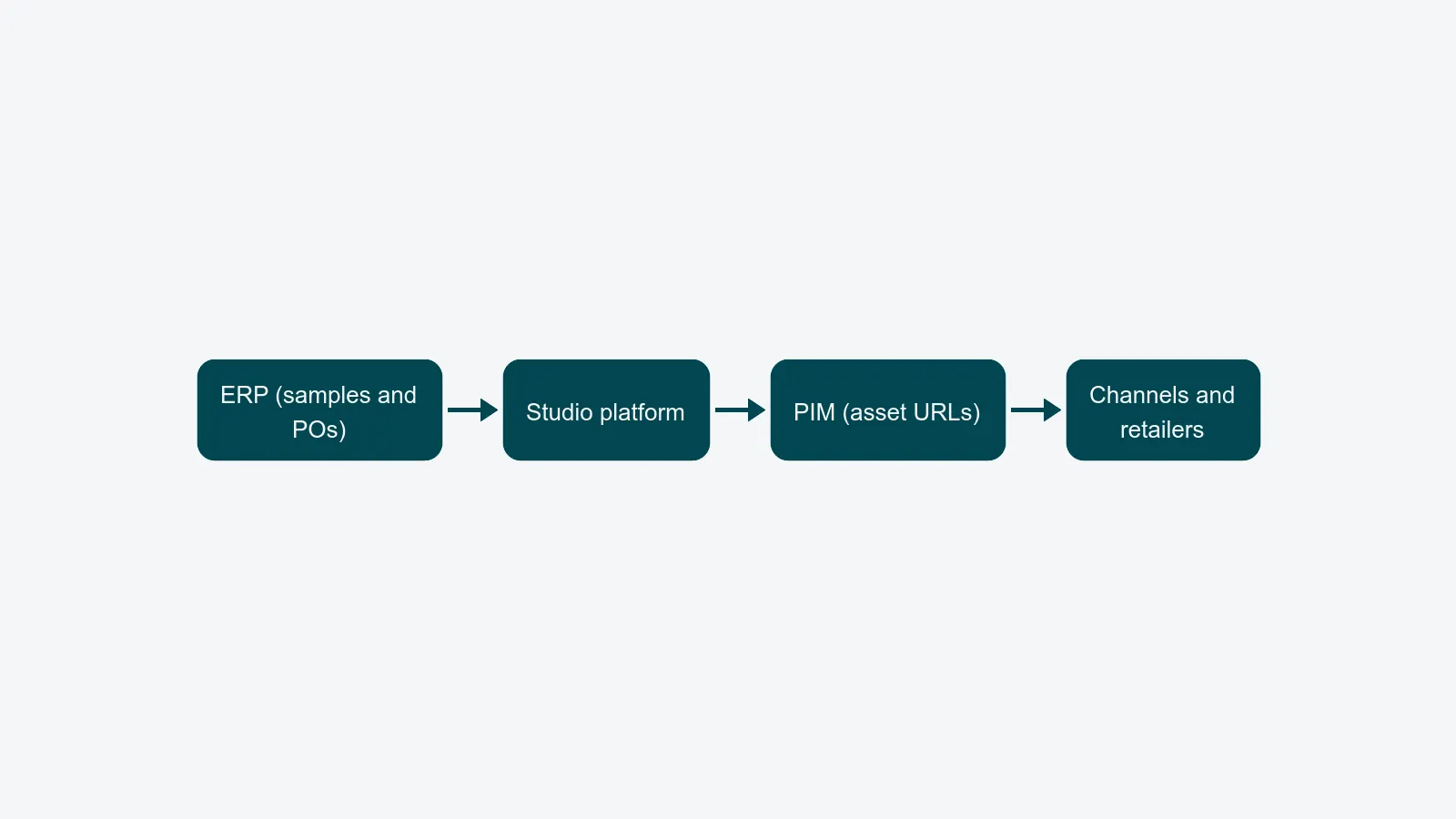
A working studio sits in the middle of a longer flow. Upstream, the PIM holds product master data - SKUs, attributes, season, copy, channel destinations. The ERP holds purchase orders, supplier records, and the receipt events that tell you a sample is physically on the loading dock. Downstream, the PIM is also where finished asset URLs need to land so they show up on product pages, in retailer feeds, and inside the marketplace listings the e-commerce team manages. For an in-house brand studio that loop is even tighter: the studio feeds one webshop directly, and every hour a finished asset sits outside the PIM is an hour the product is not live and selling.
When those connections are missing, the studio rebuilds them by hand. Producers retype SKUs into shot lists. Photographers cross-check season codes against an Airtable that was last reconciled in February. Asset URLs get pasted into PIM cells one row at a time. The cost of this rebuild - the hidden cost of fragmented studio tools - usually dwarfs the integration spend that would replace it.
A purpose-built integrations layer for content operations closes the loop. The studio becomes the production engine, not the keeper of a parallel product catalogue.
The four integration patterns worth knowing
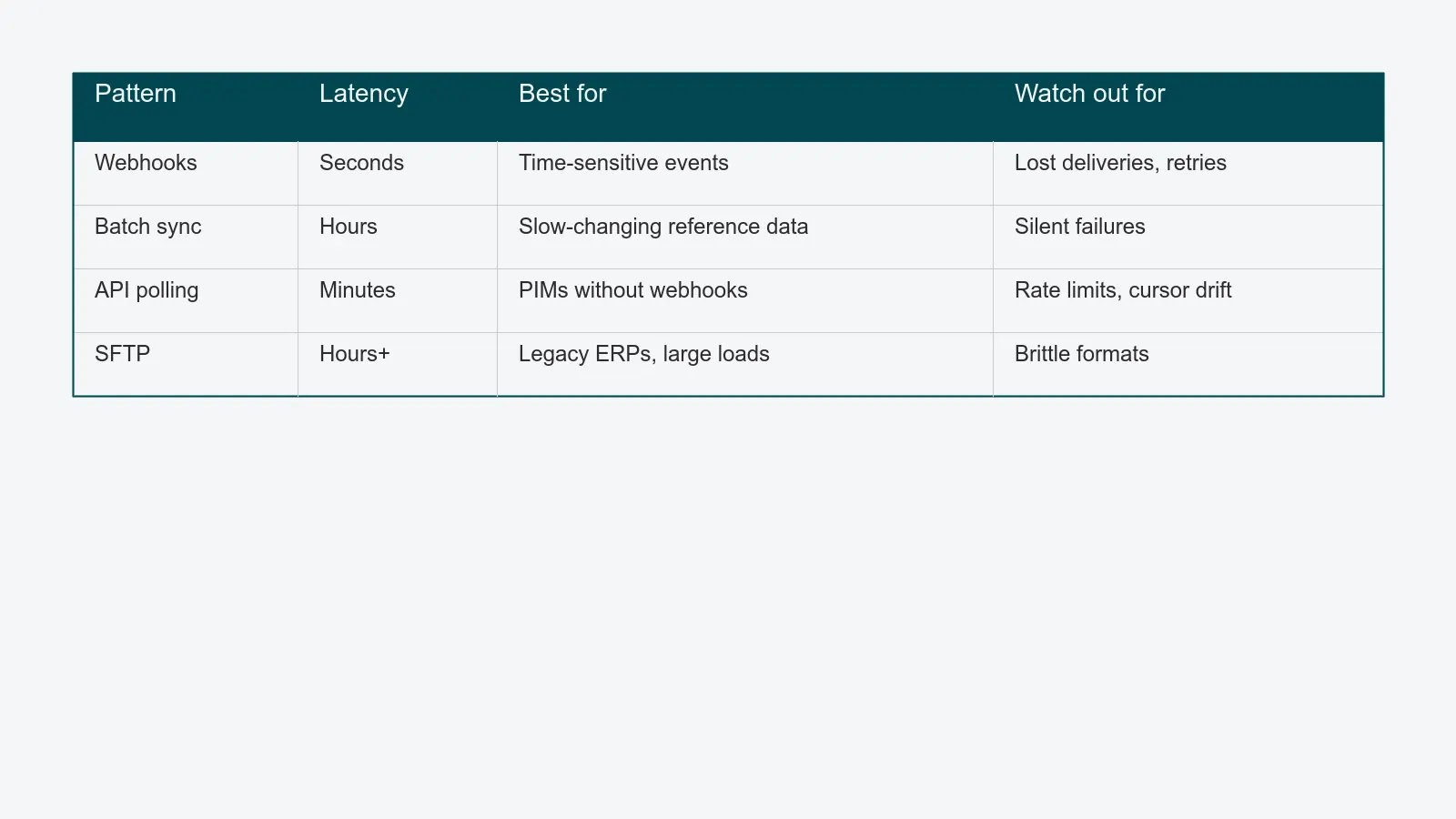
There are dozens of ways to move data between systems, but in practice the studio side of a PIM/ERP integration almost always uses one of four patterns. Choose by the shape of the data and the latency the business needs, not by what the vendor's integration team prefers.
1. Event-driven webhooks
The PIM or ERP fires an HTTP call the moment something changes - a SKU is created, a sample receipt is logged, an asset is approved. The studio platform reacts immediately: a new shot list row appears, a sample card opens, a finished asset is pushed back to the PIM record.
Good for: time-sensitive events, low-to-medium volume, anything where minutes matter (sample arrived, shoot is approved, asset is ready to publish).
Trade-offs: webhooks can be lost in transit. You need idempotent handlers, a delivery log, and a retry policy. They also require the source system to support outbound webhooks - many older ERPs do not.
2. Scheduled batch sync
A nightly or hourly job pulls deltas from the PIM and pushes finished asset references back. The studio sees yesterday's catalogue, not today's, and the PIM sees yesterday's deliveries.
Good for: large reference data sets that change slowly (seasonal collection metadata, attribute taxonomies, supplier lists), and any flow where end-of-day is good enough.
Trade-offs: latency. A SKU created at 09:00 is invisible to the studio until tomorrow's run. Batch jobs also tend to fail silently - schedule a heartbeat alert so an empty run is not mistaken for a healthy one.
3. API polling
The studio platform asks the PIM "what changed since the last cursor?" every few minutes. Simpler than webhooks because the studio side controls timing, but heavier on the PIM because the question costs a query whether anything changed or not.
Good for: PIMs that expose a modifiedSince endpoint but no outbound webhooks. Also useful as a safety net under a webhook integration - poll once an hour to catch anything the webhook layer dropped.
Trade-offs: rate limits. A 5-minute poll across 50,000 SKUs will burn your daily API budget by lunch. Cursor management - knowing exactly which timestamp you last consumed up to - is non-negotiable.
4. File-based handoff via SFTP
A CSV or JSON file lands in an SFTP folder. The other side picks it up, processes it, and drops a result file back. Old-school but, in regulated or legacy environments, often the only thing the ERP team will agree to.
Good for: legacy ERPs, vendor-managed PIMs without modern APIs, very large initial loads, environments where the security review on a real-time integration would take six months.
Trade-offs: latency, format brittleness, and reconciliation overhead. Every column header change is a production incident. SFTP is fine as a starting point - plan to retire it as soon as the systems on both ends support webhooks.
What fields actually need to map
The integration design lives or dies on the field map. Most failed PIM integrations have nothing to do with protocol choice and everything to do with two teams disagreeing on which field means what. Lock these down before any code is written.
- SKU - the canonical product identifier. Decide whether the studio works in the PIM SKU, an internal job code, or both. If both, document the join key explicitly.
- Product attributes - colour, size, material, fit. The studio needs enough to pre-populate shot lists and AI background-removal rules; not the full attribute set that the e-commerce team manages.
- Season and collection - the metadata that drives prioritisation, deadline rules, and channel routing.
- Channel destinations - which retailers, marketplaces, and own-domain pages the asset is bound for. This is what makes content distribution deterministic instead of "ask the producer."
- Asset URLs and metadata - the fields the studio writes back: hero image URL, alternate angles, video, alt text, status. Pick a stable URL contract; do not hand the PIM a temporary upload URL that changes on republish.
- Sample receipt events - from the ERP side: PO number, supplier, expected vs. actual receipt date. Without these, sample management is just another spreadsheet.
The rule of thumb: move the minimum set of fields that supports the studio's decisions. Every extra field is a future schema change waiting to break.
Source of truth: who owns what
Every field has exactly one system of record. When two systems try to own the same field, you get reconciliation tickets forever.
A defensible default for a content studio:
- PIM owns SKU, product attributes, season, channel destinations, and copy.
- ERP owns purchase orders, supplier records, and physical sample receipt events.
- Studio platform owns shot lists, capacity, sample location and status, asset versions, review state, and final asset URLs.
The studio platform is the source of truth for production data - when it gets created, who's working on it, when it's approved. The PIM and ERP feed it the upstream context, and it feeds them the downstream result. This is the same middle-layer logic described in PIE software explained: a content operations platform sits between commerce systems and creative tools, not on either side of that line.
Failure handling and reconciliation
Every integration eventually fails. Plan for it on day one.
- Idempotency. Webhook deliveries can fire twice. Batch jobs can rerun. Every write needs a deduplication key so a redelivered event does not create a second sample card or duplicate an asset row.
- Dead-letter queues. When a payload fails validation, do not silently drop it. Park it somewhere a human can see, with the full payload and the validation error, so it can be replayed once the underlying issue is fixed.
- Reconciliation jobs. Once a day, compare counts on both sides. Same number of active SKUs in the PIM and the studio? Same number of approved assets in the studio and the PIM record? If not, surface the diff before the client or merchandiser does.
- Visible status. Producers and studio managers need to see, per job, whether the upstream data is fresh. A sample card with a "PIM data 14 hours stale" badge prevents a shoot built on yesterday's attributes.
Security: EU residency, scoped keys, audit logs
For studios serving European brands, the integration design is also a GDPR design. Three baseline rules:
- EU data residency. Both endpoints, the studio platform, and any intermediate processor must keep data in the EU region. PixelAdmin runs on Microsoft Azure EU; verify your PIM and ERP do the same, and that any iPaaS in the middle has been configured for EU hosting too.
- Scoped API keys. Never give an integration a god-mode token. Issue per-integration credentials with the smallest possible scope: read-only on the fields it needs, write-only on the ones it has to update, and rotation on a documented schedule. The European Data Protection Board's guidance on access controls under GDPR treats over-privileged access as a breach precondition.
- Audit logs. Every integration call - inbound and outbound - should be logged with timestamp, caller, payload reference, and outcome. The studio operations team will use the log to debug; security will use it during the next access review.
Practical takeaways
- Pick the integration pattern per data flow, not per platform. SKU master data is usually batch; sample receipts are usually webhooks; legacy ERP handoffs are usually SFTP.
- Lock the field map before writing code. Two columns disagreeing on meaning will outweigh any protocol choice.
- Designate one source of truth per field and make it visible to producers - not buried in an integration spec nobody reads.
- Build for failure on day one: idempotent writes, dead-letter queues, daily reconciliation, visible freshness.
- Treat the integration as a GDPR control surface: EU hosting, scoped keys, full audit logs.
If you want a concrete plan against your own PIM and ERP, book an integrations review and we will walk the data flows with your numbers, your systems, and your existing security posture in scope.