

A retoucher clicks approve. Six weeks of planning, sample logistics, capture, and post-production come down to one final question: how does this asset get from the approved-folder into a product detail page on the storefront, in the right size, the right format, with the right color profile, under the right filename, by the deadline the merchandiser promised?
For most studios, that last mile is where the workflow falls apart. The creative is finished. The operations are not. This article is about asset distribution e-commerce in practice - the hidden plumbing between QA approval and a live PDP - and how to design it so it stops being the bottleneck.
TL;DR
- Asset distribution is not "uploading files." It is a channel-by-channel transformation pipeline with size variants, format choice, color profile conversion, watermarks, naming conventions, and CDN paths.
- Distribution should be driven by your PIM, not by a human reading a spreadsheet of SKUs.
- Version pinning is what stops an old approved version from accidentally going live again.
- Robust distribution needs retry logic, dead-letter queues, and notifications - not hope.
- Reporting closes the loop: which asset went live, on which channel, when, and at what URL.
What "distribution" actually means after QA approval
Most teams describe distribution as the export step: take the approved master, render the variants, send them to the channel. That is the visible part. Underneath sits a longer chain.
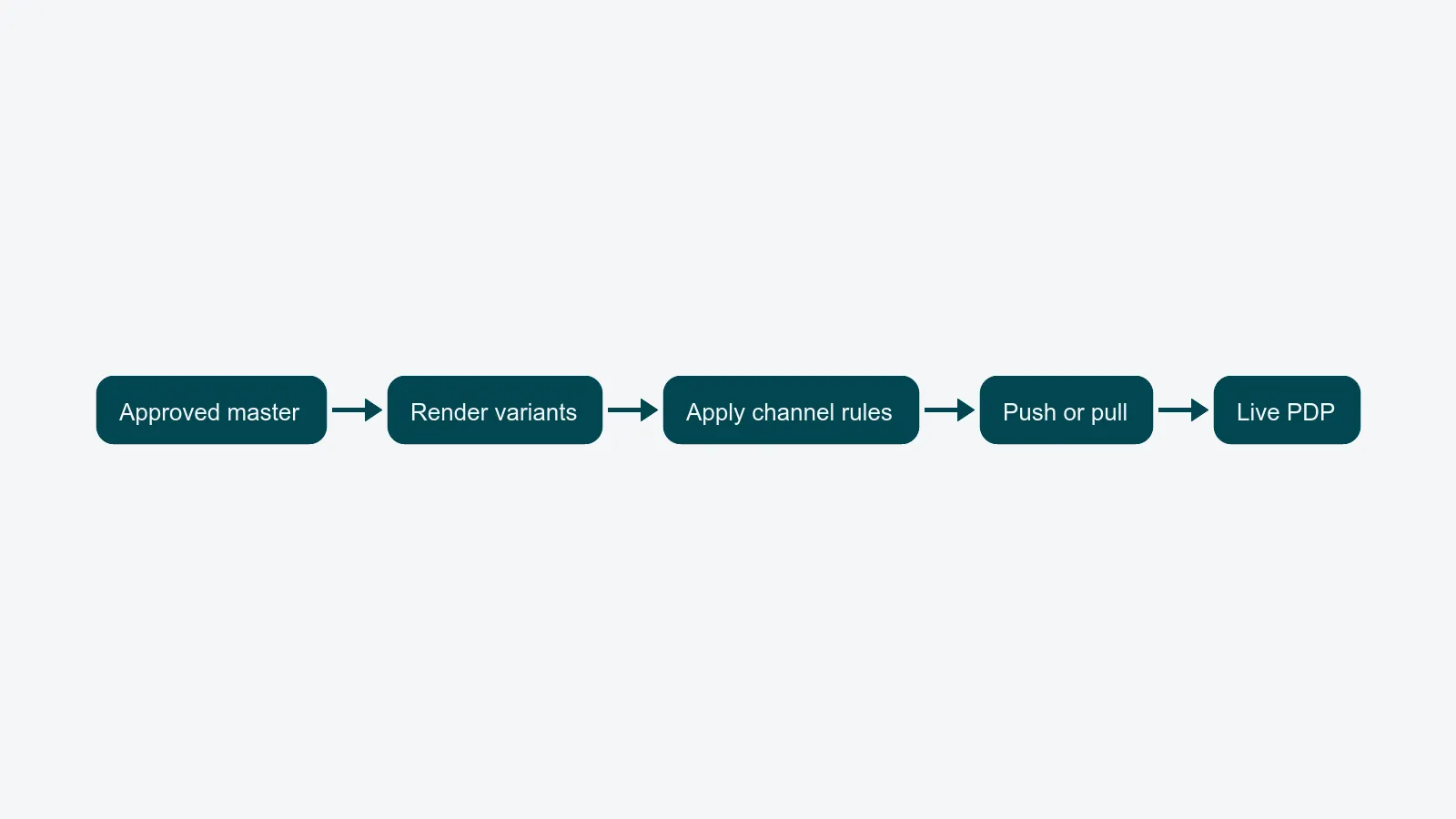
When a single approved master leaves QA, it has to become:
- The hero image at 2400×3000 for the brand site, sRGB, JPEG quality 85, named
<sku>_01.jpg. - A square 1200×1200 crop for the marketplace listing, sRGB, JPEG quality 80, named
<sku>-A.jpg. - A 1080×1350 portrait crop for the social ad library, with a small watermark in the corner.
- A 600×600 thumbnail for the internal PIM preview.
- An archive-quality 16-bit TIFF in Adobe RGB for the print catalog team.
Five outputs from one master. Five different channels with five different rules. Now multiply by 400 SKUs in a single drop.
If your studio is doing this by hand - opening Photoshop actions, running Lightroom export presets, dragging files into channel-named folders - you are not running distribution. You are running a copy-paste factory. And the error rate scales linearly with volume.
Channel-specific transformations
A real distribution layer codifies the rules per channel as data, not as tribal knowledge. The minimum specification for each destination:
- Size variants. Width, height, and crop strategy (center, smart, manual hotspot). Some channels need multiple variants from the same master.
- Format choice. JPEG for photographic content, PNG for transparent assets, WebP or AVIF for modern web channels, TIFF for print archives. Some marketplaces still mandate JPEG only.
- Color profile conversion. Master files are typically Adobe RGB or ProPhoto. Web channels need sRGB; print channels need CMYK or specific Adobe RGB. Get this wrong and your reds shift on the storefront.
- Compression and quality. Quality 85 is not a magic number - each channel has its own tolerance for file weight versus visual fidelity.
- Watermarks and overlays. Some PR or partner channels require a watermark. Internal preview thumbnails do not.
- Naming conventions.
<sku>_01.jpgis not the same asSKU-1.jpg. Channels reject uploads that fail their regex. - CDN paths and folder structure.
/products/<category>/<sku>/<variant>.jpgis a contract with the front-end team. Break it and PDPs render placeholders.
The point is not that any of these are hard individually. The point is that there are dozens of them, and the cost of getting any one wrong is a dead PDP or a rejected upload at 4pm on a Friday.
PIM-driven distribution: the SKU-to-channel matrix
Distribution is not a property of an asset. It is a property of a product on a channel. Whether SKU 12345 goes live on the brand site, the marketplace, the wholesale portal, or the partner B2B feed is a business rule that lives in your PIM, not in the studio.
The right model is a SKU-to-channel matrix:
| SKU | Brand site | Marketplace | Wholesale portal | Social |
|---|---|---|---|---|
| 12345 | yes | yes | yes | no |
| 12346 | yes | no | yes | yes |
| 12347-EU | yes (EU) | yes (EU) | no | no |
When the PIM owns this matrix, distribution becomes a query: "for SKU 12345, give me every channel that should receive this asset, in the format and naming each channel expects." The studio team never opens that spreadsheet. The platform reads from PIM, applies channel rules, and renders the correct output to the correct destination.
This is the single biggest unlock in the chain. If your team is still maintaining "which SKU goes where" in a shared sheet, you are guaranteed to either over-publish (sensitive SKUs leak to channels that should not have them) or under-publish (a marketplace listing has no image and the merchandiser blames the studio). For the deeper integration story, see connecting your studio to PIM and ERP.
Version pinning: stop republishing yesterday's image
Here is a failure mode every mature studio has lived through. An asset gets re-rendered for some unrelated reason - a metadata edit, a re-export, a migration - and the previous approved version, which was already replaced, gets pushed live again. The merchandiser sees an old packshot reappear on the PDP and the studio looks careless.
The fix is version pinning. Each channel stores a reference to a specific approved version of an asset, not "the latest." When the master is updated, the channel does not auto-republish. A human (or a workflow rule) explicitly decides whether the channel should move to the new version.
Practical rules:
- Every asset has an immutable version ID at QA approval.
- The PIM-to-channel binding stores that version ID.
- Re-renders, re-exports, and metadata edits never silently change what is live.
- Promotion to a new version is a deliberate action with an audit trail.
This is unglamorous infrastructure. It is also the difference between a studio that ships and a studio that has to apologize.
Push to channel vs. pull via API
Two architectural patterns dominate distribution, and they have different operational profiles.
Push to channel means the platform actively sends the rendered variant to the destination - SFTP upload, channel API POST, S3 sync. The channel is passive. Push is the right model when:
- The channel does not expose a useful pull API.
- You need to control timing precisely (e.g., a coordinated drop at 09:00 across markets).
- The channel demands a specific folder structure or filename it cannot derive itself.
Pull via API means the channel asks for the asset on demand by ID. The platform exposes a stable URL or endpoint. Pull is the right model when:
- The channel can store only a reference and fetch on render.
- Multiple channels need the same variant and you want to avoid duplication.
- The downstream system handles caching and CDN delivery itself.
Most real distribution stacks mix both. A modern brand site pulls; a legacy marketplace requires push; the social ad platform pulls some assets and accepts push for others. The platform's job is to support both cleanly without forcing the studio team to know which is which. The studio approves the asset; the rules engine decides the protocol per channel. The integrations layer is what makes that abstraction possible.
Distribution failure handling
Networks fail. Channel APIs throttle you. SFTP credentials expire. The marketplace decides that a perfectly valid JPEG is suddenly "non-compliant." Distribution that does not plan for failure is distribution that will silently rot.
The minimum failure-handling pattern:
- Retry with backoff. Transient network failures get three to five automatic retries with exponential delay before being escalated.
- Dead-letter queue. Items that fail after retries land in a visible failure list with the actual error message - not a generic "upload failed."
- Notifications. The studio manager and the channel owner get alerted, ideally with a one-click "retry from here" action.
- Quarantine on shape errors. If a channel rejects a file for size or format, the platform should never blindly retry - it should mark it as a configuration issue and surface it for review.
Without this, distribution failures show up as customer complaints. With this, they show up as a queue your operations lead clears every morning in fifteen minutes.
Reporting closes the loop
The last piece studios skip is reporting. Once a thousand variants leave the platform, where did they go? When? Did they actually appear on the PDP, or did the upload succeed but the channel never indexed it?
A distribution layer that takes itself seriously answers, for any asset:
- Which channels received this version.
- When each delivery completed.
- The live URL on each channel.
- Whether the channel confirmed indexing (where its API supports that).
- Time-to-live, from QA approval to first live render on the storefront.
That last metric - approval-to-live time - is the single number that tells a Studio Manager whether the distribution layer is working. Tracking it next to throughput and rework rate is how the studio's operational story stops ending at "we approved the asset" and starts ending at "the asset is on the storefront." For the broader production story, see the packshot workflow guide and the upstream workflow automation overview.
What good looks like
A studio with a working distribution layer can answer all of these without anyone opening a folder:
- For SKU 12345, what is currently live on each channel, and which approved version is each channel pinned to?
- How many assets approved yesterday are not yet live on at least one channel they should be on?
- Which channel had the highest delivery failure rate last week, and what was the failure reason?
- For the spring drop, how many SKUs are blocked from going live, and on which channels?
If your studio cannot answer those today, the gap is not creative output. The gap is the distribution layer between approval and storefront.
Where to go next
If you are scoping how distribution should look in your stack, the guide on choosing content operations software in 2026 covers what to evaluate. To see how distribution rides on top of integrations to PIM, ERP, and DAM, the integrations overview walks through the connector model.
PixelAdmin handles asset distribution e-commerce as a first-class part of the platform - PIM-driven, version-pinned, retry-aware, and reportable. If your last mile from approval to storefront is where the wheels come off, book a demo and we will walk through your channel matrix together.