

If you retouch product images for a living, you already know that image metadata in photography is what separates a usable archive from a digital landfill. The pixels are the easy part. The fields hanging off them - SKU, campaign, retoucher, license, version - decide whether anyone can actually find that hero shot in nine months when the buyer asks for it.
Most studios design their metadata schema by accident. A photographer types a few IPTC keywords during ingest. A retoucher invents a status flag. A producer adds a column to the project tracker. Six months later there are three half-built taxonomies, none of them complete, and the search bar in the DAM is the most expensive guessing game in the building.
This article is the schema, the governance, and the export hygiene I wish every studio had on day one.
The four layers every studio asset needs
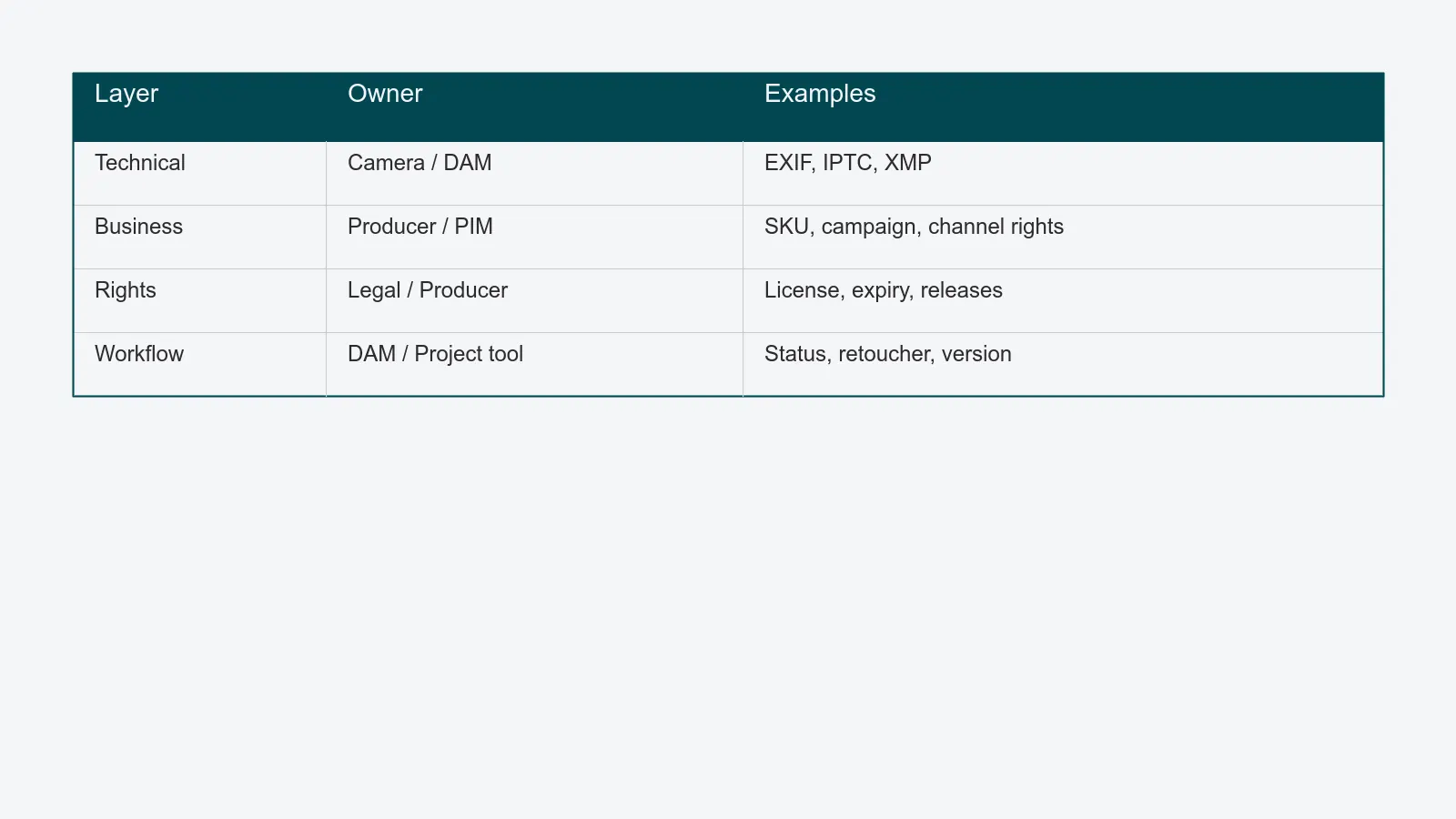
A complete metadata record for a product image is not a flat list of keywords. It is four overlapping layers, each with a different owner and a different lifecycle.
Technical metadata is what the camera and the editing software write automatically. EXIF carries the capture facts: camera body, lens, ISO, shutter, aperture, capture time, color space. IPTC and XMP carry editorial fields: headline, description, creator, copyright, keywords, location. Most of this writes itself if your tethered capture is configured correctly - but only if nobody strips it later.
Business metadata is what makes the asset commercially useful. SKU or style number, campaign code, season, line, channel rights (web, print, social, retail partner, internal only), launch date, region. None of this exists in the camera. It is added at ingest, sometimes by hand, increasingly by lookup against your PIM. This is the layer your buyers actually search on.
Rights metadata keeps the legal team out of your inbox. Model release reference, property release reference, license type, license expiry, restricted territories, exclusivity windows, third-party clearances. A missing expiry date here is the difference between "we shipped on time" and "we paid a settlement."
Workflow metadata describes the asset's state in your production line. Status (raw, in retouch, in QA, approved, published, archived), assigned retoucher, QA approver, version number, parent asset, derivation chain. Workflow metadata is the layer your DAM and your project tracker fight over - and the one that has to be the same number in both places, or nothing reconciles.
If any one of those four layers is weak, the others rot. Strong technical fields with no rights tracking still ship expired models. Strong workflow fields with no business fields still mean nobody can find the asset by SKU. The schema has to cover all four, even if you start small.
Embedded vs sidecar: where the fields actually live
Metadata can live in two places: inside the file itself, or in a sidecar (an .xmp file next to the image, or a row in your DAM's database). Both are legitimate. Studios get into trouble when they pretend the choice does not matter.
Embedded metadata travels with the file. Hand a TIFF to an external retoucher, and the IPTC headline, the creator, the copyright notice, and any XMP custom fields go with it. The downside is that not every format carries every field reliably - JPEG and TIFF are good citizens, PSD is selective, raw formats vary by camera.
Sidecar metadata stays in the system that wrote it. Your DAM is the canonical source. The advantages are obvious: rich relational fields, multi-value attributes, audit trails, validation against a controlled vocabulary. The downside is equally obvious: the moment a file leaves the DAM, the sidecar does not follow it.
The practical answer is both, with a hierarchy. The DAM is the source of truth. On export, the DAM writes a defined subset of fields back into the file's IPTC and XMP blocks, so downstream consumers - the PIM, the e-commerce platform, an external retoucher, a syndication partner - see the same canonical values. Re-ingest from those downstream systems re-reads the embedded fields and reconciles them against the DAM. Anything in the DAM that did not survive the round trip is a flag, not silent data loss.
Governing the taxonomy: controlled vocabularies vs free tags
A taxonomy is just a list of allowed values for a field. "Garment type" can be free text - in which case half your archive will be tagged "jacket," a third "Jacket," and a stubborn minority "jakke" - or it can be a controlled vocabulary, where the field accepts only entries from a curated list.
Controlled vocabularies are non-negotiable for any field a buyer searches on. Garment type, color, season, channel, status. The list of allowed values is short, owned by one person, and versioned. When you add a value, you add it on purpose. When you retire a value, you write a migration that updates every existing asset.
Free-tagging has its place - it is fast, it captures the long tail, and it surfaces concepts the controlled vocabulary missed. The right pattern is a hybrid: free-tag at ingest, then promote any free tag that recurs above a threshold into the controlled vocabulary on a quarterly review. Free tags that stay long-tail stay informal.
Taxonomy versioning is the part most studios skip. The taxonomy you defined in 2023 is not the taxonomy you will ship in 2027. New product lines, new channels, new compliance requirements - all of them change the field list. Every taxonomy change needs a version number, an effective date, and a migration plan for assets tagged under the old version. Without versioning, "find every asset tagged 'sustainable' before we tightened the definition" is unanswerable.
The same governance discipline applies to auto-tagging product images: an AI model that writes into your taxonomy needs the same review, the same audit trail, and the same retirement plan as any human contributor. A tag is a tag, regardless of who wrote it.
Automated tagging, with a retoucher in the loop
Manual tagging at scale is unaffordable. Pure auto-tagging is unaccountable. The pipeline that actually works is automation with a retoucher gate.
The vision and language models running in PixelAdmin's AI module propose tags with a confidence score against your taxonomy. Above a confidence threshold (typical setting: 0.9 for color, 0.85 for garment type, 0.7 for material), the tag writes through to the asset record. Below it, the tag goes to a queue the retoucher already sees during their normal QA pass. The retoucher confirms, edits, or rejects. Every decision is logged against the asset.
The result is two-sided: most assets are tagged in seconds with no human touch, and the assets that need judgment get judgment from the person already looking at the pixels. The audit trail is complete, the taxonomy stays clean, and the retoucher is not buried in busywork.
For studios still deciding whether they need this layer at all, the prerequisite reading is what is a DAM - auto-tagging without a real DAM underneath is a tagging engine writing into a void.
Metadata persistence across the export pipeline
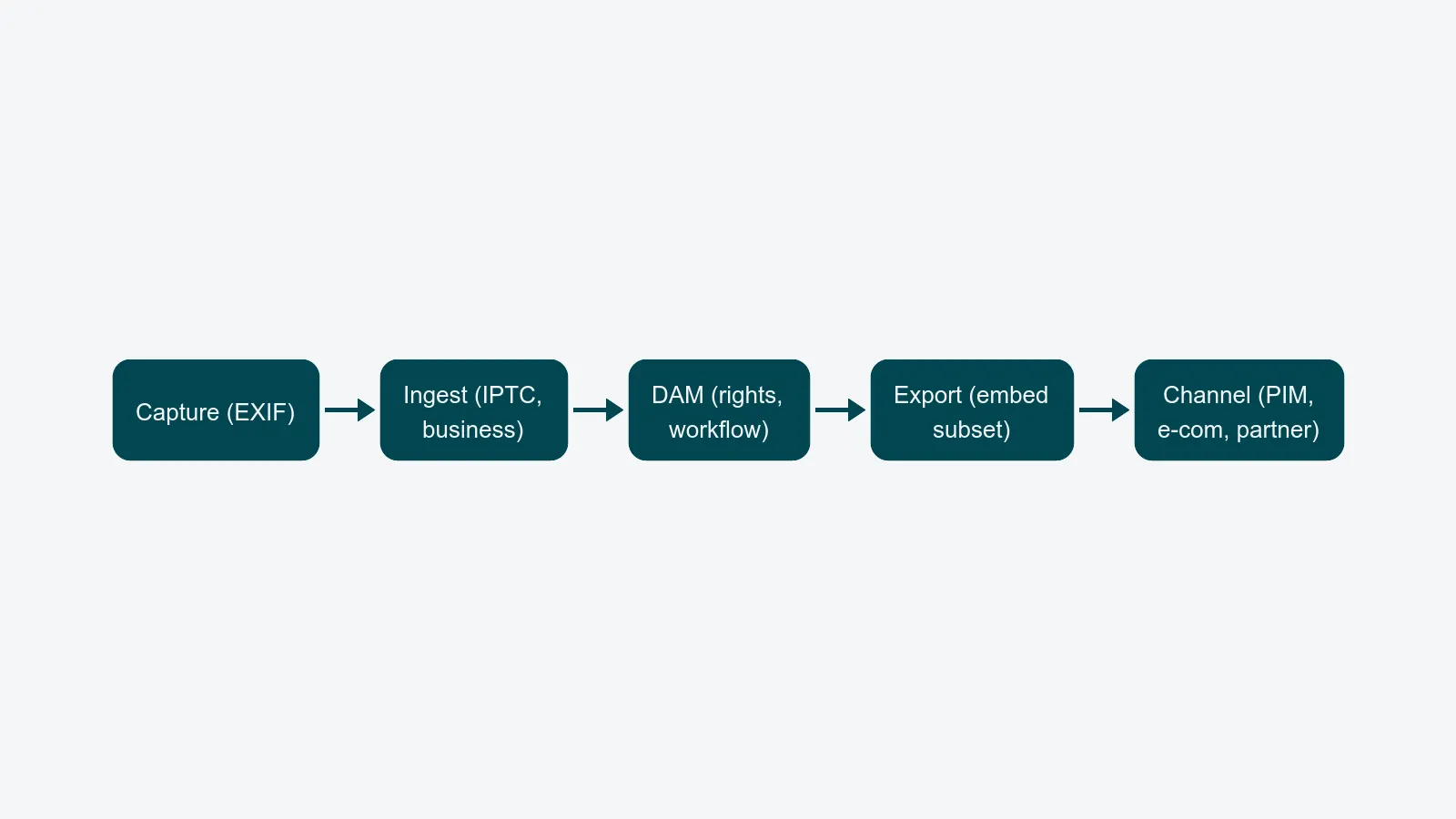
The most common metadata failure is not bad input - it is silent stripping on output. Your DAM holds a perfect record. The image ships to a partner. The metadata is gone.
Three things strip metadata, in roughly this order of frequency.
Image optimization tools. Most CDN pipelines, image resizers, and "save for web" presets remove EXIF, IPTC, and XMP by default to shave file size. The fix is a pass-through profile: a defined list of fields the optimizer is required to preserve, even at the cost of a few extra kilobytes. Copyright, creator, and rights expiry should never be optional.
Format conversions. Going from TIFF to JPEG, from PSD to TIFF, or from raw to anything will lose fields silently if the export tool does not map them. Define the export profile in the DAM, not in the export tool - that way the same fields ship every time, regardless of which retoucher hits the button.
Channel delivery handoffs. Your e-commerce platform, your PIM, and your social scheduler each have their own metadata model. Some accept IPTC. Some only accept fields you push via API. Some quietly drop everything that is not in their own schema. The right pattern is an integration profile per channel: which DAM fields map to which channel fields, what gets embedded in the file, and what travels alongside as API metadata.
If you cannot answer "which of my fields survive each export path" in a paragraph, you do not have a metadata strategy - you have a hope.
A short checklist before you commit a schema
- Cover all four layers - technical, business, rights, workflow - even if some start small.
- Pick the controlled vocabularies before you pick the tools. Tools enforce schema; they do not invent it.
- Decide which fields embed and which stay sidecar, and write the rule down.
- Version the taxonomy from day one. Every change gets a number and a migration.
- Audit one full export path per quarter and confirm the metadata survives.
Metadata is the cheapest part of your operation to design well and the most expensive to fix in retrospect. Get the schema right, govern the taxonomy honestly, and treat every export pipeline as a place metadata can die - and your archive starts compounding instead of decaying.
If you want to see a working version of this on real studio assets, book a metadata review and we will walk through your current schema, your auto-tagging accuracy, and the export paths that are quietly stripping fields today.