

Most studios pick a naming convention on a Tuesday afternoon, write it on a wiki page, and move on. It works for the first ten thousand assets. Then a buyer adds a colour, the retoucher saves a quick _v2-final-FINAL, somebody uploads Front.tif next to front.TIF, and the storefront starts 404-ing on a hero shot the day before launch.
Past 100,000 assets, an ad-hoc naming pattern is not a small annoyance. It is an operational liability that breaks PIM joins, S3 listings, and the next migration. This article is the convention we recommend to the studios we audit - what fields belong in a filename, what order they go in, and how to roll out a rename without taking down the storefront.
TL;DR
- An ad-hoc pattern survives to roughly 10,000–20,000 assets. After that, collisions, sort drift, and case-sensitivity bugs compound.
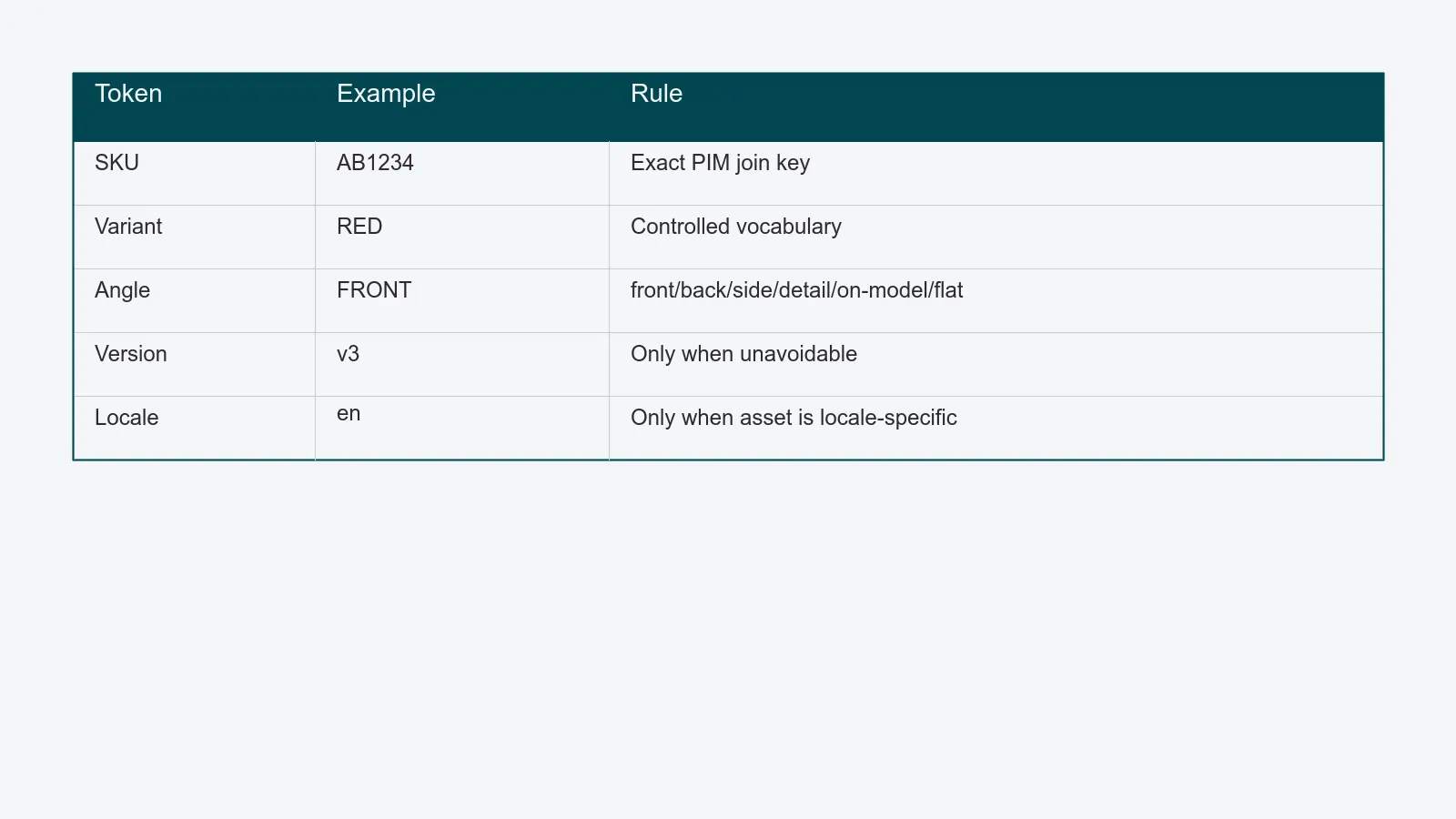
- A durable product image naming convention carries five fields: SKU, variant, angle, version, locale. A size token is sometimes added for legacy systems that key on the filename.
- Token order matters. Sort left-to-right by the field most likely to group assets correctly in a flat listing.
- Hyphens beat underscores beat dots. Stay lowercase, ASCII, URL-safe. Cap practical length at 100 characters even though filesystems allow more.
- Versioning belongs in the DAM, not the filename, except in two narrow cases.
- Renames are forever. Ship them with redirect maps and PIM joins updated in the same release.
Why ad-hoc naming dies past 100k assets
Four failure modes show up at almost the same volume, and they compound.
Collisions. Two photographers shoot the same SKU on different days and both save AB1234.tif. The second write either silently overwrites the first or fails - depending on the storage. Either outcome is a bad day.
Sort order. A flat S3 listing of 100,000 keys is sorted lexicographically. If the version token is on the left (v3-AB1234-RED-FRONT.tif), every version of every asset clusters together and the listing is unusable for spot-checks. SKU on the left fixes this.
Search and joins. PIMs and ERPs join on substrings of filenames. Studios that put the SKU in position 3 instead of position 1 burn engineering time on regex-based joins for years.
Case and Unicode. Windows is case-insensitive. Linux and most object stores are case-sensitive. URLs are case-sensitive. A studio that mixes Front, FRONT, and front will eventually serve a 404 on production.
The Library of Congress's Digital Preservation file-naming guidance frames the same problem more soberly: filenames have to be human-readable, machine-parseable, and stable across system migrations. NIST's research-data file-organization guidance lands in the same place. Neither was written for e-commerce, but both apply.
The five fields that always belong
A filename should answer five questions in five tokens. Anything else belongs in metadata, not the filename.
- SKU - the product identifier the PIM owns. This is the join key. It must match exactly.
- Variant - colour, material, or size variant when the SKU does not already encode it. For apparel, this is usually colour.
- Angle - front, back, side, detail, on-model, flat-lay. Use a controlled vocabulary, not free text.
- Version - only when filename versioning is unavoidable (see below). Otherwise omit.
- Locale - only when the asset itself is locale-specific (a label change for a market, an on-pack regulatory variant). Most assets do not need this.
A size token (-1024, -thumb, -2048x2048) is sometimes added when a downstream system cannot ask the DAM for renditions and reads the filename instead. Treat this as a legacy concession, not part of the master filename.
Token order, separators, and case
Order tokens left-to-right by the field most likely to give you the right grouping in a flat listing. For most studios, that order is:
<SKU>-<VARIANT>-<ANGLE>-<VERSION>.<ext>
Three rules cover the rest:
- Hyphens between tokens, never underscores or dots. Hyphens survive URL encoding cleanly, render as readable in shells, and double-click-select as a single word in most text editors. Underscores work but interact badly with Markdown italics in documentation. Dots inside the stem confuse libraries that strip everything after the first dot when computing extensions.
- Lowercase ASCII only. No uppercase, no accents, no spaces, no punctuation other than hyphens. This sounds restrictive until you have served a 404 on a URL that worked locally.
- Length budget. The POSIX filesystem limit is 255 bytes for a filename. S3 keys can be up to 1,024 bytes. URLs are practically capped at around 2,000 characters by browsers. None of this is the real constraint. The real constraint is that humans cannot read a 180-character filename. Cap the stem at 100 characters and you have headroom for everything.
AB1234-RED-FRONT-v3.tif is 22 characters. There is no reason to go longer.
Versioning in the filename versus the DAM
The most common naming-convention disaster is filename versioning. _v2, _FINAL, _FINAL_v2, _use-this-one. Every studio has lived through it.
The default rule is simple: versioning belongs in the DAM, not the filename. A DAM that treats versions as a first-class concept lets the same logical asset have ten revisions, the latest one being served everywhere by default, with the full history available for audit. The filename does not change between revisions. Storefront URLs do not break.
There are exactly two cases where filename versioning is acceptable:
- The asset is leaving the DAM. When a finished asset is exported to a partner who does not use a DAM (a print bureau, a marketplace that ingests by FTP), embedding a version in the filename gives the recipient a stable reference. Use a short token:
-v3, not-version-three-final. - The downstream system rejects in-place updates. Some PIMs cache aggressively on the filename. If you cannot invalidate the cache, you must rename to invalidate. This is a workaround, not a pattern. Push the vendor to fix it.
Outside those two cases, version in the DAM. For a deeper treatment of how to structure that, see the asset versioning policy guide.
Concrete examples by category
Three categories cover most of what a packshot studio shoots. The token spec adapts to each.
Apparel and accessories. Variant is colour. Angle vocabulary is front, back, side, detail, on-model, flat.
AB1234-RED-FRONT-v3.tif
AB1234-RED-ON-MODEL.tif
AB1234-NAVY-FLAT.tif
Cosmetics. Variant is shade or size. Angle vocabulary is front, back, lifestyle, swatch, texture.
LIP-2208-ROSE-FRONT.tif
LIP-2208-ROSE-SWATCH.tif
SER-501-30ML-BACK.tif
Footwear. Variant is colour and sometimes width. Angle vocabulary adds pair, sole, three-quarter.
SH-9912-BLACK-PAIR.tif
SH-9912-BLACK-SOLE.tif
SH-9912-BLACK-THREE-QUARTER.tif
Notice what is not in any of these names: photographer initials, shoot dates, retoucher, season, channel. Those belong in structured metadata, where they can be queried, filtered, and changed without renaming a single file.
Migrating from the existing chaos
Most studios cannot start fresh - they have a history. A migration runs in three phases, the same way the move from a shared drive to a DAM does.
Phase 1 - freeze and forward. From day one, every new asset uses the new convention. Old assets stay where they are. This stops the bleeding immediately.
Phase 2 - rename the active set. The last 6–12 months of regularly-retrieved assets get renamed to the new convention. This is where care is needed. Ship the rename together with:
- A redirect map for every public URL that referenced the old filename.
- A PIM update that swaps old filenames for new ones in the same release window.
- A storefront cache purge so visitors do not see cached 404s.
- A read-only fallback at the old name for a defined window - usually 90 days - so partners on stale links have time to update.
Phase 3 - historic backfill. The archive is renamed in chunks tied to specific projects. A reshoot for the spring catalogue is a natural moment to rename last year's spring assets, not a separate workstream.
The single biggest mistake is treating Phase 2 as a filename change instead of a release. Renames are forever. They are infrastructure work, not housekeeping.
What good looks like - a five-question check
Before you commit a naming convention to the wiki and the studio manager's onboarding doc, run it through these:
- Does the leftmost token group the listing the way the team needs to scan it?
- Is every token from a controlled vocabulary, not free text?
- Does the convention round-trip through a URL, an Excel cell, and a Bash shell without escaping?
- Is the total stem under 100 characters for a realistic worst case?
- If a partner system goes away tomorrow, can the PIM and ERP integration still join on the SKU token alone?
If any answer is uncomfortable, the convention is not ready. Fix it before the next 10,000 assets, not after the next 100,000.
If you want a second pair of eyes on the convention you have today - including how it would survive a migration into PixelAdmin - we will do a 45-minute review against your current filenames, PIM joins, and storefront URLs.