
The path a RAW file travels from the back of a camera to a searchable record in your DAM is short on a whiteboard and long in production. Five stages, half a dozen tools, three kinds of failure, and a place - almost always one specific place - where every studio quietly loses time. This article is a working blueprint for that path: what each stage does, how to wire it with real tools, and where to put the seams so the pipeline survives a Tuesday with three photographers shooting at once.
We've audited enough studios to know the bottleneck is rarely capture. It's everything between capture and commit.
TL;DR
- A working raw to dam ingest pipeline has five stages: capture, ingest, sidecar propagation, derivative generation, and atomic commit.
- Most studios get stages 1 and 2 right and lose the rest to manual handoffs - XMP sidecars get stripped, derivatives get rebuilt twice, and naming collisions turn into 30-minute Slack threads.
- The right boundary between built (rsync + ImageMagick + a queue) and bought (a managed content-ops platform) sits at roughly 3–5 photographers or 2,000+ files per shoot day.
- The two metrics that predict pipeline pain are intake-to-proxy lag and per-shoot error rate. If you don't measure them, you can't fix them.
Stage 1 - capture: the tether destination is a design choice
The pipeline starts where the camera writes its first byte. Capture One and Phase One Capture write tethered files to a session folder; that folder is your tether destination, and where you put it decides almost everything that comes after.
Three options, three trade-offs:
- Local SSD on the capture workstation. Fastest write, lowest latency for the photographer's preview, zero network risk. Files are stranded on one machine until ingest moves them. Use this for high-frame-rate sessions and any shoot where dropped frames matter.
- Network share (SMB/NFS). Slightly higher write latency, but every workstation, retoucher, and ingest agent sees the file the moment it lands. Works well for one studio room with a fast switch and a NAS that can keep up with
RAW + JPEGwrites. - Cloud hot folder (Dropbox, OneDrive, Capture One Live, or a managed shoot-to-cloud destination). Highest latency, highest resilience, lets a remote retoucher start working while the shoot is still on. The trade-off is bandwidth and the nondeterminism of consumer sync clients - not what you want as the only copy of a paid shoot.
Pick one as the system of record for capture. The others are convenience copies. A pipeline with two systems of record will eventually disagree.
Naming tokens are part of the pipeline
Capture One's session naming dialog supports tokens like {Job Name}_{SKU}_{Image Counter (5)}_{Date Year}{Date Month}{Date Day}. Set them once per job from the brief - never let the photographer type a filename by hand mid-shoot. Photo Mechanic users can set the same convention via Edit → Preferences → File Naming with {job}_{sku}_{seq5}.
The naming convention is a contract between stages 1 and 2. Break it on the camera side and every downstream stage has to guess.
Stage 2 - ingest: watch folder, checksum, working set
Ingest is the stage that promotes a file from "exists on a tether destination" to "lives in the pipeline's working set." Two non-negotiables:
- A watch process picks up new files automatically. A photographer should never have to drag-and-drop. Capture One's built-in Hot Folder (set under File → Hot Folder),
inotifywaiton Linux, orFileSystemWatcheron Windows all do the job; what matters is that no human step gates the pipeline. - Every file is checksummed before the source is touched. Compute a SHA-256 of the source RAW, copy to the working set with
rsync -a --checksum --partial --inplace, then SHA-256 the destination. Match or fail loud.
A minimal Linux ingest watcher looks like this in production:
inotifywait -m -e close_write --format '%w%f' /tether/inbox |
  while read -r src; do
    sha_src=$(sha256sum "$src" | awk '{print $1}')
    rsync -a --checksum --partial --inplace "$src" /working/$(date +%Y/%m/%d)/
    sha_dst=$(sha256sum "/working/$(date +%Y/%m/%d)/$(basename "$src")" | awk '{print $1}')
    [ "$sha_src" = "$sha_dst" ] && echo "OK $src" || echo "FAIL $src" >&2
  done
The --partial --inplace flags matter. They handle the case where the camera is still flushing the RAW and the watcher fires too early - rsync resumes rather than corrupting. The close_write event (instead of create) means the file is fully written before we touch it.
This is also the right stage to assign the canonical asset ID - a UUID (or a deterministic hash of job + sku + capture-time + counter) that every later stage carries. The original filename is now metadata, not identity.
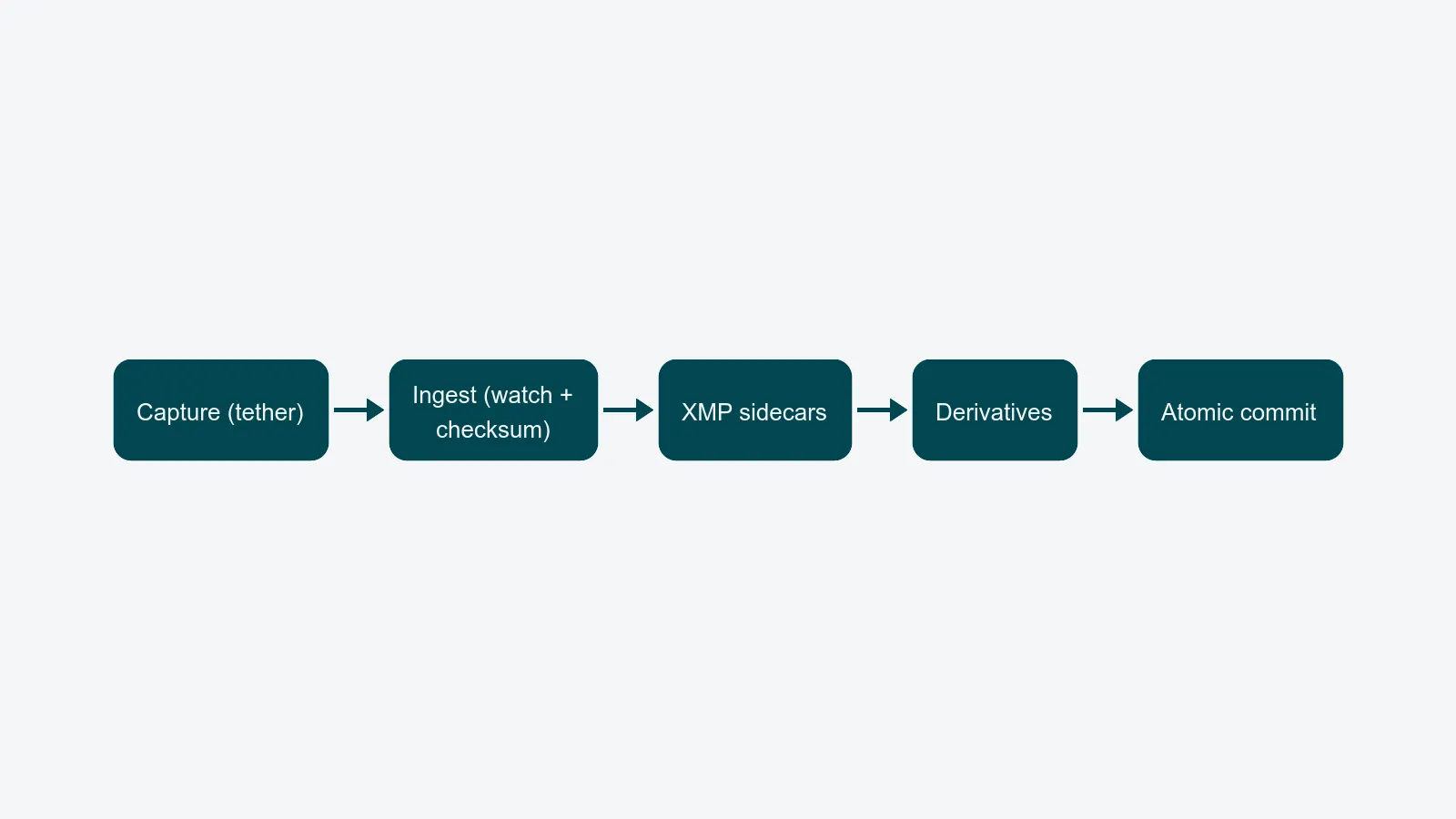
Stage 3 - sidecar XMP propagation
Every RAW file in a serious pipeline travels with an XMP sidecar. Keywords, copyright, color label, IPTC Title, IPTC Description, the photographer's Creator field, the model release reference - all of it lives in <filename>.xmp next to the RAW, and all of it must travel with the file through every later stage.
The two failure modes here are equally common and equally avoidable: tools that strip XMP, and tools that overwrite XMP with stale values. The fix is to make exiftool the single writer of metadata, and to call it explicitly at every transition:
# Stamp ingest-time metadata onto the sidecar without touching the RAW
exiftool -overwrite_original \
  -XMP-photoshop:Source="job-${JOB_ID}" \
  -XMP-dc:Rights="© ${STUDIO_NAME} ${YEAR}" \
  -XMP-xmpRights:WebStatement="https://${STUDIO_DOMAIN}/rights" \
  -IPTC:Source="${SKU}" \
  -ext xmp /working/${YYYY}/${MM}/${DD}/
For high-volume tagging at ingest, Photo Mechanic is still the fastest tool a human can drive - its variables panel writes XMP at 200+ files a minute once the photographer has set the ingest profile. A studio shooting 800 packshots a day will pay for the licence in the first week.
For derived signing of provenance - e.g. embedding an invisible-watermark token so a leaked image can be traced back to the campaign - Imatag writes a robust token at ingest that survives JPEG re-encoding and crops. Treat it as one more sidecar stage: write once, never again.
The golden rule: the RAW is read-only after capture. All metadata goes into the sidecar. Tools that want to mutate the RAW (some converters do) get sandboxed.
Stage 4 - derivative generation
The DAM doesn't serve RAW files to retouchers, retailers, or web. It serves derivatives. The pipeline stage that builds them is recipe-driven: a small set of named outputs, each with locked-in parameters, generated once per source.
A typical recipe set for a packshot studio:
- Master TIFF - 16-bit, ProPhoto or Adobe RGB, no compression. The retoucher's input.
- Web JPG - sRGB, quality 85, longest edge 2000 px, stripped of camera EXIF but keeping IPTC + copyright.
- Archive DNG - Adobe DNG with embedded original RAW, lossless compression. The long-term archive copy.
- Thumbnails - 256, 512, and 1024 px square, sRGB, used by the DAM grid and search results.
ImageMagick handles the JPG and thumbnail tier well, scripted against a queue:
magick "$src.tif" \
  -profile /icc/sRGB.icc -strip \
  -resize 2000x2000\> -quality 85 \
  -sampling-factor 4:2:0 -interlace JPEG \
  "$out/web.jpg"

magick "$src.tif" \
  -profile /icc/sRGB.icc -strip \
  -resize 512x512^ -gravity center -extent 512x512 \
  "$out/thumb-512.jpg"
The -strip removes camera-noise EXIF; the -profile ensures color-managed output. For DNG, Adobe's command-line DNG Converter (Adobe DNG Converter.exe -c -p2 -dng1.5) is still the reference implementation - there is no good open-source alternative and the format matters enough to use it.
Generate derivatives once, then never again from the source. Re-rendering on demand looks elegant in a slide deck and costs you the next shoot's compute window in production.
Stage 5 - atomic commit to DAM
This is the stage every team underestimates. The commit step takes the source RAW, the XMP sidecar, the derivatives, and the asset ID, and writes them to the DAM as a single transaction. Either the whole asset lands and is searchable, or none of it does.
Two patterns work; one doesn't.
Works - staging area + manifest. Build the asset bundle in a staging directory. Write a manifest file last (manifest.json listing every file's path and SHA-256). The DAM's commit endpoint reads the manifest, validates every checksum, and only then promotes the bundle into the searchable index. If anything fails, the staging area is deleted and the source remains in the working set for retry.
Works - write-then-flag. Write all bundle files into the DAM's storage with a committed=false flag. Run validation. Flip the flag in a single transactional update. The DAM's search index ignores committed=false rows; readers only see complete assets.
Doesn't work - sequential writes with no rollback. "We'll just write the JPG, then the TIFF, then the metadata." Half-committed assets are the single most common cause of "the image is in the DAM but the keywords aren't" support tickets. A pipeline without rollback isn't a pipeline; it's a sequence of optimistic copies.
Failure handling: the four classes that bite
Every studio's pipeline meets the same four failures eventually. Treat them as first-class events:
- Corrupt RAW. Camera buffers fail. SD cards fail. Detect at stage 2 (the source-vs-destination checksum mismatch is your tripwire) and quarantine the file in
/working/quarantine/with a JSON record of the photographer, camera body, and capture time. Don't pretend it didn't happen. - Partial uploads from cloud hot folders. Sync clients write
.tmpfiles and rename. Make the watch process ignore filenames matching*.tmpand*.~lock*- and only act onclose_writeevents. - Naming collisions. Two photographers in two rooms hit the same counter. Resolve at the asset-ID layer (the UUID makes filenames decorative) and surface the collision in the operator log so the naming token gets fixed for the next shoot.
- Expired tokens. Cloud destinations and the DAM's commit API both use auth tokens that expire on a schedule somebody has forgotten. The pipeline should refresh tokens proactively and fail loudly when refresh fails - not retry silently for six hours.
Concurrency: lock-free hot folders
Three photographers shoot at once. Two ingest workers process the queue. The pipeline must not lose, duplicate, or reorder files.
The pattern is claim-then-process:
- Each ingest worker watches the hot folder and, on a new file, atomically moves it from
inbox/toclaimed/<worker-id>/usingrename(2)(orMove-Itemon Windows).renamewithin the same filesystem is atomic - exactly one worker wins. - The losing workers see ENOENT and return to watching.
- The winner processes the file end-to-end and, on success, removes it from
claimed/. On failure, a watchdog moves staleclaimed/files older than 10 minutes back toinbox/.
This pattern is lock-free, replicates across hosts (as long as they share a filesystem), and handles ingest-worker crashes without ops intervention. It is also exactly what every well-designed managed ingest service does under the hood.
Build vs. buy: the honest threshold
The build-it case (rsync + ImageMagick + a queue + a small commit service) is real and works for studios up to a point. The point is roughly:
- Up to 2 photographers and fewer than 500 files per shoot day, build it. The pipeline is a weekend of bash and a cron job, and the studio manager will keep it in their head.
- 3–5 photographers or 500–2,000 files per day, the build-it pipeline starts to need its own caretaker. This is where studios either hire a dedicated engineer or buy a managed content-ops platform.
- 5+ photographers or 2,000+ files per day, build-it stops being economical. The pipeline is no longer a side project - it is a system with uptime, observability, and on-call expectations.
A managed pipeline replaces all five stages with one configured workflow, ships with the lock-free hot folder pattern, and removes the part where you run your own checksum validator. That isn't a feature comparison; it is a question of what your team is paid to do.
Observability: where the bottleneck actually lives
The pipeline is only as good as its instrumentation. Three metrics tell you everything:
- Intake rate - files per minute crossing stage 2. Should match the shoot's pace; a falling rate during an active shoot means the watcher is starved or the network share is saturated.
- Lag - wall-clock from
close_writeat stage 1 to commit at stage 5. Studios that haven't measured this are usually surprised it's not 30 seconds. It's frequently 8–20 minutes, and most of it lives in stage 4. - Error rate - failures per 1,000 ingests, broken down by class. A healthy pipeline runs at well under 0.5%; anything above 2% means a class of failure is being normalised.
When we audit ingest pipelines, the bottleneck is stage 4 more often than any other - derivative generation queued behind a single-threaded ImageMagick process on a workstation that's also running Lightroom. The fix is almost always the same: move derivatives to a dedicated worker pool and stop generating them on capture machines.
What good looks like
Before signing off on an ingest pipeline - built or bought - confirm:
- Tether destination is documented and there is exactly one system of record per shoot.
- Naming tokens are set on the capture app, not typed by a human.
- Every file is checksummed source-to-working before the source is touched.
- XMP sidecars travel with every file at every stage, written only by
exiftool. - Derivatives are recipe-driven, generated once, with
--stripand color profile baked in. - Commit is atomic - staging + manifest, or write-then-flag - with rollback on failure.
- Concurrency is lock-free at the filesystem layer, not lock-based at an application layer.
- Intake rate, lag, and error rate are measured and visible to the studio manager.
If any of those is shaky, that is your bottleneck - not the camera, not the network, not the retoucher.
Where to go next
If you're sketching the pipeline for the first time, the DAM vs. shared drive piece is where most studios start; it sets the architectural framing this article assumes. If you're past commit and need to push the resulting assets to a PIM, e-commerce, and partner channels, from shoot to storefront covers the next link in the chain, with the distribution module and integrations doing the heavy lifting.
PixelAdmin runs the full pipeline - capture-side hot folders, sidecar-aware ingest, recipe-driven derivatives, atomic commit to the DAM, and the observability the studio manager needs to know it's healthy. If you'd rather not build all of that yourself, book an ingest review and we'll trace your current pipeline stage by stage with you.