

A studio's turnaround time is not decided at the camera or at the retouching desk. It is decided in the gaps between them - the moments when a job changes hands. A sample arrives but the photographer does not know it is on the shelf. A retoucher finishes a packshot but forgets to attach the master file in the email. A QA reviewer signs off, but the distribution team only sees it the next morning. Each gap looks like five lost minutes. Together, they are most of your lead time.
This is a studio handoff workflow playbook. It covers the five hand-offs that move a job from sample receipt to channel delivery, why each one fails when it lives in email, and what each should look like inside a structured system - with status transitions, deep links, version pins, and an audit trail you can actually defend.
The five hand-offs that decide your turnaround time
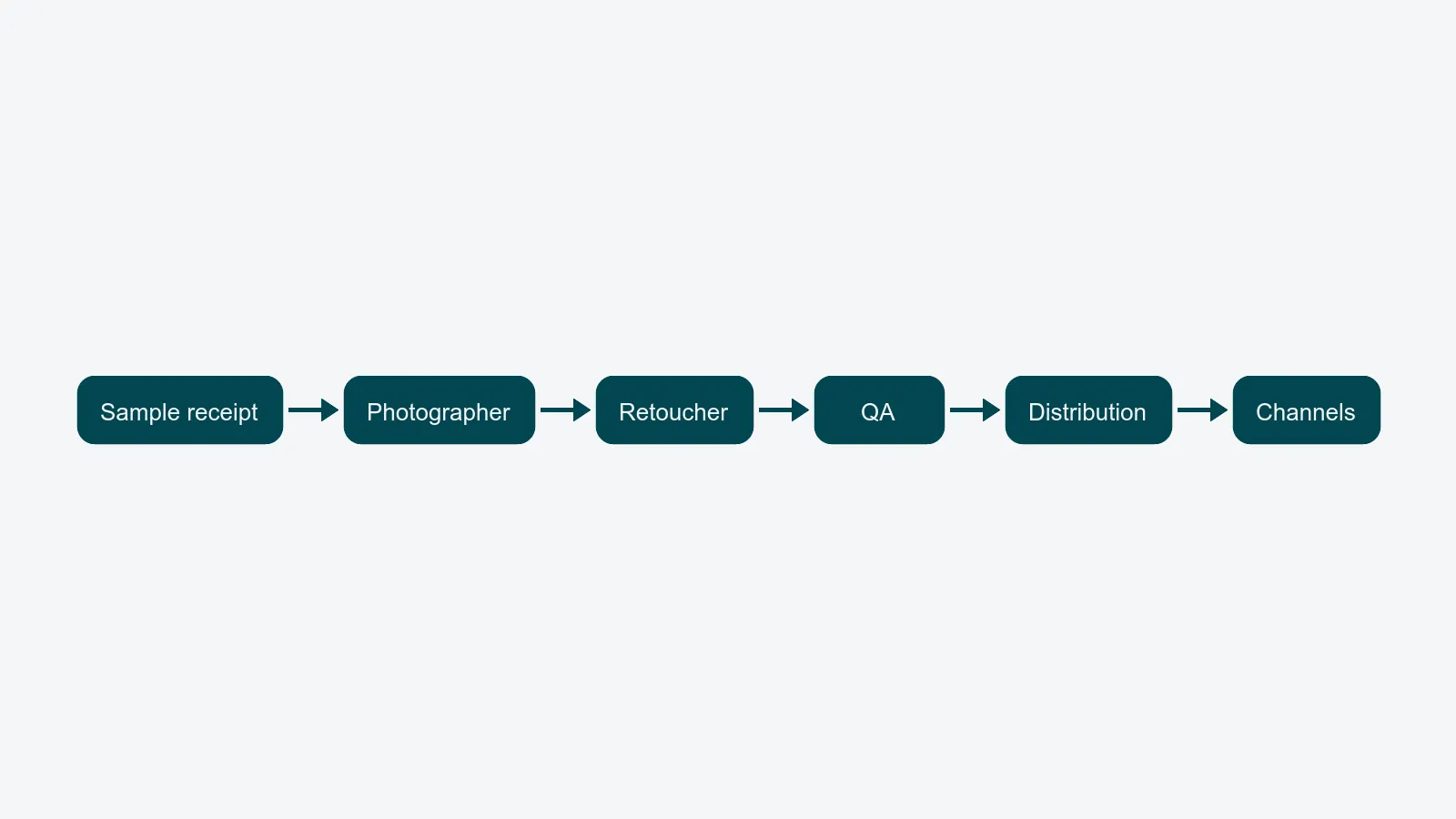
Every studio runs the same five transitions, regardless of category - whether you shoot for external clients or feed your own brand's webshop. The labels differ, the failure modes do not.
- Sample receipt → photographer. A box arrives at goods-in. Someone needs to know what is inside, which job it belongs to, and when it is due in front of the camera.
- Photographer → retoucher. The shoot is done. RAW files, selects, shot list annotations, styling notes, and reference images need to land in front of the right retoucher with enough context to start.
- Retoucher → QA. The packshot is finished. It needs to enter the review queue with the correct version pinned, the brief attached, and the right reviewer assigned.
- QA → distribution. The asset is approved. It needs to be released to the distribution layer with the correct metadata, file derivatives, and rights state.
- Distribution → channel teams. Final assets need to reach the e-commerce, marketplace, retail, and marketing teams who actually publish them - with versioning, naming, and rights that match each channel's requirements.
Drop any one of these into email and you inherit four predictable failures: lost context, no SLA, hidden status, and missing assets. The rest of this article walks each hand-off, names the failure, and describes the structured equivalent.
Why email fails every hand-off (the same way, every time)
The pattern repeats across all five transitions. It is worth naming because it is what a structured system has to replace.
- Lost context. The next person in line gets a subject line and an attachment, not the brief, the shot list, the prior comments, and the rights state. They reconstruct what they need from memory or from a Slack scroll.
- No SLA. An email lands in an inbox. There is no clock, no escalation path, no visibility for the producer who needs to know it has been sitting there for 18 hours.
- Hidden status. Outside the two people on the thread, nobody knows where the job is. The producer pings each role in turn at standup. The studio's status meeting exists because email hides status.
- Missing assets. The retoucher attaches the wrong version of the layered file. The distribution team gets the JPG but not the TIFF master. The reviewer is looking at a thumbnail in a mail client, not the asset itself.
The fix is not "use email better." It is to move every hand-off onto an asset record that owns its own status, links, versions, and history.
What each hand-off looks like in a structured system
A structured studio handoff workflow is built from four primitives, applied at each transition.
Status field transitions. Each job and each asset has an explicit status - sample_received, ready_to_shoot, captured, in_retouch, ready_for_qa, approved, delivered. A hand-off is a status change, not a message. The change itself is the event the rest of the system reacts to.
Automatic notifications with deep links. When status changes, the next role gets a notification that links straight to the asset record, not to a generic dashboard. One click and the retoucher is looking at the brief, the references, the RAW selects, and the open comments - not searching for them.
Attached assets with version pins. The hand-off carries the files with it, pinned to a version. "Approved version" is a specific revision, not "the latest one in the folder." The QA reviewer signs off on v4, distribution receives v4, the channel team publishes v4. If v5 lands later, it does not silently replace what was approved.
Audit trail for legal and governance. Every status change is timestamped, attributed, and immutable. When a client - or, for an in-house team, a brand stakeholder - asks "who approved this on the 14th?" or legal asks "did we publish this image after the model release expired?", the answer is one query, not a thirty-minute search through inboxes.
Apply these four primitives to each of the five hand-offs and the workflow stops being a chain of emails. It becomes a chain of state transitions you can measure.
Measuring hand-off latency
Once hand-offs are status transitions, you can measure them. The single most useful metric is hand-off latency: the time between one role marking a job ready and the next role picking it up.
For a healthy studio:
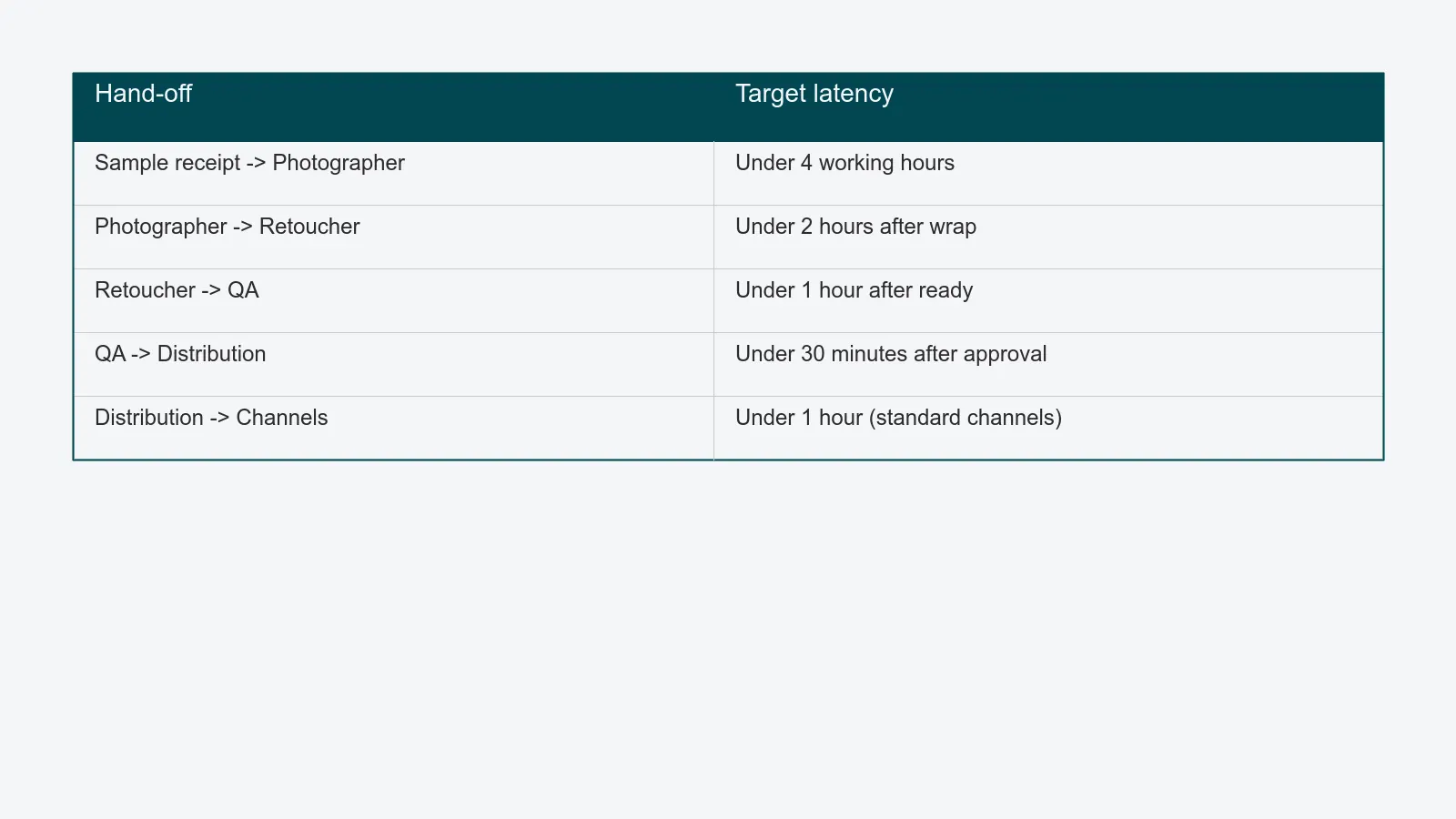
- Sample → photographer: under 4 working hours. Anything more and your goods-in process is the bottleneck, not the studio floor.
- Photographer → retoucher: under 2 hours after wrap. RAW import and selects should not stretch overnight unless that is the published policy.
- Retoucher → QA: under 1 hour after the retoucher marks ready. If this drifts, the QA queue is overloaded, not the retouching desk.
- QA → distribution: under 30 minutes once approved. This should be near-instant in an automated pipeline.
- Distribution → channels: under 1 hour for standard channels. Marketplaces with manual ingest are exceptions you should call out separately.
Compare these with active work time and the answer is almost always uncomfortable: most of the lead time is spent in queues, not in production. That is the number that justifies the migration. Pair it with the first-pass approval rate discussed in the content production QA playbook and you have two numbers that explain almost every turnaround problem.
What to instrument first
You do not have to migrate every hand-off at once. The pragmatic order:
- Instrument the retoucher → QA hand-off first. This is where most rework lives and where annotated review pays back fastest. The companion piece on removing approval bottlenecks covers the gate design in detail.
- Then sample → photographer. Sample tracking is the easiest to put a status field on, and it eliminates the most common "where is the box?" interruption.
- Then QA → distribution. Once approval is structured, releasing to distribution becomes a button, not a follow-up email.
- Then photographer → retoucher and distribution → channels last. These benefit from the discipline you have built upstream.
Each step removes one class of email thread. By the third hand-off, the studio's daily standup gets shorter - not because people talk faster, but because the dashboard already shows what they used to discuss.
Where to go next
If your studio is still running hand-offs through email and Slack, the cost is not visible until you measure latency between roles - whether the asset is headed to a client for sign-off or straight to your own webshop. A structured visual review loop handles the QA hand-off; a structured workflow engine handles the other four. Commercial studios can see how this plays out across multiple clients on the studios solution page, and in-house teams shipping to their own channels on the in-house studio solution page. When you are ready to map your own pipeline, book a 30-minute walkthrough and we will trace one job from sample receipt to channel delivery on your real data.