

If you are a Head of Content Production with a shortlist of three or four tools on your desk, you already know the hard part of a content ops platform evaluation is not the demo. It is the moment two months later when finance asks why you picked the one you picked, procurement wants the scoring, and the studio team has already started using something different anyway. Vendor decks are not a methodology. Feature checklists are not a methodology. What you need is a weighted scoring framework that survives contact with reality.
This guide gives you that framework. Eight evaluation axes, each with concrete questions to ask, a 1–5 scoring rubric, and the red flags that should pull a vendor off the shortlist. It is vendor-neutral on purpose - you can use it to evaluate any content operations platform, including ours.
TL;DR
- A serious content ops platform evaluation is scored, weighted, and documented - not a vibes-based demo write-up.
- Eight axes cover the full picture: workflow depth, sample and asset traceability, AI quality, the review loop, integrations breadth, reporting, security and GDPR posture, vendor fit and support, and total cost of ownership.
- Spreadsheet-based studios and general-purpose project management score well on cost and badly on traceability. Incumbent point tools score well on a single axis and badly across the rest. Purpose-built platforms should score above 3 on every axis or you should keep looking.
- TCO over three years usually exceeds list price by 40–80% once integration, training, and exit costs are counted.
- Document your weights before the demos, not after. It is the only way to keep the process honest.
Why most evaluations go sideways
A typical content ops platform evaluation starts with an RFP, three vendor demos, a champion's spreadsheet, and a procurement gate. Six weeks later the team picks the tool whose demo had the cleanest screenshots, and twelve months later the studio is still using a parallel set of spreadsheets because the chosen platform did not actually fit how they work.
The failure mode is consistent. Evaluators score what is easy to score - pricing, named features, brand recognition - and avoid scoring what is hard to score - handoff fidelity, return-loop friction, the half-second of latency that makes a tethered shoot painful. The fix is to make the hard things explicit, weight them, and force every vendor through the same rubric.
The framework below is opinionated. It assumes you are a brand studio or commercial photo studio shooting at meaningful volume, and that your problem is operational fragmentation, not a missing feature. Adjust the weights for your context, but keep the axes.
How to use this framework
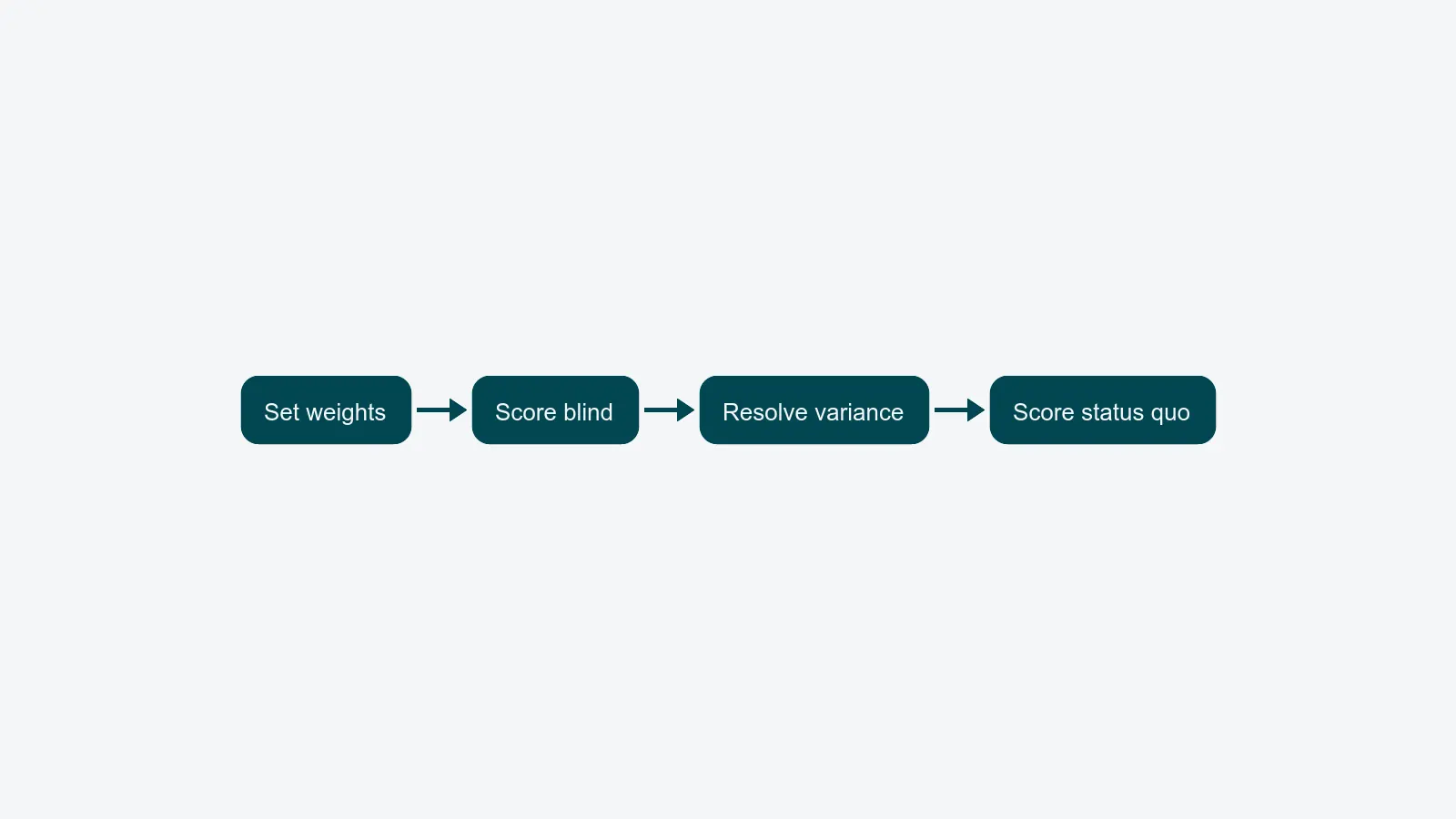
Before you talk to any vendor, do three things:
- Set your weights. The eight axes below are not equally important for every studio. A high-volume packshot studio probably weights workflow and sample traceability above AI. An in-house brand studio with a strong creative pipeline probably weights review and integrations above sample handling. Decide your weights as a panel - content lead, studio manager, IT, finance, security - and write them down.
- Score blind where you can. Have each panelist score independently before the group discussion. Average the scores per axis. Variance above 1.5 points on the same axis is a flag that the panel does not agree on what "good" looks like, and you should resolve it before continuing.
- Score the status quo too. Run your current stack - be it general-purpose project management plus a shared drive, or a set of incumbent point tools - through the same rubric. If the new platform does not beat the status quo by at least 1 point on three or more axes, the migration cost is unlikely to pay back.
The eight evaluation axes
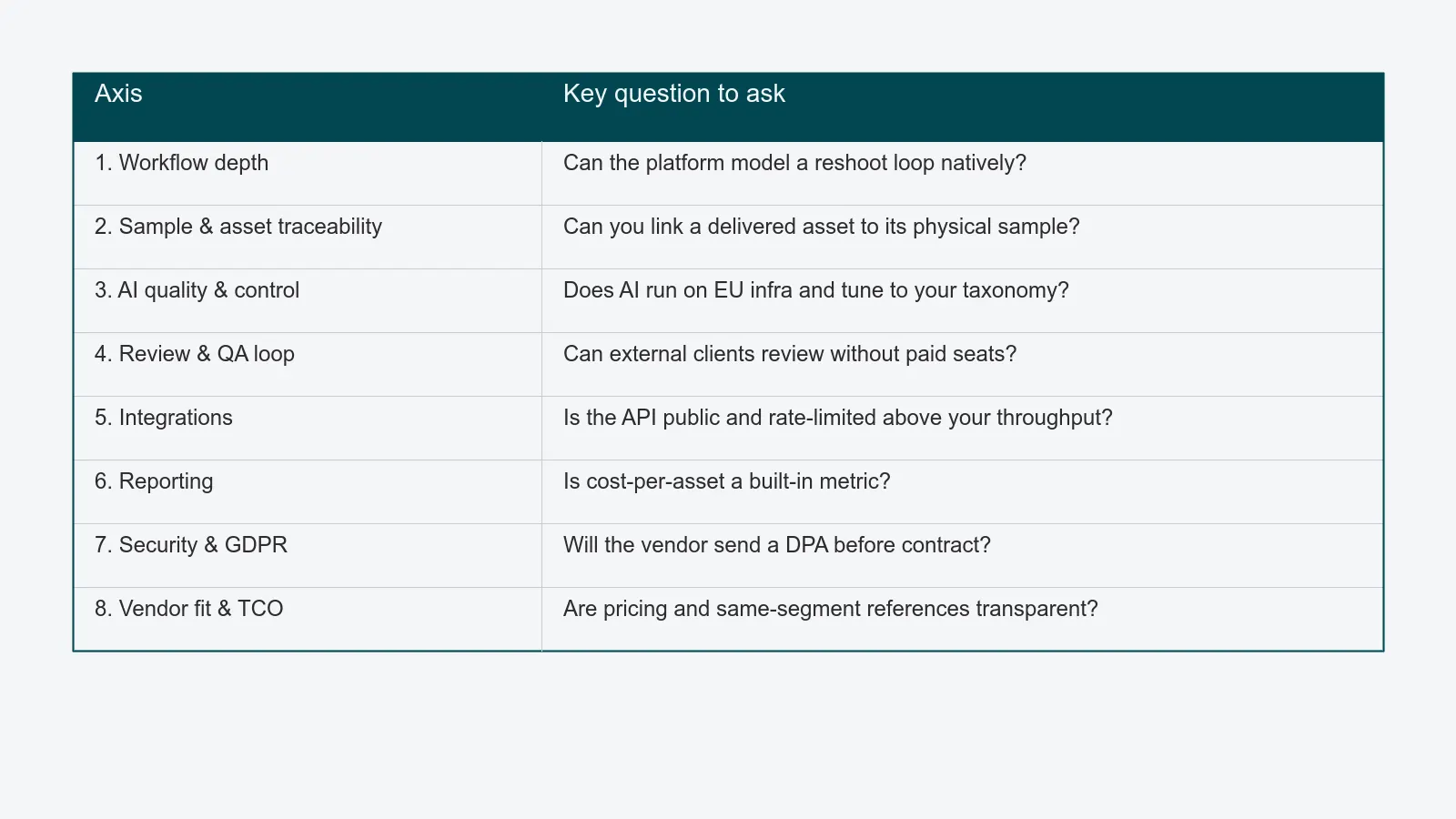
Each axis below has the same shape: what to ask, how to score, and the red flags. Scores are 1 (does not address it) through 5 (addresses it natively, in production, with reference customers). Treat anything scored 1 or 2 on a high-weight axis as a disqualifier.
Axis 1 - Workflow depth and configurability
What it measures. Whether the platform models your actual production stages - intake, sample receipt, planning, capture, post, review, delivery, archive - as first-class workflow steps with handoffs, owners, SLAs, and automations. Or whether "workflow" means a kanban board with custom statuses bolted on.
What to ask.
- Show me a job moving from sample receipt to delivery without anyone opening another tool.
- Where do conditional routes live? What happens when a shot needs reshooting? Is that a status change or a real branch in the workflow?
- Can a non-developer change the workflow definition, or does it require a professional services engagement?
- How are SLAs and deadlines tracked per stage, not just per job?
Scoring rubric.
| Score | What it looks like |
|---|---|
| 5 | Native, configurable workflow engine with stage-level SLAs, conditional branches, and audit trail. Studio admins can change definitions without code. |
| 4 | Workflow engine present but rigid; configuration requires vendor PS. |
| 3 | Status-based "workflow" on top of a kanban or list view. No SLAs at the stage level. |
| 2 | Workflow is implicit in custom fields and folders. Each studio reinvents it. |
| 1 | No workflow concept. Tasks and assets are managed independently. |
Red flags. "Workflow" demoed as a Trello-style board with no enforcement. No way to model a reshoot loop. The vendor cannot show a single configured workflow without their solutions engineer driving. See the workflow automation overview for a reference of what stage-level workflow looks like in a content ops platform.
Axis 2 - Sample and asset traceability
What it measures. Whether physical samples and digital assets share a single ID space. When a buyer asks "which delivered image came from this exact sample?" you should answer in seconds, not in a freelancer-week.
What to ask.
- Can I trace any delivered asset back to the sample it was shot from, including timestamps and the responsible owner?
- How are samples received, labeled, and returned? Is there a barcode or QR layer, or is it manual?
- What happens to traceability when a sample is reshot months later for a re-edition?
Scoring rubric.
| Score | What it looks like |
|---|---|
| 5 | Sample and asset records share IDs end to end. Barcode/QR receipt is native. Audit trail is queryable. |
| 4 | Tight linking, but the sample side is a separate add-on or module. |
| 3 | Manual linking via custom fields. Works but degrades over time. |
| 2 | Samples tracked in a separate spreadsheet imported nightly. |
| 1 | No sample concept. The platform only knows about digital files. |
Red flags. Sample tracking is described as "we integrate with your inventory system" - that is not a sample tracking layer, that is a punt. Assets and samples in unrelated databases with no foreign key. For background on what a real sample layer covers, the sample management deep dive walks through it.
Axis 3 - AI quality and controllability
What it measures. Whether the AI features (background removal, masking, tagging, color correction, variant generation) produce production-grade output, are tunable per brand, and run at the volumes you actually shoot.
What to ask.
- Run the AI on twenty of my real samples, not your demo set. Show me the rejects.
- What is the false-positive rate on auto-tagging? Can I retrain on my taxonomy?
- Where does the model run? On EU infrastructure, or shipped to a US-hosted third party?
- Can I A/B a human pass against the AI pass and measure the time and quality delta?
Scoring rubric.
| Score | What it looks like |
|---|---|
| 5 | AI runs on EU infrastructure, is tunable per brand, has documented quality benchmarks, and integrates into the workflow as a queue step rather than a separate tool. |
| 4 | Strong AI, EU-hosted, but minimal tunability. |
| 3 | AI present but generic; quality is a coin flip on hard categories (e.g. translucent, reflective). |
| 2 | AI is a marketing label on a third-party API call. |
| 1 | No AI, or AI is a separate paid module not integrated in the workflow. |
Red flags. AI demos only on the vendor's curated stock photography. No published benchmarks. Output cannot be reviewed and overridden inline before it propagates downstream. See the AI functions overview for what production-grade AI looks like wired into a workflow.
Axis 4 - Review and QA loop
What it measures. How fast a feedback round goes from "first proof out" to "approved for delivery" without dropping into email, Slack, or a separate review tool.
What to ask.
- Show me a complete review cycle, including external client feedback, in the platform.
- How is feedback tied to a specific pixel coordinate or asset version? Can a retoucher act on it without hunting?
- What is the median review-cycle time across your reference customers?
- How do brand guideline checks and color profile checks fit into the QA loop?
Scoring rubric.
| Score | What it looks like |
|---|---|
| 5 | Pixel-precise review, version history, internal and external reviewers, automated QA checks, all in one loop. Client review needs no extra license. |
| 4 | Strong review tool but external clients need a seat or workaround. |
| 3 | Review is "share a link, collect feedback in comments." Works at low volume. |
| 2 | Review happens in PDF or email. Platform stores the result. |
| 1 | No review concept. Approvals tracked manually. |
Red flags. External clients cannot review without a paid seat. Comments are not anchored to image regions or versions. See the QA and review module for what a closed feedback loop should cover.
Axis 5 - Integrations breadth and depth
What it measures. Whether the platform connects to your existing PIM, ERP, e-commerce, CMS, marketing automation, and creative tools - natively, with documented APIs, and at the volumes you actually push.
What to ask.
- Show me the production integration with a PIM equivalent to ours, including error handling and replay.
- Is the API public, documented, and rate-limited at numbers that match my throughput?
- Are there native connectors to Adobe Creative Cloud, the major DAMs, and the major commerce platforms?
- What is the platform's stance on webhooks, event streams, and bidirectional sync vs. one-way push?
Scoring rubric.
| Score | What it looks like |
|---|---|
| 5 | Public API, documented webhooks, native connectors to the top PIMs/ERPs/commerce platforms, and a partner ecosystem with reference integrations. |
| 4 | Strong API and webhooks, but native connectors are limited; expect some custom work. |
| 3 | API exists but is undocumented or rate-limited below your needs. |
| 2 | Integration via CSV import/export only. |
| 1 | No public API. Vendor-led professional services for every integration. |
Red flags. API is on the roadmap. Connectors are "available via partner" - meaning you build them. See the integrations overview for the connector and API surface a content ops platform should publish.
Axis 6 - Reporting and analytics
What it measures. Whether you can answer cost-per-asset, throughput-per-photographer, average-cycle-time, and bottleneck-by-stage without a freelancer.
What to ask.
- Show me a dashboard answering "what is our cost per asset by category, this quarter."
- How are stage-level cycle times tracked? Can I export them?
- What is the lag between an event happening and it appearing in reporting?
- Is reporting at the platform level, or do I need a separate BI tool?
Scoring rubric.
| Score | What it looks like |
|---|---|
| 5 | Real-time dashboards, stage-level metrics, export to BI, configurable per role. Cost-per-asset is a built-in metric. |
| 4 | Dashboards exist but require BI to extend. Cost-per-asset is computed externally. |
| 3 | Out-of-the-box reports cover throughput, but bottleneck analysis is manual. |
| 2 | Reporting is CSV export only. |
| 1 | No reporting layer. Numbers are pulled from the database by a developer. |
Red flags. Demo dashboards are static screenshots, not live. No way to slice by photographer, retoucher, or category. See the reporting overview for the metrics a content ops platform should expose by default.
Axis 7 - Security and GDPR posture
What it measures. Whether the platform is hosted in your jurisdiction, holds the certifications your security team needs, and gives you the contractual artifacts (DPA, SLA, sub-processor list) without a fight.
What to ask.
- Where is data hosted? What is your stance on EU-only hosting?
- Send me your DPA, SLA, and sub-processor list before the next call.
- What is your incident response process? What is the notification SLA?
- How are roles and permissions modeled? Can I prove who saw which asset, and when?
- Do you support SSO and SCIM provisioning out of the box?
Scoring rubric.
| Score | What it looks like |
|---|---|
| 5 | EU-only hosting available, GDPR-compliant by design, signed DPA on request, audit log, SSO/SCIM, role-based access control with field-level granularity. |
| 4 | EU hosting available, full DPA, SSO. SCIM or audit log limited. |
| 3 | Hosting region selectable but limited certifications. |
| 2 | US-hosted only with EU data transfer mechanisms relied on. |
| 1 | No region control. No DPA. Security posture is a marketing page. |
Red flags. "We're working on certifications." DPA only available after contract signature. Sub-processors not disclosed. Reference: the PixelAdmin security posture details what a serious GDPR-aligned hosting story looks like in practice. The European Commission's official GDPR text is the right reference for your security panel's questions.
Axis 8 - Vendor fit, support, and total cost of ownership
What it measures. Whether the vendor will still be around in three years, whether their support model fits your time zone and language, and whether the real cost of ownership is what list price suggests.
What to ask.
- What language is your support delivered in? What are the response SLAs by tier?
- Show me three reference customers in my segment and country.
- What are the implementation, training, integration, and exit costs?
- What does a renewal escalation look like in years two and three?
Scoring rubric.
| Score | What it looks like |
|---|---|
| 5 | Support in your language, named customer success contact, transparent pricing, references in your segment, defined exit terms. |
| 4 | Most of the above; support language or references slightly off-fit. |
| 3 | English-only support, generic CSM, references from adjacent industries. |
| 2 | Support routed to a generic queue. Pricing is "let's talk." |
| 1 | Vendor cannot provide references in your segment. Renewal terms are vague. |
Red flags. Pricing only revealed after the third call. References all from the wrong country, segment, or volume tier. The PixelAdmin pricing page is one example of pricing transparency you can use as a benchmark when comparing.
The TCO model
List price is rarely more than half the real cost of a content ops platform. A workable three-year TCO model includes:
| Cost category | Typical share of three-year TCO |
|---|---|
| Subscription fees (incl. seat growth and tier changes) | 50–60% |
| Implementation and configuration | 10–15% |
| Data migration from incumbent tools and spreadsheets | 5–10% |
| Integration build and maintenance | 5–10% |
| Training and change management | 5–10% |
| Renewal escalations (years two and three) | 5–10% |
| Exit and re-platforming reserve | 2–5% |
Ask every vendor to quote each line. The vendor that refuses, or only quotes subscription, is signalling that the rest is your problem. According to Gartner's published Magic Quadrant for Digital Asset Management Platforms coverage, mature evaluations weight TCO and integration ecosystem at least as heavily as feature breadth - because that is where the post-purchase cost lives.
Putting it together - a worked example
Here is what a panel scoring three options might look like with weights set for a high-volume packshot studio. Scores are illustrative, not endorsements.
| Axis | Weight | Spreadsheet stack | General-purpose PM | Purpose-built content ops platform |
|---|---|---|---|---|
| Workflow depth | 20% | 1 | 3 | 5 |
| Sample and asset traceability | 15% | 1 | 1 | 5 |
| AI quality | 10% | 1 | 1 | 4 |
| Review and QA loop | 15% | 2 | 2 | 5 |
| Integrations | 10% | 1 | 3 | 4 |
| Reporting | 10% | 2 | 3 | 4 |
| Security and GDPR | 10% | 2 | 4 | 5 |
| Vendor fit and TCO | 10% | 5 | 3 | 4 |
| Weighted total (out of 5) | 100% | 1.7 | 2.5 | 4.6 |
The pattern is what matters, not the exact numbers. The spreadsheet stack wins on cost and loses on every operational axis. General-purpose project management is competent on coordination and unaware of samples, AI, and review. A purpose-built platform should clear 4 across the board, or it has not earned your migration budget.
Practical checklist
Use these as a final gate before you commit:
- Weights documented and signed off before demos, not after.
- Status quo scored on the same rubric as new vendors.
- Each axis has a panel-agreed score with variance under 1.5 points.
- Each shortlisted vendor produced a DPA, SLA, sub-processor list, and three same-segment references.
- TCO modeled across three years, all seven cost lines.
- Reshoot loop, sample return, and external client review demoed in the same session, on your data.
- One axis-1-or-2 score on a high-weight axis is treated as a disqualifier.
If any item is missing, the evaluation is not done - even if procurement is asking for a decision.
FAQ
How long should a serious content ops platform evaluation take? Six to ten weeks from RFP to signed contract is reasonable for a studio doing the work properly. Faster usually means weights were skipped. Slower usually means panel disagreement on weights.
Should we run a paid pilot? Yes, if the vendor will agree to one with measurable acceptance criteria written before the pilot starts. A pilot without acceptance criteria is just a longer demo.
How do we keep the framework honest when a vendor lobbies an executive? The documented weights are the answer. If an executive wants to override a low score on a high-weight axis, they need to argue the weight, not the score.
Is this framework biased toward purpose-built platforms? The framework is biased toward axes that matter for content production at volume. General-purpose tools score low because they were not built for this. That is not the framework's bias - it is the workload's.
Where to go next
If you want the broader buying-stage context the eight axes sit inside, the guide on choosing content operations software in 2026 is the companion piece. For an operational view of what these axes mean on a real production line, the complete guide to commercial packshot workflows walks through the workflow this framework is scoring.
PixelAdmin is built for high-volume content production studios that have outgrown fragmented tooling. If you are running a real evaluation and want the rubric, the references, and the TCO breakdown for our platform, book a walkthrough and we will score ourselves on your weights, in front of your panel.