

Most retouching teams have a folder called something like Actions_FINAL_v3 on a shared drive. Inside it: 200-plus .atn files exported by people who left two years ago. Half of them throw a "step could not be completed" dialog the first time you run them. The other half work, but only on the senior retoucher's machine.
A shared Photoshop action library is the highest-leverage tool a retouching team owns - and the worst-governed asset in most studios. This guide is the operator's playbook: where the .atn lives, how to name actions so a new hire finds the right one in seconds, what kills a shared action, and how to run the library like production infrastructure instead of a junk drawer.
TL;DR
- A shared
.atnlibrary survives only with a single source of truth, scope-prefixed names, strict action hygiene, and named owners per action. - The four classic killers are absolute paths, hard-coded layer names, OS- and language-locale dependency, and plugin calls without a fallback.
- Use a sortable prefix scheme (
00_setup__,10_skin__,20_fabric__) so the panel reads like a menu, not a search result. - Every action gets an owner, a version, a change log, and a test asset. No exceptions.
- A new retoucher should be productive in the library within 30 minutes - if it takes longer, the library is the problem.
What kills a shared action
Shared actions fail for a small, predictable set of reasons. They show up the morning after the action ran cleanly for the person who recorded it.
Absolute paths. Recording a Save As to C:\Users\anna\Desktop\out\ works for Anna. For everyone else, the action throws as soon as that path is invoked. The same applies to Open commands, Place Embedded, Load Selection from disk, and any Save for Web preset that was created on someone else's machine.
Hard-coded layer names. "Select Layer 'Background copy 2'" is a brittle reference. The moment the file's layer stack differs - different naming convention, an extra adjustment layer, a Smart Object instead of a raster - the step fails. Actions that operate by layer name drift out of compatibility within weeks.
OS- and language-locale dependency. Photoshop records menu paths by string, not by ID. An action recorded in a Danish UI will look for "Justeringer" instead of "Adjustments." Cross-OS recordings hit similar shortcut and dialog-label drift. The library does not survive an Adobe update if it relies on the localized menu graph.
Plugin calls without a fallback. Calling Imagenomic Portraiture, a Topaz filter, or a Frequency Separation panel script inside a shared action only works if every workstation has the plugin licensed and at the same version. Plugins should be optional steps, not load-bearing ones.
These four failure modes account for most of the "the action doesn't work on my machine" tickets. Adobe's Action panel documentation covers how to record portably; the rest is discipline.
Where the .atn library lives
There are three viable storage models. Pick one and commit.
Cloud-sync folder (Dropbox, OneDrive, Google Drive). The lowest-friction option. Every retoucher subscribes to the same folder, Photoshop loads from a known path, sync handles distribution. Trade-off: no real version history, no review gates, accidental overwrites are silent. Acceptable for teams of three to five retouchers who all sit in the same studio.
Shared network drive (NAS / SMB). The classic studio setup. Works, but suffers the same flaws as cloud-sync plus latency on remote retouchers. Avoid making this the primary store if any retoucher works outside the office.
Git LFS. The right answer for any team larger than five or working across locations. Each .atn is a binary in a real repository, with a commit history, pull requests, and the ability to roll back a bad release. The friction is real - most retouchers will not write git push from a terminal - but the governance dividend is large. Pair it with a small launch script that pulls the latest .atn files into the Photoshop Actions folder, and the retoucher never sees Git directly.
For most studios with one location and fewer than ten retouchers, cloud-sync with a strict review cycle is fine. Above that, Git LFS pays back the setup cost the first time someone overwrites the master library by accident.
Naming conventions that survive a year
Photoshop's Action panel sorts alphabetically. Use that. A name like Skin smoothing low floats randomly in the panel. A name like 10_skin__fs-low slots into a predictable position every time.
The convention we run with studios:
NN_scope__variant
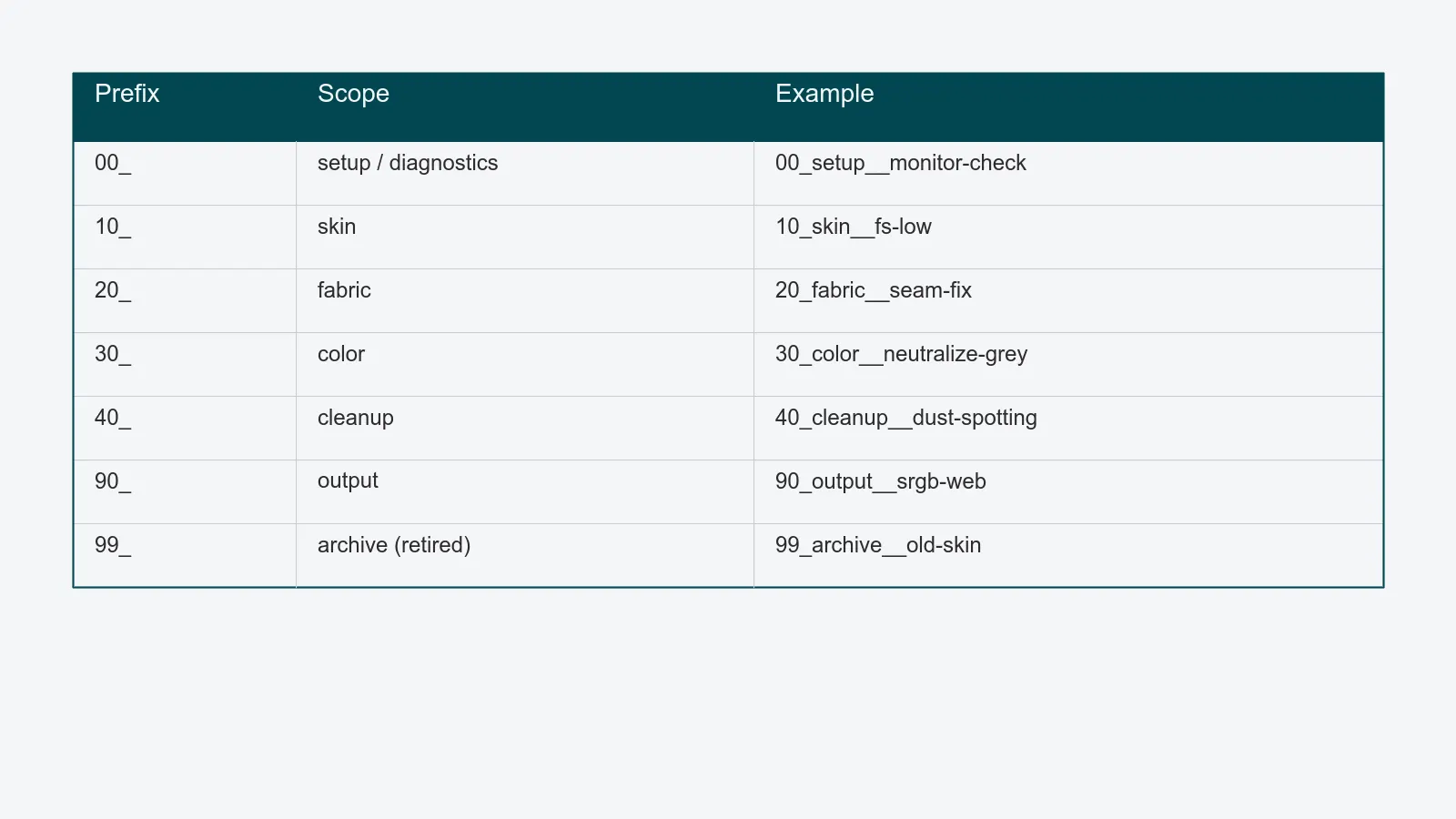
NN- two-digit numeric prefix grouping actions by category (00_setup,10_skin,20_fabric,30_color,40_cleanup,90_output).scope- the subject the action operates on (skin,fabric,metal,monitor-check).variant- the specific behavior (fs-low,fs-high,dodge-burn,frequency-sep).
Worked examples:
00_setup__monitor-check
00_setup__working-space-check
10_skin__fs-low
10_skin__fs-high
20_fabric__cleanup
20_fabric__seam-fix
30_color__neutralize-grey
40_cleanup__dust-spotting
90_output__srgb-web
90_output__cmyk-print
The numeric prefixes give the panel a stable order. Scope prefixes mean a retoucher searches by what the action does, not by who recorded it. Variants disambiguate without forcing tribal memory.
A few sub-rules earn their keep:
- Lowercase, underscore-separated. Mixed case is a search hazard.
- Two underscores between scope and variant (
skin__fs-low). Single underscores already separate words inside the scope. - Reserve
00_for diagnostics - monitor calibration check, working-space check, ICC profile assignment. Actions every retoucher runs first. - Reserve
90_for output - final exports, channel conversions, sharpening for delivery. The last things touched.
This is the same logic Russell Brown's classic action style guide used twenty years ago, and it still works because the Action panel hasn't changed.
Action hygiene: the non-negotiable rules
Every action that enters the shared library passes a short hygiene checklist. The library owner enforces it; pull requests fail review otherwise.
- No absolute paths. Save As, Place, Load steps reference a token (
%PROJECT%/exports/) resolved at runtime by a small wrapper script, or use Photoshop's relative-path features. - No hard-coded layer names. Use Select Top Layer, Select Below, or Select By ID. If the action genuinely needs a named layer, its first step renames the active layer to a known token.
- No Save As dialogs. Anything that pops a dialog mid-run breaks batch processing in Image Processor Pro and similar studio batch tools. Use Export As with a saved preset or write a
.jsxscript step. - No plugin calls without a fallback. If the action depends on Imagenomic, Topaz, or any third-party filter, it checks for the plugin and skips that step gracefully when it is missing. The Retouching Academy community has good examples of plugin-fallback patterns.
- No locale-dependent menu paths. Record actions in the English Photoshop UI, period. Retouchers whose local install is non-English switch the UI language for action authoring. This is the single biggest cause of "works on Lars's machine, breaks on mine."
- No destructive raster steps on the master. Sharpening, blurring, and frequency-separation actions operate on duplicated layers, never on the original. Output actions flatten to a copy.
The list is short by design. Six rules a retoucher can hold in their head; six checks a reviewer can run in 90 seconds.
Versioning and the review cycle
Actions drift. Photoshop versions change. The library needs a review cadence or it becomes a graveyard.
Semver-ish for the library. 2.4.1 - major when the naming scheme or category structure changes, minor when actions are added or substantially reworked, patch for fixes. Tag the release in Git or in a VERSION.txt next to the .atn.
One owner per action. A name in a registry. When the action breaks, there is no debate about who fixes it. When the owner leaves, ownership transfers explicitly, not by entropy.
A change log per action. Three columns: date, change, author. Lives in a single actions.md file in the library folder. Reading the change log is faster than reading the action history inside Photoshop.
A test asset per action. A reference PSD that the action runs against, with the expected output saved alongside. When Photoshop ships a new version, the library owner runs every action against its test asset. The ones that fail get patched or retired.
A retirement path. Actions that haven't been used in twelve months move to a 99_archive__ prefix, then drop out of the next minor version. The panel should never have more actions than the team can name from memory.
Onboarding a new retoucher in 30 minutes
If a new hire needs more than half an hour to be productive in the library, the library is the problem. The session looks like this:
- Minute 0–5. Install the action set. The library wrapper script copies the latest
.atninto the Photoshop Actions folder and loads it on launch. - Minute 5–15. Walk the panel top to bottom. Explain the prefix scheme, the diagnostic actions in
00_, and the output actions in90_. The structure should be self-explanatory by the end of the walk. - Minute 15–25. Run three actions on a test asset together - one skin action, one cleanup, one output. The new retoucher sees the expected behavior and the rollback procedure.
- Minute 25–30. Hand over the change log, the action registry (owner per action), and the contribution guide. Explain the review cycle: nobody commits a new action without a review, no exceptions.
This is what a governed library buys. Not faster retouching - that comes from craft. Predictable retouching, where any retoucher can sit at any workstation and produce the same output, with the same traceable history. The same logic that drives a color-managed retouching pipeline and structured visual review applies here: make the infrastructure invisible so the craft stays visible.
For editors and retouchers running high-volume work, the action library is part of the same operations layer that makes QA repeatable. Govern it the same way.
Practical checklist
Before declaring the library production-ready, audit:
- Can a new retoucher find the right action in fewer than 10 seconds?
- Does every action have a named owner, a version, and a change-log entry?
- Are there test assets for every action, run against the latest Photoshop version?
- Has every action been screened for absolute paths, layer-name dependency, and locale lock-in?
- Is there a documented retirement path for actions that go stale?
- Does the library install in under five minutes on a clean workstation?
If three or more answers are uncomfortable, the action library is leaking. Start with the hygiene rules - they catch the most failures for the least effort - and put the naming convention in place before adding another .atn to the folder.