

Most studio managers do not run out of talent. They run out of the right resource at the right hour. A photographer is free, but the infinity-cove set is double-booked. The retouching queue is empty on Tuesday and on fire by Thursday. Samples are sitting on a shelf because the producer was on another job when they arrived. None of this is a hiring problem - it is a studio capacity planning problem, and most teams are still trying to solve it with a shared spreadsheet.
This article gives you a working model for studio capacity planning in a high-volume packshot operation: what to measure, how to forecast demand, how to find the binding bottleneck, and how to turn the model into a weekly cadence your team will actually follow. It reads the same whether you run a commercial studio juggling many unrelated client jobs or an in-house brand studio pushing one season's SKU volume to your own webshop - the resource axes and the constraint logic are identical.
TL;DR
- Capacity is not a single number - it is the minimum of five separate resource axes.
- The constraint moves. A studio that was photographer-bound in Q1 becomes retouch-bound in Q3 once volume rises.
- Forecasting demand only needs three inputs: confirmed jobs, repeat-client baselines, and known seasonal drops.
- The binding bottleneck - what Theory of Constraints calls the system constraint - is the only resource worth elevating until the next one appears.
- A weekly cadence with a shared, real-time view beats a monthly plan in a spreadsheet, every time.
What studio capacity planning actually means
For a packshot studio, studio capacity planning is the discipline of matching committed and forecasted work against the real available hours of every resource needed to ship an asset - not just the camera.
Most studios plan capacity as if it were a single dial: "how many shoot days can we deliver this month?" That number is meaningless on its own. A shoot day with no retouching capacity behind it does not produce a delivered asset. A retouching slot with no approved sample upstream is dead time. The unit you are planning for is the completed asset, and that requires every stage of the line to clear at the same throughput.
A useful definition: capacity planning is the answer to two questions, refreshed weekly.
- Given everything we have committed to, where will work pile up next?
- If a new job lands tomorrow, what is the earliest honest delivery date we can promise?
If answering either of those takes more than five minutes, your model is not working.
The five resource axes you have to plan against
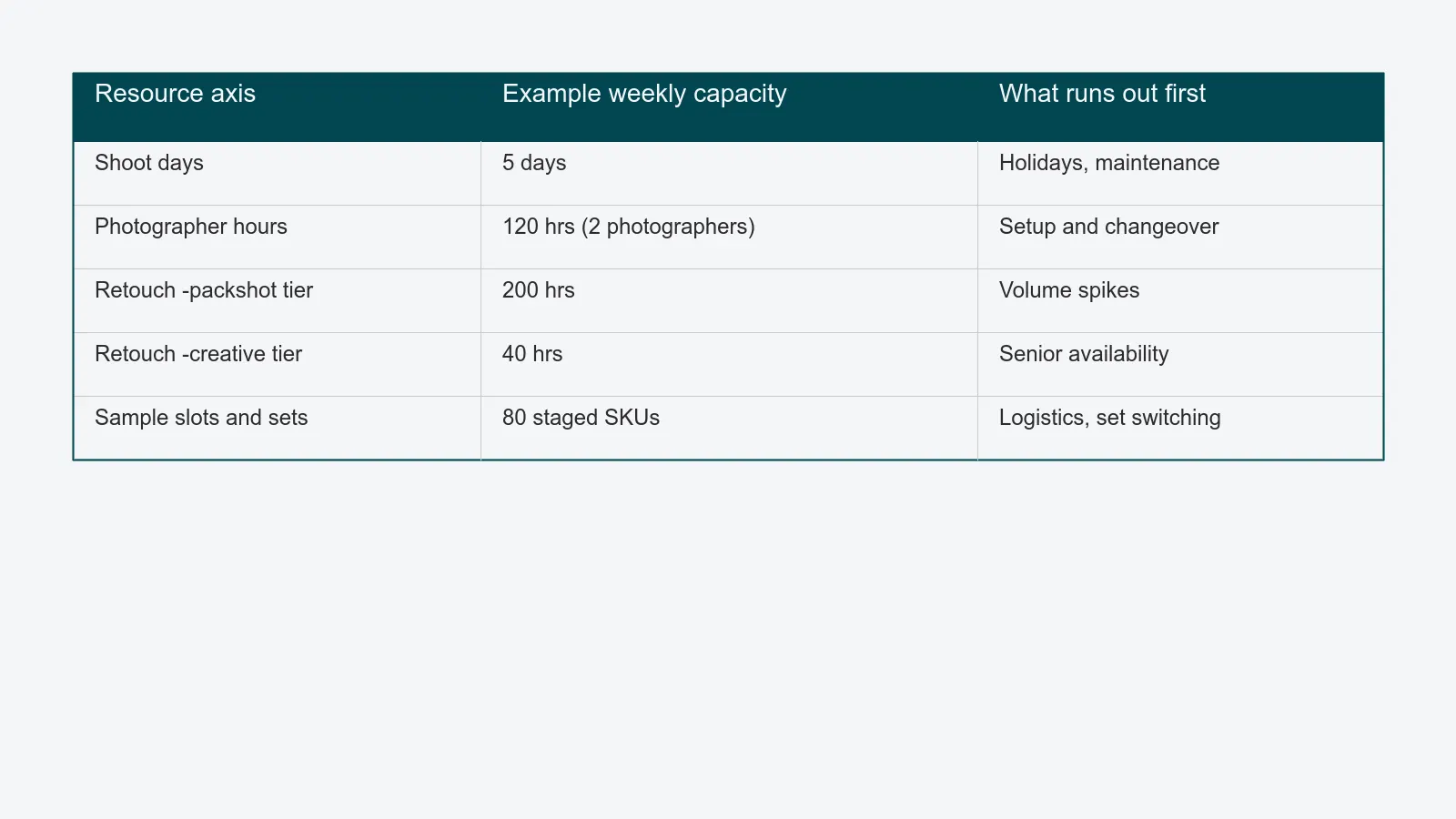
A packshot studio has five resource axes that constrain throughput. Capacity is the minimum of all five - never the maximum, never the average.
- Shoot days available. Calendar days the studio is staffed and open, minus maintenance, holidays, and pre-booked priority work. This is the easiest number to overstate; mark days that are "half held" as half.
- Photographer hours. Effective shooting hours per photographer per week, after accounting for setup, break-down, briefing, and on-set QA. A useful rule of thumb: subtract 20–30% from rostered hours.
- Retouching hours per skill tier. Break this into at least two tiers - high-volume packshot retouching and complex creative retouching. Treat them as separate pools, because a senior retoucher rescuing a queue of standard packshots is a hidden cost.
- Sample slots and physical flow. Sample tables, garment racks, return shelves. If a studio shoots 200 SKUs a week but only has space to stage 80 at a time, the bottleneck is logistical, not creative. The sample management module is what makes this axis trackable in real time.
- Set and equipment availability. Cyclorama, infinity cove, mannequin rig, ghost-mannequin setup. Each set has a setup cost; switching between them mid-day eats more capacity than schedules usually admit.
Plan against all five every week. The honest number is whichever runs out first.
Forecasting incoming demand
Demand forecasting in a packshot studio does not require statistics. It requires three inputs, kept in one place.
Confirmed jobs. Briefs that are signed off and scheduled. These are the easy ones.
Recurring-demand baselines. For each recurring source of work - an external client for a commercial studio, or a product category or sub-brand for an in-house team - the rolling four-week average of SKUs delivered. A line that has shipped 80–120 SKUs a week for six months is overwhelmingly likely to ship 80–120 SKUs next week, even before anyone tells you. Treat that as committed capacity.
Known seasonal drops. Ask every recurring client - or, for an in-house team, your own merchandising and channel calendar - about the next four launch windows. Mark them on the same calendar. A drop you knew about in January is not an emergency in August.
Layer these three on top of each other and you have a honest 8–12 week forward view. Most studios stop at "confirmed jobs" and are then surprised every quarter by demand that was completely predictable.
For deeper context on how this connects to the production line, the packshot workflow guide walks through the seven stages a job moves through and where forecasting plugs in.
Identifying the binding bottleneck
Once you have the five resource axes and the forecast, the next question is: which one runs out first? Not all of them at once - exactly one. Theory of Constraints, the operations-management framework most rigorously surveyed in the 2024 review of bottleneck identification methods in Applied Sciences, is built on a simple observation: every system has one binding constraint at a time, and improvements anywhere except at that constraint do not raise throughput.
For a packshot studio, three signals point to the binding bottleneck.
- Where work-in-progress accumulates. If files pile up in the retouching queue but never in the shoot queue, retouching is binding.
- Where load-to-capacity is highest. Compute committed hours divided by available hours per axis. The axis above 90% is binding; anything above 100% is already late.
- Where buffers run dry. If samples are always arriving late at the shoot stage, but rarely late at retouch, sample logistics is binding upstream.
The constraint moves. A studio that was photographer-bound at 800 SKUs a week becomes retouch-bound at 1,400. Re-identify it every month, not every year.
Scenario planning for peak
Peak periods - fashion drops, holiday campaigns, new-collection launches - are where capacity plans either pay off or expose how thin the model was.
Build three scenarios for every peak window. Eight weeks out is enough lead time for any of them to be useful.
Base case. Forecasted demand at the rolling baseline. The plan covers it without overtime.
Stretch case. Demand 25% above baseline. Document explicitly which axis breaks first and what you do - typically: add a retoucher for two weeks, push non-urgent jobs back, or batch SKUs to reduce set switches.
Break case. Demand 50% above baseline. This is the conversation you have in advance with whoever owns the deadline - the commercial team in a studio shooting for clients, or merchandising and the channel owner in an in-house brand team - not the day a client or the webshop asks. What do you decline or push back, what do you reschedule, what do you outsource?
A planned break case is not a failure. An unplanned one is. The reduce packshot turnaround time article goes deeper on the levers that compress cycle time when peak hits anyway.
Turning the model into a weekly cadence
A capacity plan that lives in a quarterly slide deck is decorative. The plan has to become the weekly operating rhythm of the studio.
A practical cadence:
- Monday morning, 30 minutes. Studio manager, lead producer, lead retoucher. Review last week's actuals against forecast. Confirm the binding bottleneck. Lock the week's bookings against capacity, not against optimism.
- Wednesday, 15 minutes. Mid-week check on the binding axis. If retouch is running hot, what slips? If samples are late, what reshuffles?
- Friday, 30 minutes. Update the rolling 8-week forecast with anything new. Confirmed jobs, repeat-client baselines, drop dates. Republish the same view to the whole studio.
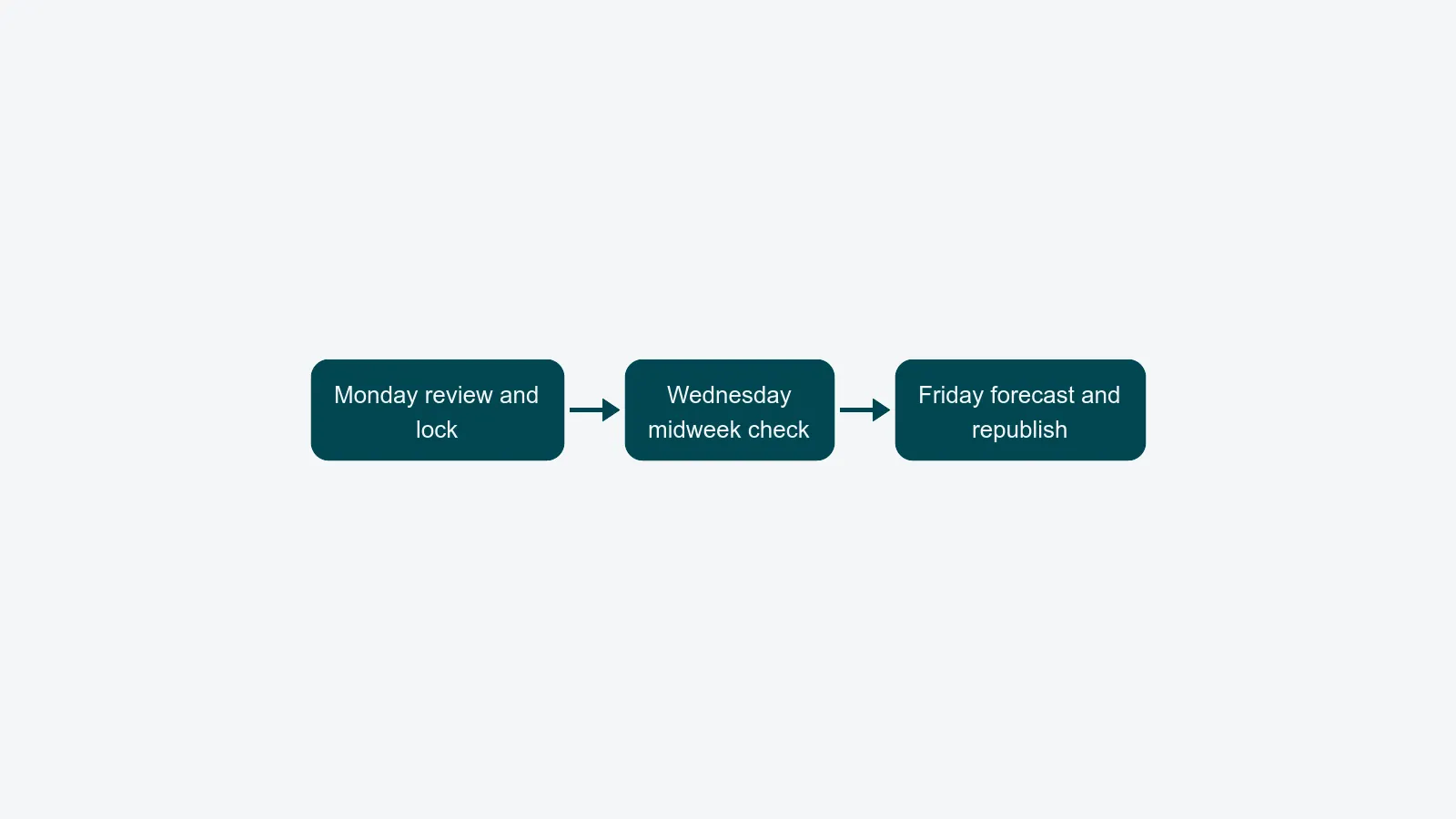
This cadence only works if everyone is looking at the same numbers. A spreadsheet that one person updates manually is the source of every "I didn't know the studio was full" conversation. A live capacity view, owned by the role who runs the studio, is what makes the cadence sustainable. The studio manager role page shows how this dashboard sits at the centre of the day, and the reporting module is where last week's actuals come from. Whether that throughput serves outside clients in a commercial studio or feeds your own channel from an in-house brand studio, the cadence is the same.
A capacity plan you trust is the difference between a studio that can confidently say "yes, we will deliver" and one that quietly hopes things work out.
Where to start
If your current planning is a spreadsheet plus an instinct, start with three things this week.
- Write down your five resource axes and an honest weekly capacity for each.
- Pull the last four weeks of delivered SKUs per client and call that the baseline.
- Identify the one axis that ran out first in each of the last four weeks. That is your binding bottleneck. Plan the next quarter around it.
When you outgrow the spreadsheet - and you will, somewhere between 500 and 1,000 SKUs a week - a studio capacity planning system replaces the manual updates with a live view across photographers, sets, samples, and retouching queues. That is when capacity planning stops being a monthly fire drill and starts being how the studio runs.