

There's a recognisable moment in a growing studio. The producer is mid-shoot, holding a sample, scrolling down an Airtable view sorted by SKU and squinting because the row they want is somewhere between line 312 and 480. The photographer waits. The next sample is already on the table. The base that ran the studio beautifully at 30 SKUs a day is now the slowest part of a 250-SKU day.
That moment is not a sign that Airtable is bad. It's a sign that your studio has crossed the line where a flexible generalist database starts to cost you more than a purpose-built system would. This article is about where that line actually sits - and what changes when you move from Airtable for studios to a content operations platform built around the shoot day itself.
TL;DR
- Airtable is excellent for early-stage studios - fast to set up, flexible, no IT involvement, easy to share with a client.
- The model strains in three predictable places: shoot-day lookup speed, per-client base licensing math, and the parallel spreadsheets that grow up around the bases.
- A purpose-built content operations platform like PixelAdmin replaces those bases with surfaces designed for the production lifecycle - sample intake, shoot, retouch, review, distribution - instead of generic rows and views.
- Stay on Airtable if your studio is small, your clients are few, and the spreadsheet drag is still survivable. Move when the bases stop composing into a single source of truth.
Why so many studios start on Airtable
There's a reason the path keeps repeating. A studio outgrows shared sheets, somebody on the team finds Airtable, and within two weekends there's a working base with views for shoots, samples, retoucher queues, and a calendar. It looks like a small miracle compared to what came before.
Airtable genuinely earns the credit. It is flexible: you can model any workflow you want without asking IT for permission. It is fast to share with clients, freelancers, and stylists who already trust the brand. It connects to the rest of your stack - Slack, Google Drive, Zapier, Make - with a few clicks. It scales reasonably well from a one-photographer setup to a studio of 8 or 10 people. And it is cheap on the first invoice.
For an early-stage studio, that bundle is hard to beat. You should be running on Airtable. The question this article is about isn't whether Airtable is a good tool. It's about what happens when your studio stops looking like an early-stage studio.
Where Airtable's model strains at studio scale
Three patterns show up consistently when a studio's volume and complexity outgrow the base. Each is survivable on its own. Together they're the signal.
1. Lookup friction during the shoot itself
A shoot day is a sequence of small, fast lookups. Sample arrives at the table. Photographer needs to confirm the SKU, the colourway, the angle list, and any brief notes. The next sample is already in line. Multiply that by 200–400 products in a day and the cost of every extra five seconds compounds.
Airtable was not designed for this. Bases are general-purpose databases - you find a record by filtering, sorting, or scrolling, the same way you would in any spreadsheet view. Even with well-built filters, shoot-day reality is messier than the filter UI handles: a sample that arrived under a slightly different name, a SKU that needs to be looked up by the photographer's barcode scanner, a brief that lives one click away in a linked record.
PixelAdmin's studio scheduling and shoot-day surfaces are built around the shoot, not around the database. The shot list is the working surface. Samples are checked in by scan. The brief, references, and angle list are on the same screen as the capture queue, and the next product is already cued up. It's the same data - it's just shaped for the moment of the shoot rather than for the afternoon someone first set up the workspace.
2. Per-client base licensing math at studio scale
Commercial studios working with multiple brands almost always end up with a base per client. It's the natural way to keep client A's data out of client B's view, give each client their own collaborator seats, and tailor the schema to what each brand actually needs. The first base is free. The second is fine. By the time the studio has 8–12 active clients, the seat-times-base math has become a real number on the budget - and the workspace economics start to fight the studio's growth instead of supporting it.
We won't quote pricing here because Airtable's pricing changes. The structural problem is what matters: each new client adds a multiplier to your tooling cost, and the cost grows along the axis your business is trying to grow on. A platform priced per studio rather than per base behaves the opposite way - it gets cheaper per client as you take on more work, not more expensive.
PixelAdmin is licensed by studio capacity (users and storage), with client structure handled inside the platform. Adding a new brand client is a configuration change, not a procurement event.
3. Parallel spreadsheets, growing back
Even disciplined Airtable studios end up with a layer of spreadsheets next to the base. Capacity planning lives in a sheet because the base doesn't natively model resource availability. Sample tracking moves to a sheet because the base wasn't designed for status fields the warehouse team wants. The monthly KPI roll-up lives in a sheet because nobody wants to build a dashboard inside Airtable that the CFO will actually look at.
None of this is a failure of Airtable. It's the consequence of a generalist tool sitting in the middle of a specialist workflow. The bases hold one shape of the truth; the spreadsheets hold the other shapes. Studios spend non-trivial time keeping the two in sync, and the question "where is this job actually right now?" no longer has one answer.
A content operations platform earns its keep by collapsing those layers. PixelAdmin covers sample management, studio capacity, review and approval, DAM, and distribution as one connected system, with reporting reading from the same data the production runs on. The single source of truth isn't a slogan - it's the architectural reason the parallel spreadsheets stop appearing.
What changes when you move to a purpose-built platform
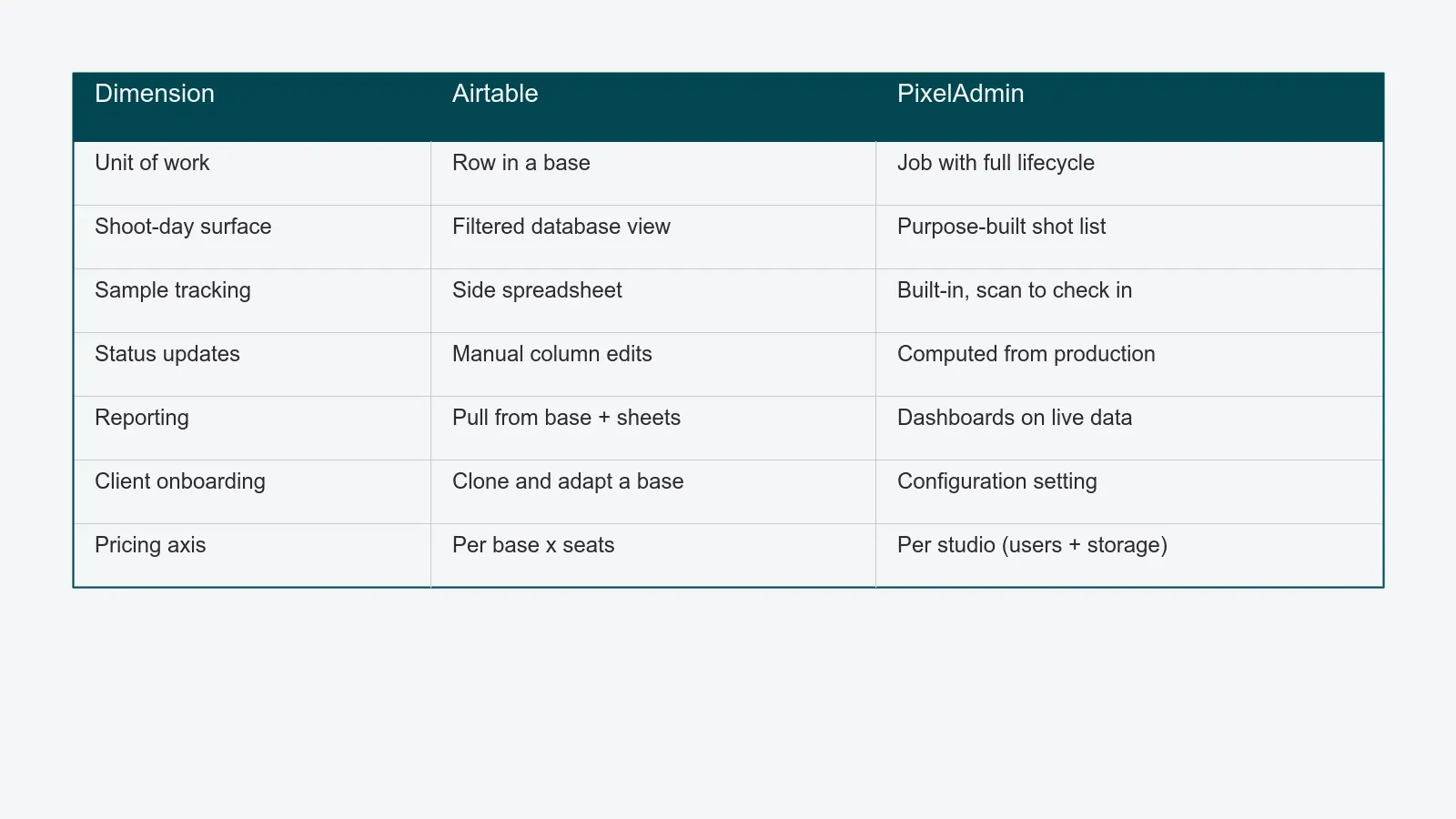
The honest answer isn't "everything." Many things stay the same.You still shoot tethered. Your retouchers still work in Capture One and Photoshop. Your client still wants to look at proofs and click approve. Your production calendar still has the same number of shoot days in it.
What changes is the shape of the data and the operational surfaces sitting on top of it.
- The unit of work is a job, not a row. A job carries its samples, its shot list, its capture, its retouch queue, its proofs, its delivered assets, and its KPIs. You stop assembling those things from views across linked tables.
- The shoot-day surface is the shoot day. Photographers and stylists work from a screen built for a fast-moving production line, not a database UI optimised for record-by-record editing.
- Status is computed, not maintained. When capture is marked complete, retouching's queue updates. When the retoucher delivers, review is notified. Nobody updates a status column by hand.
- Reporting reads from production, not from a parallel sheet. Cost per asset, turnaround days, capacity utilisation, on-time delivery - they exist as standing dashboards on the same data the team is creating.
- Client onboarding is a setting, not a new base. A new brand gets its own workspace and access controls inside the same platform, on the same pricing.
Behind all of that is a quieter difference. A generalist database asks your team to model the studio inside the tool. A purpose-built platform comes with the model already built - sample, shoot, retouch, review, asset, distribution channel - and your team configures around it instead of from scratch. That's the one-time cost you pay during onboarding. After that, the model maintains itself.
Stay on Airtable if…
The honest version of this comparison includes the cases where Airtable is still the right answer for now.
- Your studio is 3–6 people, with one or two recurring clients. The base does the job, the spreadsheets are minimal, and the team is small enough to stay coordinated without a tool change.
- You shoot fewer than roughly 50 SKUs a week, or volume is unevenly distributed (long tails of bespoke shoots, not high-volume packshot lines). Shoot-day lookup friction isn't where your time is going.
- You don't yet need a real DAM, rights tracking, or rendition pipeline. Finished assets live in a shared drive, the brand handles distribution, and that arrangement is fine.
- You're still figuring out your operating model. Airtable's flexibility is a feature when you're iterating on what a job, a sample, or a deliverable even means. Locking in a model too early can be more expensive than the spreadsheet drag.
- Your annual content volume is low enough that the parallel spreadsheets are a minor tax rather than a structural problem.
If three or more of those describe you today, Airtable is the right tool and PixelAdmin would be premature. Come back when the situation has moved.
Move when these signals start showing up
The other side of the honest version. These are the trip wires that buyers usually recognise as themselves.
- You have more than two parallel bases that all need to stay in sync, or one base that's grown past 10,000 rows and is starting to feel slow on real-world filters.
- The per-client base licensing line is a real number on your budget, and it's growing on the axis your business is trying to grow on.
- Your monthly KPI roll-up takes more than half a day to compile, because someone has to pull from the bases, then from the sheets, then from the shared drive.
- The shoot day itself is the bottleneck - not the photographer, not the retoucher, but the lookups, the status updates, and the "wait, which sample is this again" pauses.
- You've added a DAM, a review tool, a sample-tracking sheet, and a delivery service around Airtable, and the seams between them are where the time leaks out - the same pattern described in the hidden cost of fragmented studio tools.
- A new client onboarding takes more than a week because someone has to clone, adapt, and reconnect a base before any real work can start.
If three or more of those land, the shape of your problem has changed. Airtable hasn't gotten worse - your studio has gotten more specialised, and a purpose-built platform now does more for you than a flexible generalist can.
How to think about the move
A few practical notes for studios working through the decision.
The migration is bounded. Most studios move in a quarter, not a year. The active production goes onto the new platform first, and the historical data either follows in a backfill or stays in Airtable as a read-only archive that nobody actively updates. The fear of migration is almost always larger than the migration itself - a pattern we wrote about in the DAM vs. shared drive comparison.
Onboarding is the work that earns the time savings later. The first month is mostly modelling - mapping your samples, your job types, your client structure, your KPIs onto the platform. That's the right time to push back on assumptions you carried over from the spreadsheet years and didn't notice you were carrying.
Keep the parts of Airtable that still earn their keep. Some studios keep an Airtable base for ad-hoc internal tracking, brainstorms, or experiments - the things bases are genuinely good at. The point isn't to delete Airtable. It's to take the production lifecycle off it.
Run the numbers honestly. A clean comparison includes Airtable seats, the spreadsheets that have grown around it, the time spent compiling reports, the cost of each parallel system, and the hours the team loses to context switching. If you'd like the formulas, the studio software ROI business case walks through them.
A short, calm close
Airtable is a good tool. Most studios should run on it for the first few years. The reason to leave isn't that anything is broken - it's that your studio has become specific enough that a generalist tool now costs you more than a specialist one would.
If you'd like to see how your current Airtable setup would map to PixelAdmin - bases, client structure, shoot-day flow, the spreadsheets that have grown around it - book a 30-minute walkthrough. We'll show you what stays, what moves, and where the time savings actually land. No deck, no pitch.