

You can have the cleanest shot list ever written and still finish the day three angles short on forty SKUs. The list is the plan; shot-list-driven capture is what happens between the moment a sample lands on the cyc and the moment it goes back in the return crate. If that hour isn't structured, the spreadsheet on the laptop and the frames on the disk drift apart, and nobody knows until the retoucher opens the folder on Wednesday.
This piece is for photographers and studio leads who already write a decent shot list - see our shot list template for e-commerce packshot studios if you don't - and want the on-the-day execution to actually match it. The shot list is the source of truth. The capture session is the act of resolving every cell in it to a verified frame, in real time, while the sample is still in front of the camera.
TL;DR
- Treat the shot list as a variant × angle × variation matrix per SKU. A row is one expected frame, not one product.
- Keep a per-SKU expected frame count visible to the photographer and assistant, with a running tally that updates as frames are committed.
- Tag every frame verified or pending in Capture One or Lightroom - color tag for status, keyword for SKU, star rating for hero selection.
- End every SKU with on-set sign-off: a senior photographer or studio lead reads the matrix back and clears the sample for return.
- Build a missing-frame escalation path before the day starts - sample held, re-shoot scheduled, or client waiver - so the decision takes 90 seconds, not a Friday email thread.
The matrix is one row per expected frame
Most studios write a shot list with one row per SKU and a comma-separated list of angles in a column. That looks tidy on paper. It falls apart on set, because the photographer is mentally expanding "front, 3/4, back, detail × 2, on-model" into six separate captures while also lighting the next product. By the time the assistant logs the SKU as done, nobody can quickly answer "did we get the back?"
A shot list that drives capture is denormalized: one row per expected frame. SKU AB-1042 with five angles becomes five rows. Each row has its own status field. Each row gets its own captured-frame reference once the shutter fires. This is more rows, but they're the rows the day is actually shaped by.
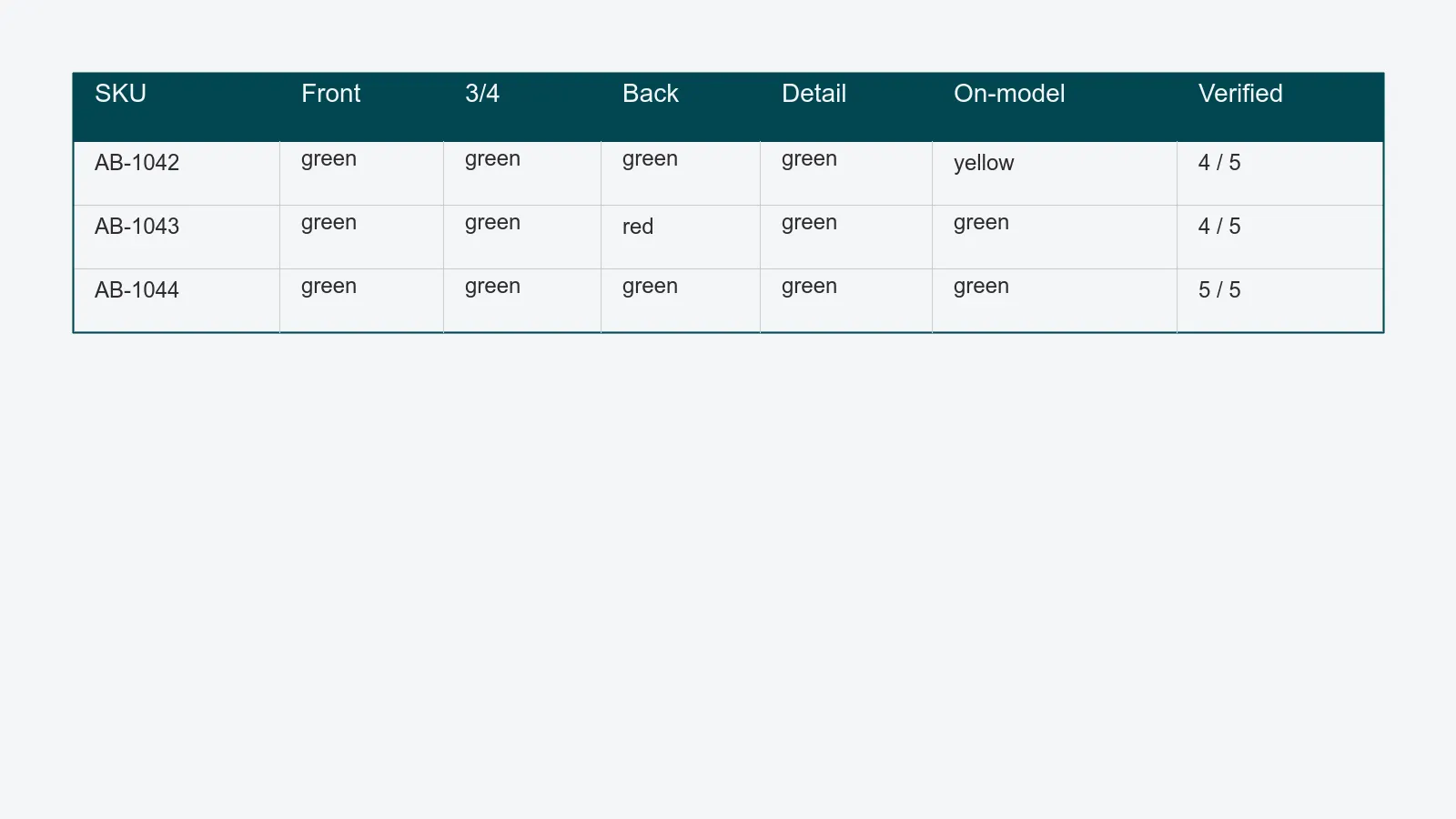
For an apparel SKU, the matrix typically looks like front / 3-quarter / back / detail (fabric or hardware) / on-model or ghost. For a cosmetics SKU: front / back-of-pack / top-of-cap / scale-with-hand / texture-swatch. For shoes: outer-side / inner-side / top-down / sole / 3-quarter pair. The angle set is the contract; the matrix is how you keep score against it.
Expected frame count, tallied as you go
Once the matrix has one row per expected frame, the expected frame count per SKU falls out for free. AB-1042 has five rows, so it expects five verified frames. The tally is a single number visible on the tethering screen or the studio iPad, and it ticks up as frames move from pending to verified.
Two numbers carry the day: expected and verified. When the sample is about to leave the cyc, those two numbers must match. If verified is less than expected, the SKU is not done - even if the assistant's gut says "we got everything." Gut feelings are how forty SKUs end up three angles short.
In practice the running tally lives wherever your shot list lives. In a spreadsheet it's a COUNTIF against the status column. In a content operations platform like PixelAdmin's workflow module, it's a SKU card on the capture board with 3 / 5 verified in the corner, updating live as Capture One commits files. Either way, it has to be glanceable from the camera position. A tally the photographer has to walk over to read is a tally that doesn't get read.
Verified vs. pending in Capture One and Lightroom
The shot-list matrix only drives the day if the capture software agrees with it. Both Capture One and Lightroom give you three free signals to mark a frame's status against the list: color tag, keyword, and star rating. Use all three deliberately, not interchangeably.
A working convention that survives a long day:
- Color tag = matrix status. Red = pending, yellow = captured-but-not-checked, green = verified-against-matrix, blue = client-flagged for retouch attention. The photographer or assistant flips a frame from yellow to green only when they've confirmed it matches the row in the shot list (right SKU, right angle, in focus, exposure clean).
- Keyword = SKU code. Every captured frame gets the SKU keyword applied automatically through a Capture One token in the file-naming preset, or a Lightroom import preset. Without the SKU on the frame, the matrix can't reconcile against anything.
- Star rating = hero selection. One star for "good enough to pass QA," two stars for "preferred frame for retouch," three stars reserved for the on-model or hero pose the marketing team will use. Don't conflate this with status - star rating is about which of N captures of the same row makes it into post.
The point isn't the specific colors. It's that the photographer, the assistant, and the retoucher who opens the folder on Wednesday all read the same signal the same way. A studio that lets each photographer invent their own color scheme is a studio that re-explains the system every Monday morning.
On-set sign-off, before the sample leaves the cyc
The cheapest QA happens while the sample is still on set. The most expensive happens after it's been couriered back to the brand. Build a sign-off step into the day so the gap between those two never opens.
Sign-off is one minute of work and looks like this. When the photographer thinks an SKU is done, they call it. The assistant or studio lead opens the matrix for that SKU, reads the angles aloud, and confirms a green color tag (verified) on a captured frame for each row. If anything is yellow or red, the sample stays on the cyc. If everything is green, the SKU is signed off and the sample is moved to the return staging area.
For a 200-SKU day, this adds roughly 200 minutes - about 3.3 hours - across two people. That sounds expensive until you compare it to the cost of one missed-angle escalation at the end of the week, which is typically a half-day of coordination plus the courier and re-shoot. Two missed-angle escalations and the sign-off pays for itself.
The senior photographer or studio lead doing sign-off is also the person catching the things the matrix can't: a logo cropped at the wrong place, a wrinkle that wasn't steamed, a color cast from an LED that drifted. Sign-off isn't bureaucracy. It's the last creative pass before the sample is gone.
A missing-frame escalation path you decide before the shoot
Sometimes a row stays pending. The hardware was missing from the box. The model is leaving in 20 minutes and the on-model frame is uncaptured. The brand's reference image is ambiguous and the photographer isn't sure which version of "back detail" they need.
A studio that hasn't pre-decided the escalation path will spend an hour figuring it out per incident. A studio that has decided makes the call in 90 seconds. The path has three branches:
- Sample held. The sample stays in the studio, the SKU goes on the next morning's shot list, and the return courier is rescheduled. Default for samples with no time pressure.
- Re-shoot scheduled. The sample goes back to the brand on schedule, and a re-shoot is booked when a replacement sample arrives. Used when the brand is on a tight return window or the original sample has been damaged in handling.
- Waiver from the requester. A short message goes to whoever owns the brief - the external client, or, for an in-house brand studio, the e-commerce or merchandising lead who feeds the webshop - explaining the missing angle and asking whether it's required. Used when the angle is borderline (a marketing-only lifestyle shot, a third detail when two are usually plenty) and they can decide cheaply.
Pre-deciding which branch applies to which kind of miss removes the worst part of escalation, which is debating the choice while the sample is sitting on the bench. Document the three branches once, and the photographer or studio manager on duty just picks the one that fits.
What "we missed three angles on forty SKUs" actually fixes
The phone call no studio wants is the one where the e-commerce manager - the client's, or your own brand's if you shoot in-house - has finished cropping for the site and three of the angles aren't there, across forty SKUs that have already shipped back. The samples are gone, the photographer is on a different job, and the only options are unflattering ones.
Shot-list-driven capture is the discipline that prevents that call. The matrix makes the gap visible while the sample is still in the building. The tally enforces the count. The verified-vs-pending convention makes the gap legible to the retoucher who opens the folder later. The sign-off is the last gate. The escalation path turns the rare miss into a 90-second decision.
This is also where capture quality and downstream QA stop being two separate problems. When every frame is committed against a row in a shared matrix, the retoucher's queue inherits the same structure - one row, one verified frame, one set of retouch flags - and the tethered capture handoff becomes a clean export of an already-reconciled list.
Five things to put in place before the next shoot day
- Convert your shot list to one row per expected frame, not one row per SKU.
- Display the per-SKU expected vs. verified count somewhere the photographer can glance at from the camera.
- Pick one color-tag, keyword, and star convention for Capture One or Lightroom and write it on the wall.
- Add a sign-off line to the day's run sheet - name the person, schedule the time, do not skip it.
- Decide your three escalation branches now, on paper, and tape them next to the tethering screen.
If you're a photographer running 100+ SKUs a day, the difference between a chaotic shoot and a clean one is rarely a better camera. It's the matrix on the iPad, the running tally on the wall, and the one minute of sign-off per SKU before the sample goes back in the crate. PixelAdmin's sample tracking and capture board run that loop for you, but the discipline works on a spreadsheet too - what matters is that the day is driven by the list, not chased after it.